Quick Summary (TL;DR)
On March 20, 2026, two WordPress AI milestones shipped on the same day.
WordPress.com announced AI write capabilities via MCP — 19 write tools for posts, pages, comments, categories, tags, and media metadata. It works with Claude, ChatGPT, Cursor, and OpenClaw. Toggle it on and go. For sites hosted on WordPress.com only.
Respira 5.0 Haven shipped with 103 tools across 12 page builders, full-fidelity snapshots, and a unified Changes page. For self-hosted WordPress sites using any page builder.
These are not competing products. They serve different WordPress ecosystems:
| WordPress.com MCP | Respira for WordPress | |
|---|---|---|
| For | Sites hosted on WordPress.com | Self-hosted WordPress (any host) |
| Builder | Gutenberg blocks | 12 builders (Elementor, Divi, Bricks, etc.) |
| Tools | 19 write tools | 103 tools (82 WP + 21 WooCommerce) |
| Safety | Draft default + Activity Log | Snapshots + Changes page + merge mode |
The Key Distinction: Hosted vs Self-Hosted
This is the most important thing to understand about this comparison.
WordPress.com MCP is a platform feature for WordPress.com hosted sites. If your site runs on wordpress.com — Personal, Premium, Business, or Commerce plan — you can toggle on AI write capabilities from your dashboard. If your site is self-hosted (on Cloudways, SiteGround, WP Engine, Kinsta, or shared hosting), WordPress.com MCP is not available to you.
Respira for WordPress is a plugin for self-hosted WordPress. If your site runs on your own hosting — any host, any plan, even shared hosting without SSH — you install the plugin and connect via MCP. If your site is on WordPress.com’s hosted platform, Respira cannot connect to it.
| WordPress.com MCP | Respira | |
|---|---|---|
| WordPress.com hosted | ✓ Yes | ✗ No |
| Self-hosted (any host) | ✗ No | ✓ Yes |
| Shared hosting (no SSH) | ✗ No | ✓ Yes |
| Managed WP hosting | ✗ No | ✓ Yes |
If you’re on WordPress.com: Use WordPress.com MCP. Respira can’t help you. If you’re self-hosted: Use Respira. WordPress.com MCP can’t reach your site.
What is WordPress.com MCP?
On March 20, 2026, WordPress.com announced AI agent write capabilities via the Model Context Protocol. Building on the read-only MCP tools they launched in October 2025, this update adds 19 write operations to the WordPress.com platform.
What it does:
- Create and edit posts and pages as Gutenberg block content
- Manage comments, categories, and tags
- Update media metadata
- Design-aware content creation — reads theme colors, fonts, spacing, and block patterns before generating content
- Works with Claude, ChatGPT, Cursor, and OpenClaw
Setup: Toggle on in your WordPress.com dashboard. No terminal, no config, no plugin install.
Pricing: Included with WordPress.com paid plans ($4–$45/month depending on tier).
What is Respira for WordPress?
Respira is a WordPress plugin and MCP server for self-hosted WordPress. It provides 103 tools across 12 page builders with a safety-first architecture: duplicate-before-edit workflow, full-fidelity snapshots, and a unified Changes page.
What it does:
- Full read + write operations across posts, pages, custom post types, media, and WooCommerce
- Builder-specific editing for 12 page builders (Elementor, Divi 4+5, Bricks, Gutenberg, Oxygen, WPBakery, Beaver Builder, Brizy, Visual Composer, Thrive Architect, Breakdance, Flatsome)
- Full-fidelity snapshots capturing builder data, metadata — everything WP revisions miss
- Changes page for reviewing pending duplicates and version history
- Merge mode preserving original URL and post ID on approval
- WebMCP write protection — every write tool mutation auto-snapshots before changing content
Setup: Install plugin from WordPress dashboard, configure MCP server connection (~60 seconds).
Pricing: €19/year starter (1 site), €199/year agency (20 sites). 7-day free trial, no credit card.
Side-by-Side: Platform & Hosting
| Aspect | WordPress.com MCP | Respira for WordPress |
|---|---|---|
| Platform | WordPress.com hosted only | Any self-hosted WordPress |
| Hosting requirement | WordPress.com paid plan | Any host (shared, VPS, managed, cloud) |
| SSH required | No (platform feature) | No (REST API only) |
| Setup | Toggle in dashboard | Plugin install + MCP config |
| Setup time | ~10 seconds | ~60 seconds |
Side-by-Side: Builder Support
| Builder | WordPress.com MCP | Respira |
|---|---|---|
| Gutenberg | ✓ Full support | ✓ Full support |
| Elementor | ✗ Not supported | ✓ All widgets + responsive |
| Divi 4 | ✗ Not supported | ✓ Shortcode modules |
| Divi 5 | ✗ Not supported | ✓ Native structure |
| Bricks | ✗ Not supported | ✓ Full Intelligence (13 design system tools) |
| Oxygen | ✗ Not supported | ✓ Supported |
| WPBakery | ✗ Not supported | ✓ Supported |
| Beaver Builder | ✗ Not supported | ✓ Supported |
| Brizy | ✗ Not supported | ✓ Supported |
| Visual Composer | ✗ Not supported | ✓ Supported |
| Thrive Architect | ✗ Not supported | ✓ Supported |
| Breakdance | ✗ Not supported | ✓ Supported |
WordPress.com is a Gutenberg-first platform. If you use Gutenberg, their MCP integration creates content natively. If your self-hosted site uses any other page builder, Respira is the only option with builder-specific intelligence.
Side-by-Side: Safety & Rollback
| Safety Feature | WordPress.com MCP | Respira |
|---|---|---|
| Draft by default | ✓ New posts start as drafts | ✓ Duplicates created, never touches live |
| Approval workflow | Chat-based confirmation | ✓ Changes page in wp-admin |
| Activity logging | ✓ Activity Log | ✓ Post-centric timeline with diff preview |
| Version history | ✗ No snapshot system | ✓ Full-fidelity snapshots (builder data + metadata) |
| One-click restore | ✗ Not available | ✓ Any version from Changes page |
| before_restore safety | ✗ Not available | ✓ Current state captured before revert |
| Write protection | Agent asks before each action | ✓ Auto-snapshot before every mutation |
| Pinned versions | ✗ Not available | ✓ Survive retention cleanup and purge |
| Merge mode | N/A (no duplicates) | ✓ Preserves original URL and post ID |
| Trash recovery | ✓ 30-day trash | ✓ Standard WP trash + snapshots |
WordPress.com’s safety model is sensible for a hosted platform: drafts by default, trash for deletions, and the agent asks before each action. Respira’s safety model is deeper because self-hosted sites run production workloads where page builders store critical layout data that WordPress revisions don’t capture.
Side-by-Side: Tool Coverage
| Category | WordPress.com MCP | Respira |
|---|---|---|
| Posts & pages | ✓ Create, edit | ✓ Create, edit, duplicate, bulk operations |
| Custom post types | ✗ Not mentioned | ✓ Full CRUD |
| Comments | ✓ Manage | ✓ Full CRUD |
| Categories & tags | ✓ Manage | ✓ All taxonomies + custom |
| Media | ✓ Metadata only | ✓ Upload, edit, delete |
| Builder components | ✗ Gutenberg blocks only | ✓ Find targets, extract, patch at component level |
| WooCommerce | ✗ No | ✓ 21 tools (products, orders, inventory, reports) |
| SEO analysis | ✗ No | ✓ Readability, structured data, performance |
| Site context | ✓ Theme design system | ✓ Theme docs, builder config, full site environment |
| Snapshot operations | ✗ No | ✓ List, diff, restore, pin, purge |
| Total | ~19 write tools | 103 tools |
Side-by-Side: AI Client Support
| AI Client | WordPress.com MCP | Respira |
|---|---|---|
| Claude Desktop | ✓ Supported | ✓ Supported |
| Claude Code | Not mentioned | ✓ Supported |
| Claude Browser (WebMCP) | ✗ Not available | ✓ Chrome 146+ |
| ChatGPT | ✓ Supported | Not tested |
| Cursor | ✓ Supported | ✓ Supported |
| Windsurf | Not mentioned | ✓ Supported |
| Codex | Not mentioned | ✓ Supported |
| OpenClaw | ✓ Supported | Not tested |
| Any MCP client | Platform-dependent | ✓ Standard MCP protocol |
Where WordPress.com MCP Wins
These are genuine advantages. Not spin.
1. Zero-Install Onboarding
Toggle on in your WordPress.com dashboard. Done. No npm, no terminal, no plugin, no config file. As described in their launch announcement, “the setup is as simple as toggling a switch.”
Respira requires a plugin install and MCP server configuration. The setup wizard helps, but it’s still more steps.
2. Design-Aware Content Creation
WordPress.com’s AI reads your theme’s design system — colors, fonts, spacing, block patterns — before creating content. The generated pages match your site’s visual identity from the start.
Respira reads theme docs and builder configuration, but WordPress.com’s integration with its own design system is tighter because they control the full stack.
3. Simplicity for Content Writers
19 focused tools. No duplicates, no approval queues, no snapshots to manage. Write a post, AI creates it as a draft, review and publish. For bloggers and content marketers who just want to write, this simplicity is the feature.
Where Respira Wins
1. Self-Hosted WordPress (The Other 60%+)
WordPress.com hosts a large number of sites, but the majority of WordPress installations are self-hosted. If you’re on Cloudways, SiteGround, WP Engine, Kinsta, DigitalOcean, AWS, or any shared hosting — WordPress.com MCP cannot reach your site.
Respira connects via REST API. Any host, any plan, no SSH required.
2. Page Builder Support (11 vs 1)
WordPress.com is Gutenberg-native. Their AI creates Gutenberg block content. That’s the right choice for their platform.
But self-hosted WordPress is dominated by page builders. Elementor alone powers over 16 million sites. Divi, Bricks, Oxygen, WPBakery — each has millions of users who chose these builders because they need capabilities beyond Gutenberg.
Respira supports all of them with builder-specific intelligence: understanding widget structures, shortcode syntax, JSON schemas, and component hierarchies.
3. Production Safety with Rollback
For content-first blogging, draft-by-default is adequate safety. For production sites running on page builders — where a broken Elementor layout or a corrupted Divi shortcode can take down a page — you need deeper protection.
Respira 5.0 Haven provides:
- Full-fidelity snapshots capturing everything WP revisions miss (builder data, post meta, custom fields)
- Changes page with diff preview before approving
- One-click restore with automatic before_restore safety capture
- Pinned versions that survive cleanup
- WebMCP write protection auto-snapshotting before every mutation
4. WooCommerce
21 dedicated tools for products, orders, inventory, and reports. WordPress.com MCP doesn’t cover e-commerce operations.
See It in Action: A Full Divi 5 Page From a Single Prompt
This native Divi 5 page was built entirely through Respira 5.0 and WebMCP on Chrome 146+ with the Claude browser extension. One prompt. One conversation. Every section, every row, every module — placed directly in the Divi visual builder.
No copy-paste. No manual layout. The AI reads your site context, picks the right builder, and writes content directly into the visual editor while you watch.
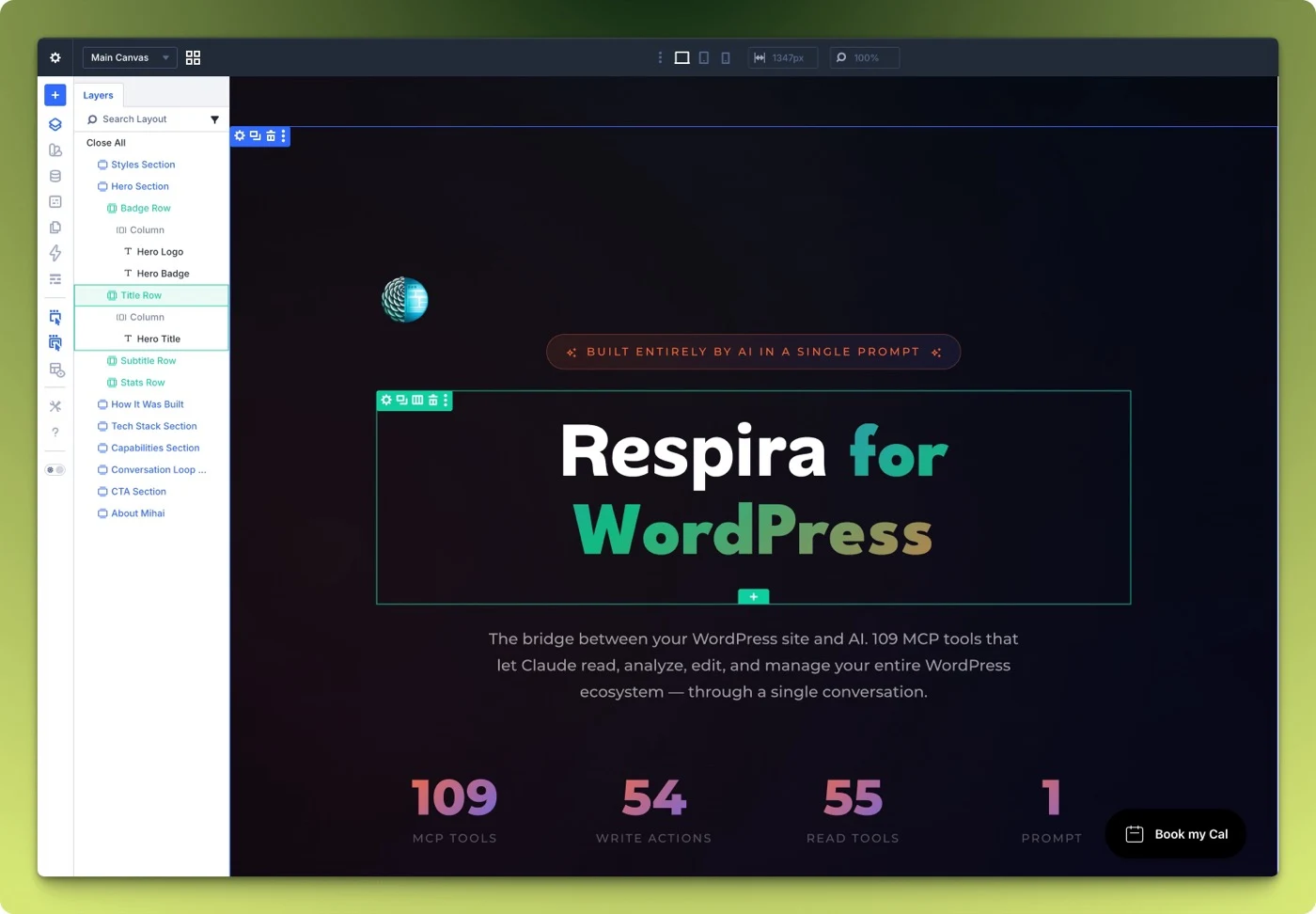
This is the kind of editing that requires builder-specific intelligence — understanding Divi 5’s module structure, row layouts, and section hierarchy. WordPress.com MCP creates Gutenberg blocks. Respira creates native builder content for whichever builder your site uses.
Real-World Scenarios
Scenario 1: Write Blog Posts on WordPress.com
| WordPress.com MCP | Respira | |
|---|---|---|
| Works? | ✓ Yes — designed for this | ✗ No — can’t connect to WordPress.com |
| Setup | Toggle on | N/A |
| Time | 2 minutes to first draft | N/A |
Winner: WordPress.com MCP. This is exactly what it’s built for.
Scenario 2: Redesign 20 Elementor Pages on Self-Hosted Site
| WordPress.com MCP | Respira | |
|---|---|---|
| Works? | ✗ No — self-hosted, not Gutenberg | ✓ Yes — full Elementor intelligence |
| Safety | N/A | Duplicates + snapshots + Changes page |
| Time | N/A | 15-20 minutes |
Winner: Respira. WordPress.com MCP can’t reach self-hosted sites or edit Elementor.
Scenario 3: Quick Gutenberg Page on WordPress.com Business
| WordPress.com MCP | Respira | |
|---|---|---|
| Works? | ✓ Yes | ✗ No |
| Design match | ✓ Reads theme design system | N/A |
| Time | 2 minutes | N/A |
Winner: WordPress.com MCP. Toggle, prompt, done.
Scenario 4: Agency with 15 Client Sites (Mixed Builders, Mixed Hosts)
| WordPress.com MCP | Respira | |
|---|---|---|
| Works? | Only for WordPress.com clients | ✓ All self-hosted clients |
| Builder coverage | Gutenberg only | All 12 builders |
| Cost | $25/mo × 15 = $375/month | €199/year for 20 sites |
| Approval workflow | Chat-based | Changes page per site |
Winner: Respira. Agency workloads need builder coverage, multi-site pricing, and approval workflows.
Scenario 5: Update WooCommerce Product Descriptions
| WordPress.com MCP | Respira | |
|---|---|---|
| WooCommerce tools | ✗ None | ✓ 21 tools |
| Product editing | Basic post content only | Products, variants, inventory, pricing |
| Safety | Draft default | Snapshot before every mutation |
Winner: Respira. E-commerce needs dedicated tools.
Pricing Comparison
| Scenario | WordPress.com MCP | Respira |
|---|---|---|
| 1 site (basic plan) | $48/year (Personal) | €19/year (~$21) |
| 1 site (full features) | $300/year (Business) | €19/year (~$21) |
| 10 sites | $480–3,000/year | ~$108/year (Agency) |
| 20 sites | $960–6,000/year | €199/year (~$215) |
Note: WordPress.com pricing includes hosting. Respira pricing is plugin-only — you bring your own hosting. The comparison is most relevant when you already have hosting and are comparing the AI editing capability.
The Bigger Picture
WordPress.com launching AI write tools via MCP on the same day as Respira 5.0 Haven is validation. The market is real. AI-assisted WordPress editing is the future of how sites get built and maintained.
The split is clean:
WordPress.com MCP serves WordPress.com hosted users who want zero-friction AI content creation with Gutenberg. Toggle on, write, publish. That’s millions of users who now have a powerful tool built into their platform.
Respira serves self-hosted WordPress users who build with page builders and need production-safe editing. Install, connect, edit across 12 builders with full rollback. That’s also millions of users who need different capabilities.
Both tools moved the ecosystem forward. Neither replaces the other. They serve different sides of the WordPress world.
Which Should You Choose?
Choose WordPress.com MCP if:
- ✓ Your site is hosted on WordPress.com
- ✓ You use Gutenberg blocks (no third-party page builders)
- ✓ You want zero-install setup
- ✓ You primarily create content (posts, pages, media)
- ✓ Draft-by-default safety is enough for your workflow
Choose Respira if:
- ✓ Your site is self-hosted WordPress (any host)
- ✓ You use page builders (Elementor, Divi, Bricks, or any of the 11 supported)
- ✓ You need full-fidelity snapshots and one-click rollback
- ✓ You run WooCommerce stores
- ✓ You need approval workflows for production sites
- ✓ You manage multiple client sites (agency pricing)
- ✓ You want WebMCP browser integration (Chrome 146+)
Start Your Free Trial
Try Respira free for 7 days — no credit card required.
103 tools across 12 page builders. Full-fidelity snapshots. Changes page. One-click restore. Works on any self-hosted WordPress.
Start Free Trial → · Read the 5.0 Haven release notes →
Compare Respira with Other AI WordPress Tools
Exploring your options? Read our other detailed comparisons:
- Respira vs Elementor AI — Page builder AI assistant comparison
- Respira vs CodeWP — Code generation vs safe page editing
Or jump directly to Respira pricing →
Published: March 20, 2026 · By Mihai, respira.press founder