
 MCP server


Quick Summary (TL;DR)
CodeWP is an AI-powered code generator that creates WordPress PHP snippets, functions, and custom code based on natural language descriptions. It’s designed for developers who need to write custom WordPress code faster.
Respira is a safety bridge that connects AI coding assistants (Cursor, Claude Code, Codex) to WordPress, allowing safe editing of actual pages across 17 page builders with a duplicate-before-edit workflow.
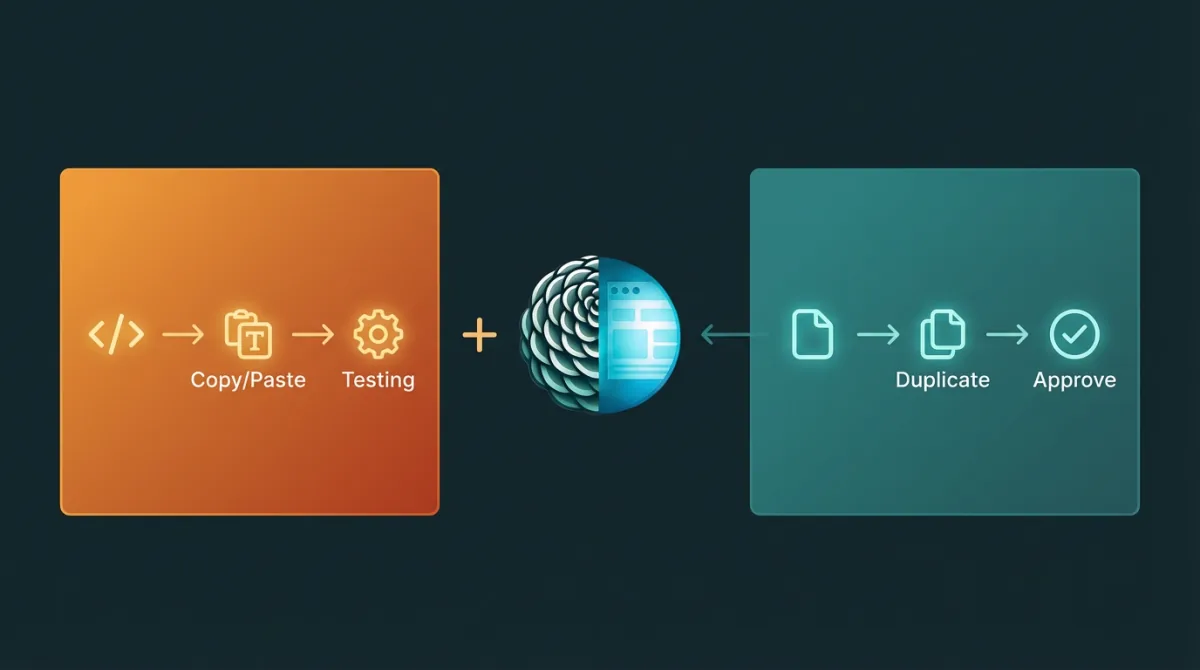
The core difference: CodeWP generates code that YOU implement. Respira lets AI safely edit your actual WordPress content.
Think of it this way:
- CodeWP = AI writes code → you copy/paste → you test
- Respira = AI edits pages → you review → you approve
They solve fundamentally different problems and complement each other perfectly.
What is CodeWP?
CodeWP (wpai.co) is an AI assistant specifically trained on WordPress code, documentation, and common development patterns. Launched in 2023 and continuously improved, it helps developers write WordPress code faster using natural language prompts.
How It Works:
- Describe what you need in plain English: “Create a custom post type for case studies with featured images”
- CodeWP generates the PHP code
- You copy the code
- You paste into functions.php, plugin, or theme
- You test and debug
What CodeWP Generates:
- Custom post types and taxonomies
- WordPress hooks (actions and filters)
- Shortcodes and widgets
- Custom admin pages
- WooCommerce customizations
- Database queries (WP_Query)
- Plugin functionality
- Theme functions
- API integrations
- Security hardening code
Key Features:
- WordPress-specific training: AI understands WordPress codex, best practices, security patterns
- Code explanations: Get line-by-line explanations of generated code
- Multiple AI models: Access to different AI engines for different tasks
- Code snippets library: Save and organize generated code
- Conversational interface: Refine code through back-and-forth chat
- WooCommerce support: Specialized for eCommerce customizations
Pricing:
- Free tier: Limited generations per month
- Pro: $18/month (~$216/year) - unlimited generations
- Agency: $36-48/month (~$432-576/year) - multiple projects, team access
Target Users:
- WordPress developers writing custom code
- Theme and plugin developers
- Developers customizing WooCommerce
- Freelancers building client functionality
- Anyone who works in functions.php daily
What is Respira for WordPress?
Respira is a safety layer that bridges professional AI coding assistants (Cursor, Claude Code, Codex CLI) to WordPress, enabling safe editing of actual WordPress pages and content across any page builder.
How It Works:
- Install Respira for WordPress on your site
- Connect to AI tool (Cursor, Claude Code, etc.) via MCP
- Tell AI what you want: “Update all hero CTAs to ‘Get Started’”
- AI creates duplicate pages with changes
- You review duplicates in WordPress admin
- You approve when ready - originals never touched
What Respira Does:
- Edits actual WordPress pages (not generates code)
- Works with 17 page builders (Elementor, Divi, Gutenberg, Bricks, Oxygen, etc.)
- Page builder intelligence (teaches AI correct syntax for each builder)
- Duplicate-before-edit safety (AI works on copies by default)
- Batch operations (update 50 pages at once)
- Approval workflow (review before publish)
- Complete audit logs (track all changes)
- One-click rollback (restore pre-edit snapshots)
Key Features:
- Multi-builder support: Not locked to one page builder
- External AI tools: Use Cursor, Claude Code, Codex - your choice
- Safety-first: duplicates by default, snapshots and rollback when something slips through
- MCP integration: Standard protocol, works with any MCP tool
- REST API only: Works on most hosting (shared included), no SSH needed
- Professional workflows: Approval, audit, rollback
Pricing:
- Maker: €9/month or €71/year for 1 site
- Builder: from €19/month for 5 sites
- Studio: from €39/month, scaling 25 to 250 sites
- 7-day free trial on Maker, no credit card required
Target Users:
- Agencies managing client sites
- Freelancers editing WordPress pages
- Anyone using page builders (Elementor, Divi, etc.)
- Teams needing safety and approval workflows
- Users of Cursor, Claude Code, or other AI coding tools
They Solve Different Problems
This is the most important thing to understand about CodeWP vs Respira.
CodeWP = AI Code Writer (For Developers)
The problem CodeWP solves:
“I need custom WordPress functionality, but I don’t want to spend hours looking up documentation and writing code from scratch.”
The workflow:
Developer: "Create a custom post type for testimonials"
↓
CodeWP: [Generates PHP code]
↓
Developer: [Copies code to functions.php]
↓
Developer: [Tests functionality]
↓
Developer: [Debugs if needed]
CodeWP output example:
// Register Custom Post Type: Testimonials
function create_testimonials_post_type() {
    $args = array(
        'label' => 'Testimonials',
        'public' => true,
        'show_in_rest' => true,
        'supports' => array('title', 'editor', 'thumbnail'),
        'has_archive' => true,
        'rewrite' => array('slug' => 'testimonials'),
    );
    register_post_type('testimonials', $args);
}
add_action('init', 'create_testimonials_post_type');
You then copy this code and implement it yourself.
Respira = AI Page Operator (For Content/Layout Edits)
The problem Respira solves:
“I need to update content or layouts across multiple WordPress pages, but I can’t risk breaking the live site.”
The workflow:
User: "Update all contact forms with new phone number"
↓
Respira + AI: [Scans site, creates duplicates, makes changes]
↓
User: [Reviews duplicates in WordPress admin]
↓
User: [Approves changes]
↓
Changes published, originals never touched
Respira doesn’t generate code - it edits actual pages safely.
Head-to-Head Comparison
| Feature | CodeWP | Respira for WordPress |
|---|---|---|
| Primary Purpose | Generate WordPress PHP code | Edit WordPress pages/content safely |
| Target User | Developers writing code | Agencies/freelancers editing sites |
| Browser AI (WebMCP) | ✗ Requires separate tooling | ✓ Built-in |
| Setup Complexity | Sign up + prompt workflows | 1 plugin install (~60 seconds) |
| Total AI Tools | ~4-10 core generation flows | 360+ tools |
| What It Outputs | Code snippets (PHP, JS) | Modified WordPress pages |
| How You Use It | Copy code → paste → test | AI edits → you review → approve |
| Page Builder Support | N/A (generates PHP code) | ✓ 11+ builders (Elementor, Divi, Gutenberg, etc.) |
| Safety Workflow | Manual testing required | ✓ Duplicate-before-edit (automatic) |
| AI Tools | Built-in AI only | Cursor, Claude Code, Codex, any MCP tool |
| Use Case | Custom functionality, plugins | Content updates, layout edits |
| Typical Task | ”Create a custom shortcode" | "Update 50 pages with new CTA” |
| Result | Code you implement | Pages ready to publish |
| Multi-Site | Per-project pricing | 1 license = 20 sites (Agency) |
| Setup | Sign up, start using | Install plugin, connect AI |
| Price (1 site) | $18-48/month | €19/year (~$21) |
| Price (10 sites) | $216-576/year per project | ~$108/year total |
When to Choose CodeWP
Choose CodeWP if you:
- ✓ Write custom WordPress code - functions, plugins, themes
- ✓ Need PHP/JS generation - hooks, filters, custom post types
- ✓ Build WordPress functionality - not just editing content
- ✓ Customize WooCommerce - custom checkout, product filters, etc.
- ✓ Work in functions.php - this is your daily workflow
- ✓ Want faster code writing - but you still implement and test yourself
Best CodeWP use cases:
- Custom post types: “Create a portfolio CPT with custom fields”
- WooCommerce mods: “Add a custom field to checkout page”
- Shortcodes: “Build a shortcode that displays recent posts by category”
- Admin customizations: “Add a custom admin menu page”
- Theme functions: “Create a function that modifies the loop”
- Plugin development: “Generate starter code for a custom plugin”
- Security hardening: “Add code to disable XML-RPC and file editing”
- Custom queries: “Build a WP_Query for posts from multiple taxonomies”
Example CodeWP workflow:
Task: Add a custom field to WooCommerce product pages

1. Tell CodeWP: "Add a custom text field to WooCommerce product
   pages that stores manufacturer info"

2. CodeWP generates:
   - Product field registration code
   - Admin interface code
   - Frontend display code
   - Save functionality

3. You copy each code block to your theme's functions.php

4. You test on staging site

5. You debug any issues

6. You deploy to production
When to Choose Respira
Choose Respira if you:
- ✓ Edit WordPress pages/content - not writing custom code
- ✓ Use page builders - Elementor, Divi, Gutenberg, Bricks, etc.
- ✓ Need safety workflows - duplicate-before-edit is critical
- ✓ Manage client sites - approval workflows matter
- ✓ Want to use external AI - Cursor, Claude Code, Codex
- ✓ Make batch updates - 20+ pages at once
Best Respira use cases:
- Content updates: “Update all contact forms with new phone number”
- CTA changes: “Change all ‘Learn More’ buttons to ‘Get Started’”
- Layout updates: “Update hero section across 30 pages”
- Batch edits: “Add new disclaimer to all product pages”
- Color scheme changes: “Update brand colors site-wide”
- Page builder edits: “Modify Elementor layouts safely”
- Client approvals: “Make changes for client review before publishing”
- Multi-builder sites: “Update pages built with Elementor AND Divi”
Example Respira workflow:
Task: Update contact forms across 20 pages

1. Tell AI via Cursor: "Update phone number on all pages
   with contact forms to (555) 123-4567"

2. Respira + AI:
   - Scans all pages
   - Identifies 20 pages with forms
   - Creates duplicates
   - Updates phone numbers in duplicates

3. You review duplicates in WordPress admin

4. You approve changes

5. Changes publish (originals never touched during process)

Total time: 10 minutes vs 2 hours manually
The Key Difference: Code Generation vs Page Editing
Let’s be crystal clear about what each tool actually does.
CodeWP: Generates Code You Implement
Input: “Create a custom post type for team members”
CodeWP Output (simplified):
function create_team_members_cpt() {
    register_post_type('team', [
        'label' => 'Team Members',
        'public' => true,
        'supports' => ['title', 'editor', 'thumbnail'],
        'has_archive' => true,
    ]);
}
add_action('init', 'create_team_members_cpt');
What you do:
- Copy this code
- Paste into functions.php or plugin
- Refresh WordPress admin
- Test that CPT appears
- Debug if something breaks
- Deploy to production
CodeWP doesn’t:
- ✗ Install the code for you
- ✗ Test the code
- ✗ Edit your existing site
- ✗ Create actual posts/pages
- ✗ Provide rollback if it breaks
CodeWP is a code writer, not an operator.
Respira: Makes AI Safely Edit Real Pages
Input: “Update all team member bios to include LinkedIn links”
Respira Process:
- AI reads your team member pages (via Respira)
- AI identifies pages with bios
- AI creates duplicate pages
- AI adds LinkedIn links to duplicates
- You review duplicates
- You approve
- Originals replaced with approved versions
What Respira does:
- ✓ Edits actual WordPress pages
- ✓ Creates safety duplicates first
- ✓ Provides review workflow
- ✓ Handles page builder syntax automatically
- ✓ Allows rollback if needed
- ✓ Never touches live pages until approved
Respira doesn’t:
- ✗ Generate PHP code for you to implement
- ✗ Create custom functionality
- ✗ Build plugins or themes
Respira is a page operator, not a code generator.
Can You Use Both Together?
Absolutely - and many WordPress professionals do!
CodeWP and Respira complement each other perfectly because they solve different problems in the WordPress development workflow.
Real-World Combined Workflow
Scenario: Building a Real Estate Listings Site
Phase 1: Custom Functionality (Use CodeWP)
Task: Create custom post type for properties

1. Use CodeWP: "Create a Properties custom post type with
   fields for price, bedrooms, bathrooms, square footage"

2. CodeWP generates:
   - Custom post type registration
   - Custom fields code
   - Admin interface
   - Frontend display functions

3. You implement the code in your theme

4. You test locally
Phase 2: Content Population (Use Respira)
Task: Create 50 property pages with consistent structure

1. Use Respira + AI: "Create 50 property pages using the
   Elementor template, populate with data from this spreadsheet"

2. AI creates pages safely via Respira

3. You review sample pages

4. You approve batch creation

5. 50 pages created with page builder layouts
Phase 3: Batch Updates (Use Respira)
Task: Update contact forms on all property pages

1. Use Respira + AI: "Update all property pages to include
   new scheduling widget in the contact section"

2. AI creates duplicates with changes

3. You review a few samples

4. You approve all 50 updates

5. Changes publish safely
Phase 4: New Custom Feature (Use CodeWP)
Task: Add mortgage calculator functionality

1. Use CodeWP: "Create a mortgage calculator shortcode
   with inputs for price, down payment, interest rate"

2. CodeWP generates shortcode code

3. You implement and test

4. Use Respira to add shortcode to relevant pages
The pattern:
- CodeWP builds custom functionality (code level)
- Respira edits pages and content (page level)
- Together = complete WordPress development workflow
Pricing Breakdown: Which is More Cost-Effective?
Let’s compare costs for different scenarios.
Solo Developer / Freelancer (1-5 projects)
CodeWP:
- Pro: $18/month = $216/year
- Unlimited code generation
- Works across all projects
- Total: $216/year
Respira:
- Starter: €19/year (~$21) per site
- 5 sites = ~$105/year
- Total: ~$105/year
Analysis:
If you write custom code frequently: CodeWP worth it If you edit pages across multiple sites: Respira worth it Many freelancers need both: ~$321/year total
Small Agency (10 client sites)
CodeWP:
- Pro/Agency: $18-48/month = $216-576/year
- Works across all projects
- Total: $216-576/year
Respira:
- Agency plan: €199/year (~$215)
- Covers all 10 sites
- Total: ~$215/year
Analysis:
CodeWP costs more for code generation Respira dramatically cheaper for multi-site management Most agencies need both: ~$431-791/year total
Medium Agency (20-30 client sites)
CodeWP:
- Agency: $36-48/month = $432-576/year
- Works across all projects
- Total: $432-576/year
Respira:
- Agency plan: €199/year (~$215)
- Covers 20 sites
- Additional 10 sites: ~$100/year
- Total: ~$315/year for 30 sites
Analysis:
For multi-site page editing, Respira is significantly cheaper CodeWP pricing doesn’t scale with # of sites (good for unlimited projects) Professional agencies need both: ~$747-891/year total
Real-World Use Case Comparisons
Use Case 1: Create Custom Booking System
With CodeWP:
- Tell CodeWP: “Build a booking system with availability calendar”
- CodeWP generates PHP code for booking functionality
- You implement code in theme/plugin
- You test and debug
- You create booking pages manually
- Time: 4-8 hours (including implementation and testing)
- Result: Working booking system
With Respira:
- Can’t do this - Respira doesn’t generate custom functionality
- Respira edits pages, doesn’t create plugins
Winner: CodeWP (only option for custom functionality)
Combined approach: Use CodeWP to build booking system code → Use Respira to add booking forms to 20 service pages safely
Use Case 2: Update 50 Product Descriptions
With CodeWP:
- CodeWP generates code that COULD programmatically update products
- You’d need to adapt code for your specific needs
- You’d need to run code (risky on production)
- No review workflow
- Time: 2-4 hours (writing, testing, deploying code)
- Risk: High (direct database modification)
With Respira:
- Tell AI: “Update product descriptions to include warranty info”
- AI creates duplicates with changes
- Review samples
- Approve all
- Time: 15-30 minutes
- Risk: Zero (duplicates only)
Winner: Respira (designed for this exact use case)
Use Case 3: Add Custom Field to WooCommerce
With CodeWP:
- Tell CodeWP: “Add custom text field for gift message on product pages”
- CodeWP generates all necessary code
- You implement in functions.php
- You test
- Time: 30-60 minutes
- Result: Working custom field
With Respira:
- Can’t do this - Respira doesn’t generate WooCommerce custom fields
- Would need to use another tool
Winner: CodeWP (only option)
Use Case 4: Update Hero Sections Across 30 Pages
With CodeWP:
- Would need to write custom code to programmatically update pages
- Risk of breaking page builder layouts
- No review workflow
- Time: 3-6 hours (including careful testing)
- Risk: High
With Respira:
- Tell AI: “Update hero sections to use new headline format”
- AI creates duplicates
- Review a few samples
- Approve all
- Time: 10-20 minutes
- Risk: Zero
Winner: Respira (dramatically better for this)
Use Case 5: Build Custom Admin Dashboard
With CodeWP:
- Tell CodeWP: “Create custom admin page with stats dashboard”
- CodeWP generates admin page code
- You implement
- Time: 1-2 hours
- Result: Custom admin interface
With Respira:
- Can’t do this - Respira doesn’t create admin pages
Winner: CodeWP (only option)
Bottom Line: Different Tools, Different Jobs
Choose CodeWP if:
You’re a developer who writes WordPress code:
- Building custom post types
- Creating plugins or themes
- Customizing WooCommerce at code level
- Writing hooks, filters, shortcodes
- Need PHP/JS generation
- Work in functions.php regularly
Choose Respira if:
You edit WordPress pages and content:
- Managing agency/client sites
- Using page builders (Elementor, Divi, etc.)
- Need safety workflows (duplicate-before-edit)
- Batch updating multiple pages
- Working with external AI (Cursor, Claude Code)
- Client work requiring approval
Use Both if:
You’re a professional WordPress developer/agency:
- CodeWP generates custom functionality code
- Respira safely edits actual pages/content
- Together = complete WordPress workflow
- Total cost: ~$320-800/year (worth it for professionals)
The Combined Workflow
Here’s how CodeWP and Respira work together in professional WordPress development:
PROJECT PHASE 1: DEVELOPMENT
→ Use CodeWP to generate custom functionality
→ Implement code in theme/plugin
→ Test locally

PROJECT PHASE 2: CONTENT POPULATION
→ Use Respira to safely create/edit pages
→ Review duplicates
→ Approve and publish

PROJECT PHASE 3: MAINTENANCE
→ Use CodeWP for new features/functionality
→ Use Respira for content updates
→ Both tools working in their lanes

ONGOING:
→ Code changes: CodeWP
→ Page edits: Respira
→ Maximum efficiency
They don’t compete - they complement.
Which Should You Choose?
Ask yourself:
Question 1: Do you write custom WordPress code daily?
- Yes → You need CodeWP
- No → You probably don’t
Question 2: Do you edit WordPress pages/content frequently?
- Yes → You need Respira
- No → You probably don’t
Question 3: Do you work on multiple WordPress sites?
- Yes → Respira’s pricing scales better
- No → CodeWP’s unlimited usage is fine
Question 4: Do you use page builders (Elementor, Divi, etc.)?
- Yes → You need Respira (CodeWP can’t help here)
- No → Respira still useful, but less critical
Question 5: Is safety critical (client sites, production)?
- Yes → Respira’s duplicate-before-edit is essential
- No → Manual testing might be okay
Start Your Free Trial
Try Respira Free for 7 Days
No credit card required. Works with 11+ page builders. Connect to Cursor, Claude Code, or any MCP-compatible AI tool. Duplicate-before-edit safety workflow.
Try CodeWP Free
Get started with CodeWP’s free tier to generate WordPress code snippets.
Compare Respira with Other AI WordPress Tools
Exploring your options? Read our other detailed comparisons:
- Respira vs Elementor AI - Page builder AI assistant comparison
- WordPress.com AI vs Self-Hosted - WordPress.com officially ships AI write tools — what about self-hosted sites?
Or jump directly to Respira pricing →
Last Updated: February 2026
Author: Mihai Dragomirescu, Founder of Respira
Keywords: Respira vs CodeWP, CodeWP alternative, AI WordPress code generator comparison, WordPress AI tools comparison, code generation vs page editing


Join the conversation
0 comments · Respira accountNo comments yet. Be the first to weigh in.