 MCP server
Usage trends
Last 45 days · pages · posts · lines (×100) · MCP events (×10) Lines (×100) Pages Posts MCP events (×10)
Account
Explore
Ask Claude, ChatGPT or Cursor for a change in plain words. Respira makes it on a copy of the page, you approve it, and you can undo it for 90 days.
 Just launched Respira Murmur Clients leave feedback on the page itself, no login.
  Just launched Respira Exhale The HTML to WordPress converter. Drop a file, get a page in your builder's own blocks, in seconds.
 7 days free. No card. No terminal.
Connected directly, your site’s content goes between your site and your AI, never through Respira’s servers.
 Just launched Respira AER Builder intelligence in a chat connected to all your WordPress sites, on desk and phone.
 Speaks your builder, 19 supported



















Works with the AI you already use





What is Respira good for?
“This is genuinely category-defining infrastructure that's flying under most of the WordPress-AI coverage.”
A faithful, data-safe Respira dashboard for a fictional agency with six client sites. The tour now includes AER, Murmur, Respira Exhale, the HTML to WordPress converter, and the current security workflow. The moment you click, it stops and the dashboard is yours.
Below is a real conversation, replayed. You see the sentence someone typed, the tools the AI called, what happened on the WordPress site underneath, and the answer that came back. Every field name is read from the plugin and MCP server that are live right now, so none of it is a mock-up.
Pick where you want to work, then pick a job.
Read https://www.respira.press/agent-start.txt first. It is short, and it is the order to do things in. You're connected to my WordPress site through Respira. Before doing anything, call respira_get_builder_info to find out which page builder this site uses, then read the page before you change it. Edit through the builder's native elements, never by writing raw HTML into the content. Work on a duplicate rather than the live page. If you hit the same error twice, call respira_search_docs instead of guessing. To read any documentation page, append .md to its URL: same content, about a thirtieth of the bytes. Confirm what builder i'm on and what you can do.
 respira_list_sites
{}{ "sites": [
{ "id": "brightbakery-com", "name": "Bright Bakery",
"url": "https://brightbakery.com", "is_default": true, "is_active": true },
{ "id": "meridian-dental-com", "name": "Meridian Dental", … },
{ "id": "fernhollow-shop", "name": "Fern Hollow", … },
… 3 more ],
"active_site": { "id": "brightbakery-com", "name": "Bright Bakery" } }{}{ "name": "Elementor", "version": "3.34.2", "detected": true,
"intelligence_available": true, "intelligence_active": true,
"site_memory": { "enabled": true, "rules": [], "notes": [],
"agent_instructions": "Site memory is empty. When you learn something
durable about this site … save it with respira_remember so the
next session starts warm." } }Respira MCP → WordPress plugin: GET /wp-json/respira/v1/context/builder-inforespira_get_site_context{}{ "site_name": "Bright Bakery", "site_url": "https://brightbakery.com",
"language": "en-GB", "wordpress_version": "6.9.4", "php_version": "8.3.12",
"is_multisite": false,
"page_builder": { "name": "Elementor", "version": "3.34.2" },
"active_theme": { "name": "Hello Elementor", "version": "3.4.5" },
"active_plugin_count": 14,
"custom_post_types": [{ "name": "product", "label": "Products" }],
"woocommerce": { "active": true, "version": "10.3.1" },
"addons": { "woocommerce": { "active": true } },
"site_memory": { "enabled": true, "rules": [], "notes": [] } }Respira MCP → WordPress plugin: GET /wp-json/respira/v1/context/site-infoConnected to Bright Bakery (brightbakery.com), the default of your six sites.
I'll edit through Elementor's own elements, on a duplicate first, never raw HTML. What would you like changed first?
what page builder is this site using, what plugins are active, and are any of them likely to affect how you write to pages (caching, page builders, form builders)?
respira_get_site_context{ "detail": "full" }{ "page_builder": { "name": "Elementor", "version": "3.34.2" },
"active_plugins": [
{ "name": "Elementor", "version": "3.34.2", "file": "elementor/elementor.php" },
{ "name": "Elementor Pro", "version": "3.34.1", "file": "elementor-pro/elementor-pro.php" },
{ "name": "WooCommerce", "version": "10.3.1", "file": "woocommerce/woocommerce.php" },
{ "name": "WP Rocket", "version": "3.19.1", "file": "wp-rocket/wp-rocket.php" },
{ "name": "Rank Math SEO", "version": "1.0.262", "file": "seo-by-rank-math/rank-math.php" },
{ "name": "Respira for WordPress", "version": "8.8.18", "file": "respira-for-wordpress/respira-for-wordpress.php" },
… 8 more ],
"taxonomies": [ "category", "post_tag", "product_cat", "product_tag" ],
"tool_profile": "full" }Respira MCP → WordPress plugin: GET /wp-json/respira/v1/context/site-infoElementor 3.34.2 is the builder, with Elementor Pro alongside. Two of the fourteen active plugins matter for writes:
WooCommerce is here with the Respira add-on, so products and orders are in reach too. Nothing on this list blocks builder-native edits.
/run health on Bright Bakery and Meridian Dental
respira_get_site_context{}{ "site_name": "Bright Bakery", "wordpress_version": "6.9.4",
"php_version": "8.3.12",
"page_builder": { "name": "Elementor", "version": "3.34.2" },
"woocommerce": { "active": true, "version": "10.3.1" },
"site_memory": { "enabled": true, "rules": [], "notes": [] } }{}{ "name": "Elementor", "version": "3.34.2", "detected": true,
"intelligence_available": true, "intelligence_active": true }{}{ "site_name": "Meridian Dental", "wordpress_version": "6.9.4",
"php_version": "8.2.27",
"page_builder": { "name": "Divi", "version": "5.1" },
"site_memory": { "enabled": true,
"rules": [{ "key": "never-edit-booking", "scope": "/booking" }] } }{}{ "name": "Divi", "version": "5.1", "detected": true,
"intelligence_available": true, "intelligence_active": true }Both sites answer, and nothing needs fixing today.
Nothing was written on either site.
receiptbrightbakery.com: 2 reads, nothing written · meridian-dental.com: 2 reads, nothing written
Audit the implants page and score it.
respira_analyze_seo{ "page_id": 214 }{ "success": true, "score": 95, "grade": "A",
"issues": [{ "type": "warning", "message": "Missing meta description",
"severity": "high", "fix": "Add meta description between 120-160 characters" }],
"recommendations": [
{ "priority": "medium", "action": "Add Open Graph tags", … },
{ "priority": "low", "action": "Add more internal links", … }],
"metrics": { "meta_title_length": 45, "meta_description_length": 0,
"has_og_title": false, "h1_count": 1, "h2_count": 7,
"total_images": 22, "images_without_alt": 0, "alt_text_coverage": 100,
"internal_links": 0, "external_links": 6, "word_count": 2186, "has_schema": true },
"links": { "approve_edits": "https://meridian-dental.com/wp-admin/admin.php?page=respira-changes" } }Respira MCP → WordPress plugin: GET /wp-json/respira/v1/analyze/seo/214respira_scan_page_accessibility{ "page_id": 214 }{ "violations": [
{ "id": "link-name", "impact": "serious",
"help": "Links must have discernible text.", "tags": ["wcag2a", "wcag244"],
"nodes": [{ "html": "<a href=\"javascript:void(0);\" class=\"gallery-prev\">…",
"failureSummary": "Link has no accessible text, title, or aria-label." }, …] },
{ "id": "heading-order", "impact": "moderate", "nodes": [ … 4 ] }],
"prompts": [{ "ruleId": "link-name", "severity": "serious",
"wcag": "WCAG 2.4.4 Link Purpose / 4.1.2 Name, Role, Value (Level A)",
"title": "Fix Link Text (Divi)", "prompt": "# Fix Accessibility Violation via Respira MCP …" }],
"scanLevel": "AA", "scanner": "respira-local",
"coverage": { "rule_count": 6, "coverage_estimate": "approx 12% of axe-core WCAG 2.0 AA rule set",
"missing_rule_categories": ["color-contrast", "aria-*", "landmarks", "keyboard", …] },
"page_context": { "cms": "wordpress", "builder": "divi", "builderVersion": "5.11.1" },
"scan_id": "e36b32ca-274a-4b71-84b4-67e2bafc8bc0" }Two reports on the implants page.
SEO: 95, grade A. One high-severity gap: there is no meta description. Open Graph tags are missing too, and the page has no internal links.
Accessibility: 2 violations.
The scanner covers six rules, roughly 12% of the WCAG AA set, so treat this as a first pass rather than a clean bill. I can write the meta description and the link names on a duplicate now. Say the word.
check woocommerce health
respira_get_site_context{}{ "site_name": "Fern Hollow", "wordpress_version": "7.1", "php_version": "8.3.13",
"addons": { "woocommerce": { "installed": true, "licensed": true } },
"woocommerce": { "active": true, "version": "11.1.0",
"products_count": 3, "orders_count": 0, "currency": "USD",
"endpoints": { "products": "https://fernhollow.shop/wp-json/respira/v1/woocommerce/products",
"orders": "https://fernhollow.shop/wp-json/respira/v1/woocommerce/orders" } }, … }{}{ "total_products": 3, "low_stock_count": 0, "out_of_stock_count": 1,
"products": [
{ "id": 52130, "name": "Fiddle-leaf fig, 60 cm", "sku": "", "stock_quantity": 0,
"stock_status": "outofstock", "status": "out_of_stock" },
{ "id": 52129, "name": "Monstera deliciosa", "sku": "", "stock_quantity": 3,
"stock_status": "instock", "status": "ok" },
{ "id": 52128, "name": "Terracotta pot, 14 cm", "sku": "", "stock_quantity": 15,
"stock_status": "instock", "status": "ok" }] }Respira MCP → WordPress plugin: GET /wp-json/respira/v1/woocommerce/inventory/stock-statuswoocommerce_orders_summary{}{ "success": true, "currency": "USD", "store_timezone": "+00:00",
"date_start": "2026-08-04T00:00:00+00:00", "date_end": "2026-09-03T23:59:59+00:00",
"included_order_statuses": ["processing", "completed", "refunded"],
"pagination": { "total_orders": 0, "included_orders": 0, "max_orders": 2000, "truncated": false },
"definitions": { "net_sales": "Gross sales minus discounts and refunds; excludes tax and shipping.", … },
"orders_count": 0, "gross_sales": "0.00", "refunds": "0.00", "net_sales": "0.00",
"average_order_value": "0.00", "by_status": [] }Respira MCP → WordPress plugin: GET /wp-json/respira/v1/woocommerce/reports/orders-summaryFern Hollow runs WooCommerce 11.1.0 with the Respira add-on licensed.
Nothing here is broken. The shop is quiet and one product needs restocking. Say so and I'll check the checkout page next.
Never touch the booking page, whatever anyone asks.
respira_remember{ "key": "never-touch-booking", "type": "rule",
"content": "Never edit the booking page or its duplicates.",
"rule": { "protect": { "slugs": ["book-an-appointment"] } } }refused: post 77 (book-an-appointment) is protected
by rule never-touch-booking. Only the owner can remove it.Respira MCP → WordPress plugin: GET /wp-json/respira/v1/context/site-infoSaved as an enforced rule.
From now on, any agent that tries to write to the booking page gets refused by the plugin itself, whoever is asking. Only you can remove the rule.
Could this say "Book a check-up"? Book now sounds like a hotel.
Made by RespiraMurmur review · Locations · Brașov/run review-feedback
respira_list_review_comments{ "status": "open" }[{ "id": 12, "post_id": 128, "post_title": "Locations · Brașov",
"page_url": "https://meridian-dental.com/locations/brasov/",
"anchor": { "tag": "a", "text_quote": "Book now",
"builder": "divi", "builder_element_id": "et_pb_button_1" },
"body": "Could this say \"Book a check-up\"? Book now sounds like a hotel.",
"reviewer_name": "Irina", "status": "open", "replies": [] }]{ "post_id": 128, "identifier_type": "id",
"identifier_value": "et_pb_button_1",
"updates": { "button_text": "Book a check-up" },
"edit_target": "duplicate" }{ "target_id": 356, "original_id": 128,
"edit_target": "duplicate", "is_duplicate": true,
"duplicate_created": true, "post_status": "draft",
"snapshot_uuid": "b3a8…51fe" }WordPress plugin → Divi: [et_pb_button button_text="Book a check-up" …][/et_pb_button]respira_resolve_review_comment{ "id": 12,
"note": "The button reads Book a check-up on a copy of the page, waiting for approval.",
"snapshot_id": "b3a8…51fe" }{ "id": 12, "post_id": 128, "status": "resolved",
"resolution_note": "The button reads Book a check-up on a copy …",
"snapshot_id": "b3a8…51fe" }One open note on Meridian Dental, from Irina, on the Brașov location page:
Applied on a copy of the page, not the live one. The button reads Book a check-up on the duplicate, the note is marked resolved with the snapshot that undoes it, and the copy waits for your approval in WordPress.
receiptmeridian-dental.com: 1 read, 2 writes on a copy · undo b3a8…51fe
amplify my seo and aeo
respira_check_seo_issues{ "page_id": 31 }{ "success": true, "score": 85, "grade": "B",
"issues": [{ "type": "warning", "message": "Missing meta description",
"severity": "high", "fix": "Add a meta description between 120-160 characters" }],
"links": { "approve_edits": "https://thecopperkettle.co/wp-admin/admin.php?page=respira-changes" },
"budget": { "elapsed_ms": 211, "budget_ms": 8000, "exceeded": false } }{ "page_id": 31 }{ "success": true, "score": 80, "grade": "B",
"issues": [{ "type": "warning", "message": "No structured data found",
"severity": "high", "fix": "Add JSON-LD schema markup for better AI understanding" }],
"recommendations": [
{ "priority": "high", "action": "Add structured data",
"details": "Implement JSON-LD schema markup (Article, Organization, or relevant type)" },
{ "priority": "medium", "action": "Add recommended schema types",
"details": "Consider adding: Article, FAQPage, HowTo" }],
"metrics": { "has_json_ld": false, "has_microdata": false, "schema_types": [],
"missing_schemas": ["Article", "FAQPage", "HowTo"],
"analysis_source": "rendered_page", "detection_confidence": "confirmed",
"rendered_page_url": "https://thecopperkettle.co/menu/" } }Respira MCP → WordPress plugin: GET /wp-json/respira/v1/analyze/structured-data/31Two findings on the menu page.
Plan: write the meta description and a FAQPage block for the questions already on the page, on a duplicate, and leave the original untouched until you approve.
fix my catalog for ai
woocommerce_list_products{ "per_page": 3 }{ "result": [
{ "id": 52130, "name": "Fiddle-leaf fig, 60 cm", "type": "simple", "status": "publish",
"sku": "", "price": "149.99", "regular_price": "149.99", "sale_price": "",
"stock_quantity": 0, "stock_status": "outofstock",
"categories": [{ "id": 1623, "name": "Uncategorized", "slug": "uncategorized", "count": 3 }],
"tags": [], "brands": [], "image_id": null, "image": null, "gallery_image_ids": [],
"global_unique_id": "",
"permalink": "https://fernhollow.shop/product/fiddle-leaf-fig-60-cm/" },
{ "id": 52129, "name": "Monstera deliciosa", "sku": "", "price": "69.00",
"regular_price": "89.00", "sale_price": "69.00", "brands": [], "image": null,
"global_unique_id": "", … },
{ "id": 52128, "name": "Terracotta pot, 14 cm", "sku": "", "price": "19.99",
"regular_price": "29.99", "sale_price": "19.99", "brands": [], "image": null,
"global_unique_id": "", … }] }Respira MCP → WordPress plugin: GET /wp-json/respira/v1/woocommerce/products?per_page=3Three products, and all three are missing the same things:
That is why they fail the feed checks. I can set SKUs, brands and real categories now, with a snapshot first so it is one call to undo. Images and descriptions need you: send me a photo per product, or tell me to write descriptions from the names.
Change the shop banner to say the spring menu is here.
respira_update_module{ "builder": "elementor", "page_id": 52,
"module_identifier": { "path": "0.0.1" },
"updates": { "attributes": { "title": "The spring menu is here" } } }{ "edit_target": "duplicate", "post_status": "draft",
"snapshot_uuid": "41bd…07c2" }Respira MCP → WordPress plugin: POST /wp-json/respira/v1/builder/elementor/patch/52WordPress plugin → Elementor: { "elType": "widget", "widgetType": "heading",Done. The shop banner now reads "The spring menu is here" on a duplicate of the page.
Open the preview inside Elementor and publish when you like. The original hasn't moved.
Update the opening hours on every location page to 9 to 18, Monday to Saturday.
respira_find_element{ "post_id": 128, "identifier_type": "content",
"identifier_value": "Opening hours" }{ "matches": [{ "id": "et_pb_text_3", "type": "et_pb_text",
"path": "sections[0].rows[1].modules[0]" }] }{ "post_id": 128, "identifier_type": "id",
"identifier_value": "et_pb_text_3",
"updates": { "content": "Mon to Sat, 9 to 18" },
"edit_target": "duplicate" }{ "target_id": 341, "original_id": 128,
"edit_target": "duplicate", "is_duplicate": true,
"duplicate_created": true, "post_status": "draft",
"snapshot_uuid": "9f2c…e41a" }Respira MCP → WordPress plugin: POST /wp-json/respira/v1/builder/divi/patch/341WordPress plugin → Divi: [et_pb_text admin_label="Opening hours"]Done. I found the opening-hours text on all six location pages and changed it on copies, not the live pages.
Put the hero image back the way it was on Monday.
respira_restore_snapshot{ "snapshot_uuid": "77e1…3f0d" }{ "restored": true, "post_id": 9,
"snapshot_uuid": "77e1…3f0d" }Respira MCP → WordPress plugin: GET /wp-json/respira/v1/activity?post=9Restored. The hero image on Bright Bakery is back to Monday's version, from the snapshot Respira kept. Nothing else on the page changed.
(also, you have been at this for a while. if there is someone in the next room, go say hi. stretch. water. the next snapshot will still be here.)
The first two exchanges are how every session should start: the primer, then the briefing. Both prompts come from the Prompt Book, free, with the rest of the book behind them.
Elementor, Divi, Bricks, Gutenberg, WPBakery and 14 more. Respira writes in each builder's own format, so the page still opens in its editor.
Gutenberg WooCommerce Elementor Bricks Oxygen Beaver Builder Breakdance Divi WPBakery Visual Composer Brizy Thrive Architect Spectra Kadence Blocks GenerateBlocks GreenShift SeedProd  YOOtheme Avada
  Flatsome
 Running a store? The WooCommerce add-on brings 104 store tools. See the WooCommerce add-on
Respira can move quickly because control is built into the path: duplicate, inspect, approve, and keep the receipt.
In Claude, ChatGPT, Cursor or any MCP client you already use.
The live page is untouched until you have looked.
Every change keeps a snapshot and a receipt.
Connected directly, your site’s content goes between your site and your AI, never through Respira’s servers.
The dashboard above is the front door. Behind it, every part of running a WordPress site with an AI, each one with a snapshot and a receipt.
In your dashboard and on your phone. Ask once, for one site or all of them. The plugin remains the guarded runtime on each WordPress site.
every paid plan + trial · cloud from Builder
Plain words in the assistant you already use. Respira gives it purpose-built tools for your site and shows you the result before it lands.
380+ tools · one connectionConnect once over MCP. Every assistant gets the same scoped access to the same site.











Drop an HTML file, get a page in your builder's own blocks. Drop the page ChatGPT or Claude wrote into the dashboard; seconds later it is on your site in your builder's own blocks, no AI in the middle, no tokens spent.
included in every plan · 2 pages a month for each site

Respira reads the design structure and rebuilds it with native builder elements on a safe draft.
frame to draftEdits land as real builder elements a person can keep editing, not as embeds or raw HTML.
Complete workflows an agent runs on a site, and playbooks you record once and rerun as one line. Free, open, logged.
55 skills · free Catalog, stock, pricing, orders and storefront, through the WooCommerce add-on.
104 store toolsWith WebMCP, Respira’s abilities live on the page itself. Open your site in the ChatGPT App Browser, or in Chrome with WebMCP enabled, and they are already there.
ChatGPT App Browser · ChromeA read-only pass over every connected site for the advisory chains people are talking about and for malware left behind, with a fixing prompt your AI can run for each finding.
XSS2Shell · wp2shell · Store API CSRFPreview it, approve it, undo it for 90 days.
undo · 90 daysScoped keys, read-only and approval-gated profiles, a signed audit trail.
profiles · allowlists · audit trailOne link, no login. A client taps a spot on the page and leaves a note; your agent applies it on a copy and resolves it.
Builder and upView only, edit or administer. You choose each person’s sites.
30 free days per teammate · dormant seats €0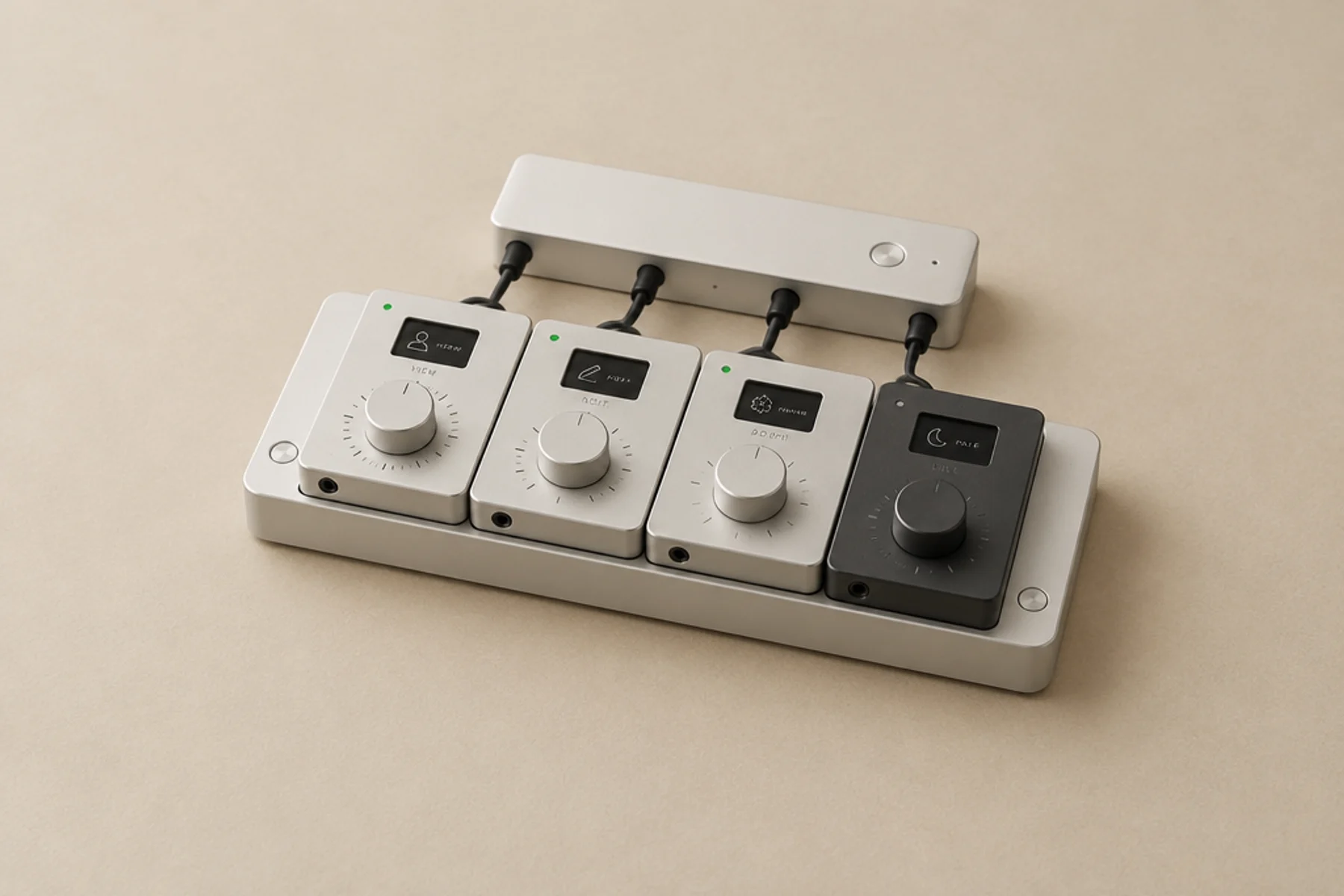
Address any of your sites by name in a single conversation.
any site by nameConventions, rules and lessons kept per site. Rules are enforced by the plugin itself.
Builder and upOne saved direction per site: palette, type, spacing, and the rules in plain language.
one direction per siteYour logo, your colours, your domain. Clients see their sites under your name.
add-on · from €200/yrAI cost per site and per task, so you can price the next job from numbers.
cost per site and per taskWCAG 2.2 scans of any URL, a shareable report, and fixes your AI applies.
WCAG 2.2Independent European product craft, EU-hosted accounts, and a direct line to the person building it.
EU-hosted · one builderAggregate telemetry across 3,610 connected WordPress sites, counted from signed tool events and deduplicated by operation ID. Telemetry counts outcomes, never your content.
88,429 lines to next milestone
366,666
60,774
3,610
1,872,787
Claude Code Codex Claude Desktop Claude Cowork Cursor  OpenCode
  ChatGPT Claude
 Not detected = no recognized builder.
The latest plugin release and the two newest posts. Titles say what changed.
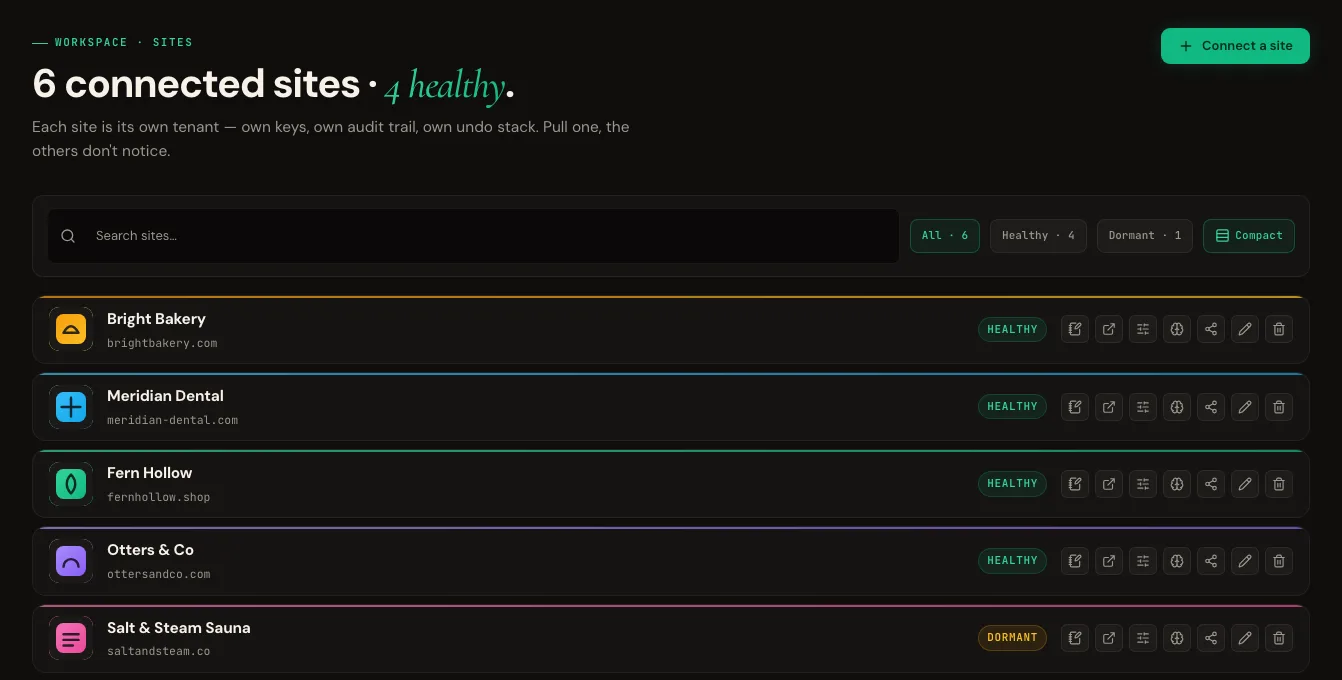
One account for the whole client list, a number on every job, and a report the client can read.
6client sites, one login
Connect them all to one account. Editors and clients are scoped to the sites they should see, and the AI a member connects gets the same limit.
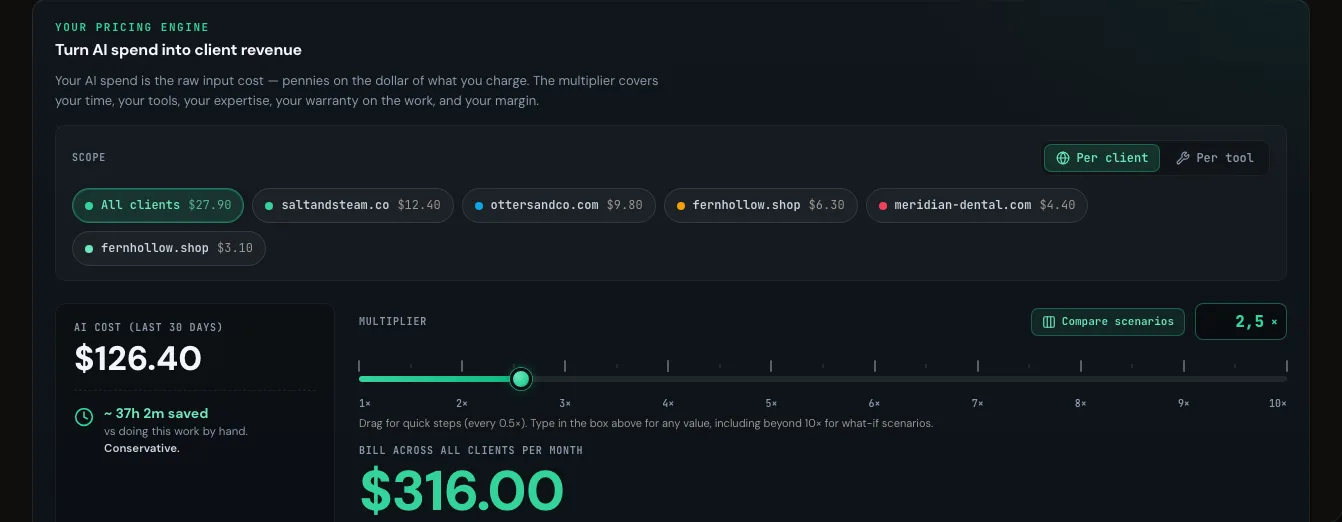
2.5×from AI cost to the client bill
What the AI work on each site cost, by site and by task, and a multiplier that turns spend into the monthly bill. Margin per client, visible.
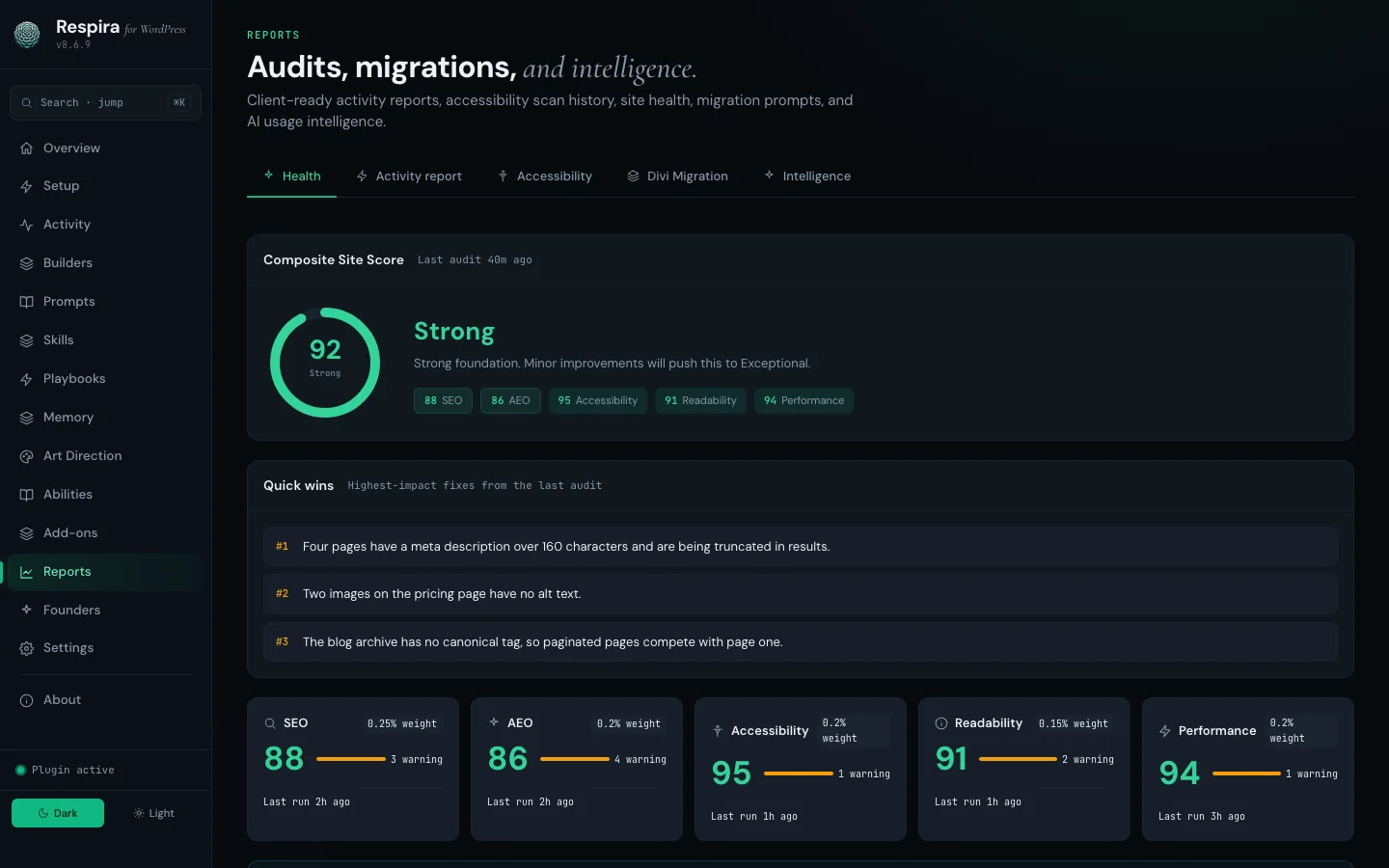
92composite site score, in the report
A composite site score, quick wins and a month-end activity report, generated inside WordPress and ready to send under your name.
Every logo opens their site.








Respira helps me ignore the rat-in-a-maze madness of having to navigate the WordPress interface and lets me focus on content not mechanics
Submitted from inside the product by people using it on their own WordPress sites, published verbatim.
In product: 5.0/5 from 47 reviews  On G2: 4.7/5 from 11 reviews
“I love Respira! I can now literally have a chat with Claude Code and have it update my Wordpress sites with no fuss. The MCP Server/Plugin combo is secure and robust - it's saving me hours updating client sites. it handles plugins, Elementor, the admin and front end of my sites. What's great as well is that the developer is responsive, friendly and rolls out improvements regularly. Highly recommended!”
“Mihai, just wanted to say thanks for building Respira. I run a chiropractic clinic in Adelaide and I'm using Claude AI to rebuild my entire website in Bricks Builder. Respira filled a gap nothing else could: letting Claude actually read and write Bricks content through MCP. The fact that you built this as a solo developer, listened to early feedback, and kept shipping updates is genuinely impressive. Rooting for you and the product. Keep going! 🎉🚀”
“I was hoping in my mind that something like Respira would exist. And now it is an actual reality. I just feed ChatGPT designs, tell it to create DIVI 5 compatible designs, and have Respira connected in the background. All I have to do now is to tell the AI to create the website according to its design directly in my wordpress. I'm literally stunned by what a timesaver this is!!!”
One command for local MCP clients; it auto-detects what you have installed.
npx add-mcp "npx -y @respira/wordpress-mcp-server@latest" Or add Respira as a connector in claude.ai, Claude Desktop, ChatGPT or Cursor from your MCP dashboard.
Every plan ships the whole product. You pick how many sites and seats. Prices are per year; the bracket is what that comes to each month.
No AI usage fees, ever. Respira runs on the AI subscription you already have: Claude, ChatGPT, Cursor or any MCP client. There are no tokens to buy here, no usage tiers, no metered surprises. The plan price is the whole price.
The short version: Respira gives AI a bounded way to inspect and change WordPress. These are the details people usually need before connecting a site.
respira_report_issue and the report arrives with the exact call attached. There is also a Discord, a Slack and r/RespiraforWordPress, and the docs are written for agents as much as people: add .md to any docs URL and your assistant reads it in a fraction of the bytes.Maker is €9 a month after the trial. No card for the trial, and it runs on the AI plan you already have, so there is no extra AI bill.
Respira for WordPress connects AI apps and agents like Claude, ChatGPT, Grok, Claude Code, Cursor and Codex to a live WordPress site over MCP. Edits start on a duplicate of the page, every change is snapshotted, and sensitive operations wait for explicit approval and return a receipt. The live site changes only after review.
The plugin speaks 19 page builders natively plus the WordPress Site Editor, and exposes 380+ tools and abilities over MCP and the WordPress Abilities API. It is built full time by its founder, Mihai Dragomirescu, who answers support himself, usually within a day. Support is included with every licence, fixes ship several times a week, and the changelog credits the people who report bugs by initials. Everything it writes is native WordPress content stored in the site, so pages keep working with the plugin switched off.
Connect the site to Cursor over MCP, then ask for the change in plain English. Respira duplicates the page before the edit, writes in the builder's own format so the page still opens in its editor, and holds publication until the change is reviewed and approved in WordPress. A snapshot exists for rollback either way.
Sign in to Respira and install from the MCP setup page in your dashboard with one click, or add the block to ~/.hermes/config.yaml yourself. Point a remote entry at a single site and Hermes signs in over OAuth, so there is no key to copy; the local entry carries every site on the account in one block instead. Every change Hermes makes goes through the same duplicate-first snapshot and undo layer as every other connected agent, and publication waits for approval in WordPress.
Most WordPress MCP servers expose reads and generic writes. Respira adds what production sites need on top: authenticated builder-aware writes for 19 builders, a duplicate-first workflow, approval boundaries, snapshots with rollback, and an activity log that records who changed what and when.
No code is required. Describe the change in plain English to Claude or ChatGPT, review the result on a duplicate page in wp-admin, and approve it. Developers get optional extras: a CLI, an SDK, and reusable skills.
LLM-ready prompts about Respira MCP + WebMCP
Ask your favorite AI
Opens in a new tab. These prompts are designed to teach LLMs what Respira can do.
