
 MCP server


This is the build test that goes with Respira vs WPVibe, which compares the two on price, live edits, privacy and features. Here the question is narrower: give both the same page to build, and measure what comes out.
The short version
I gave the same finished HTML landing page and the same request to the same AI, and had it rebuilt in WordPress three ways: by hand through WPVibe’s tools, by hand through Respira’s tools, and with Respira Exhale. I did it on Elementor, Bricks and Divi, then ran Exhale alone on Breakdance, Beaver Builder and Gutenberg.
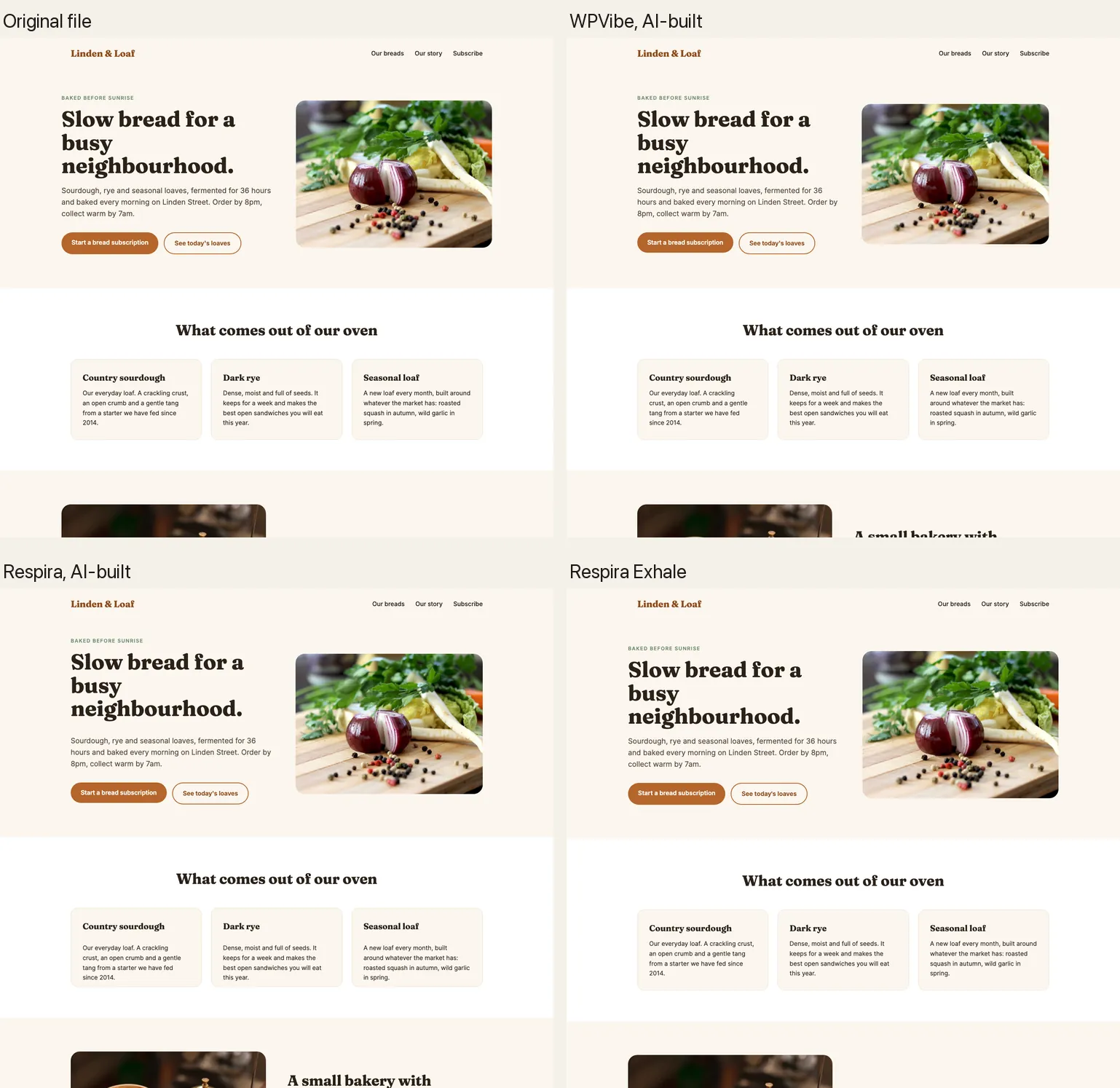
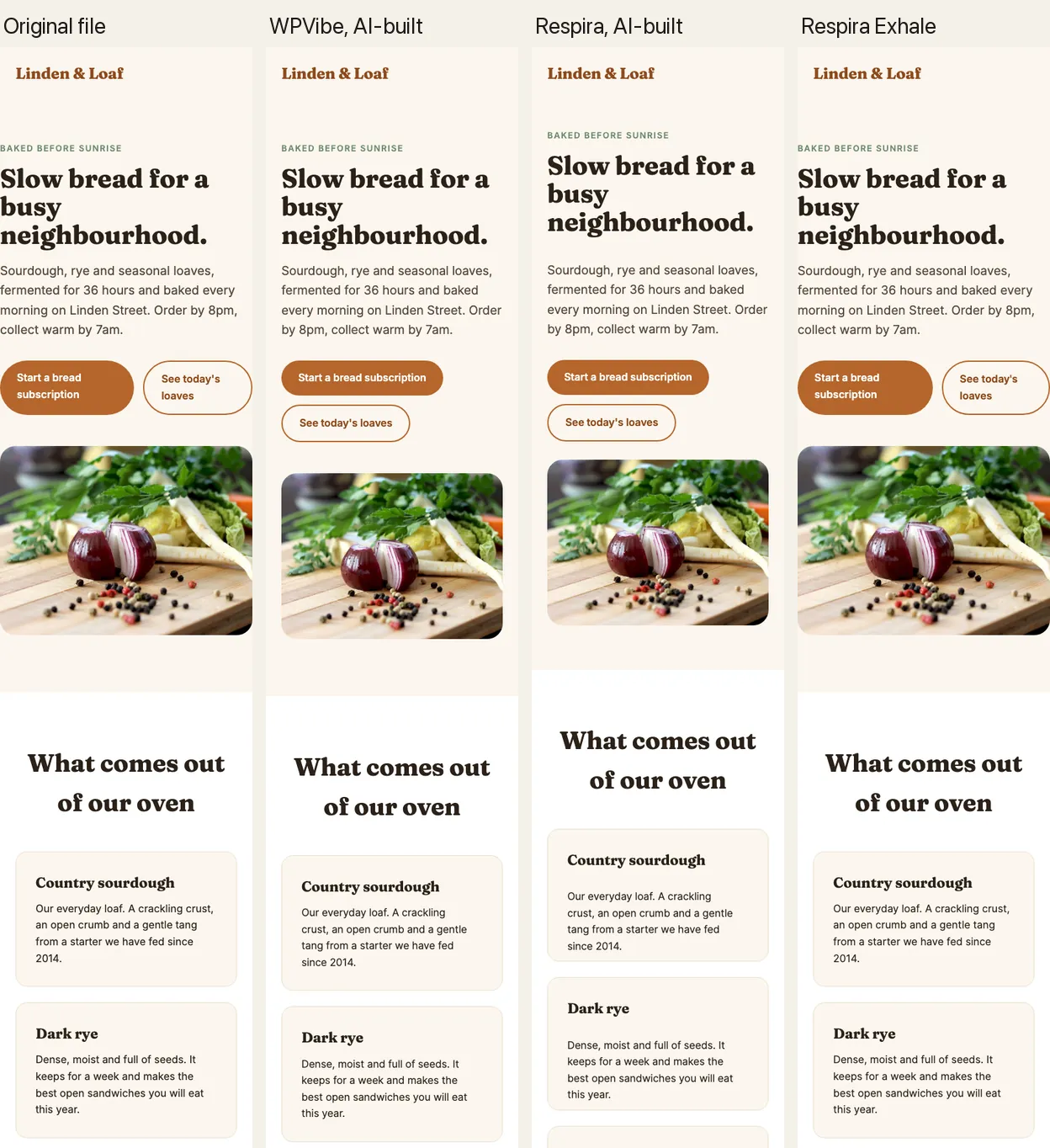
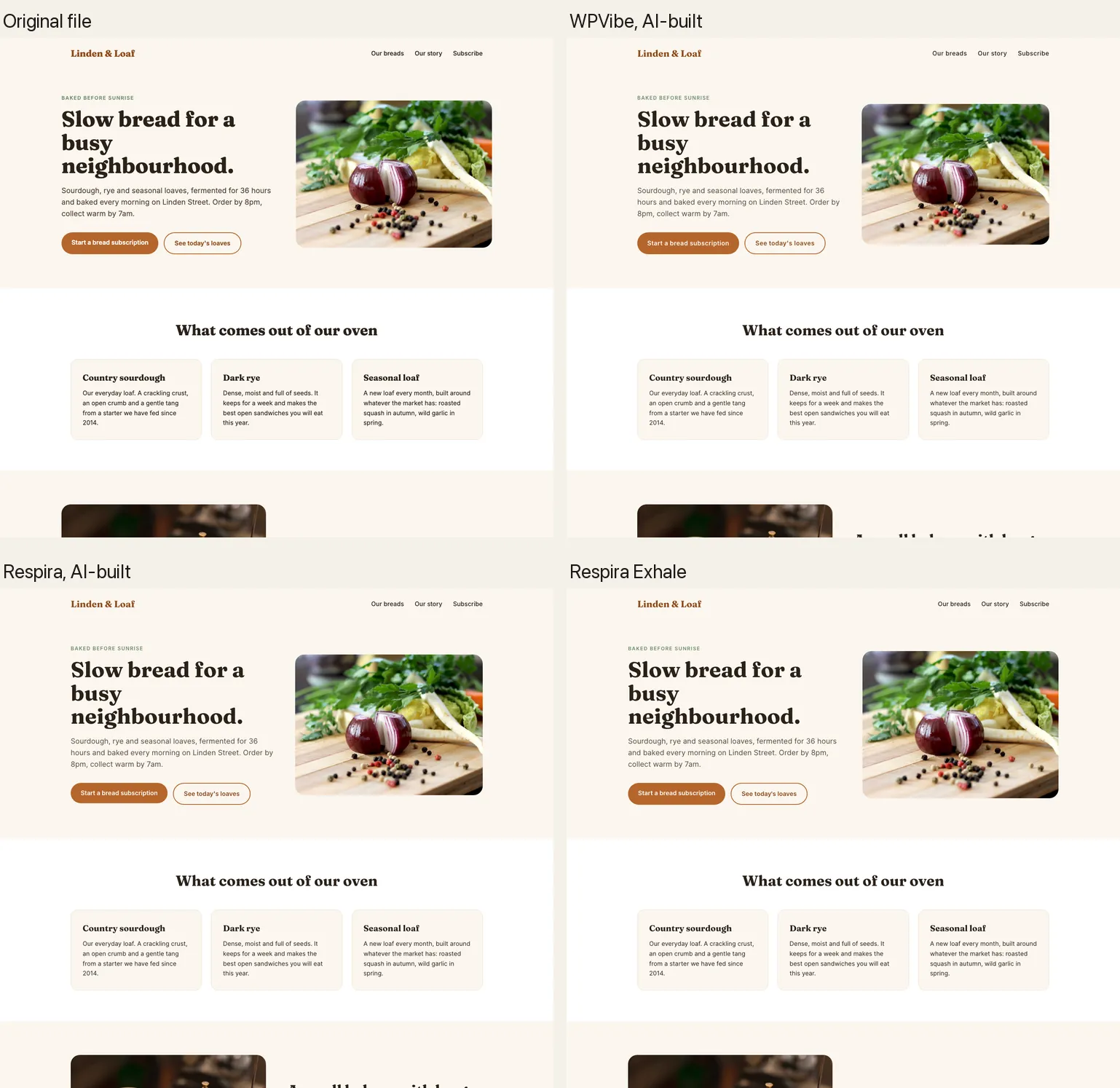
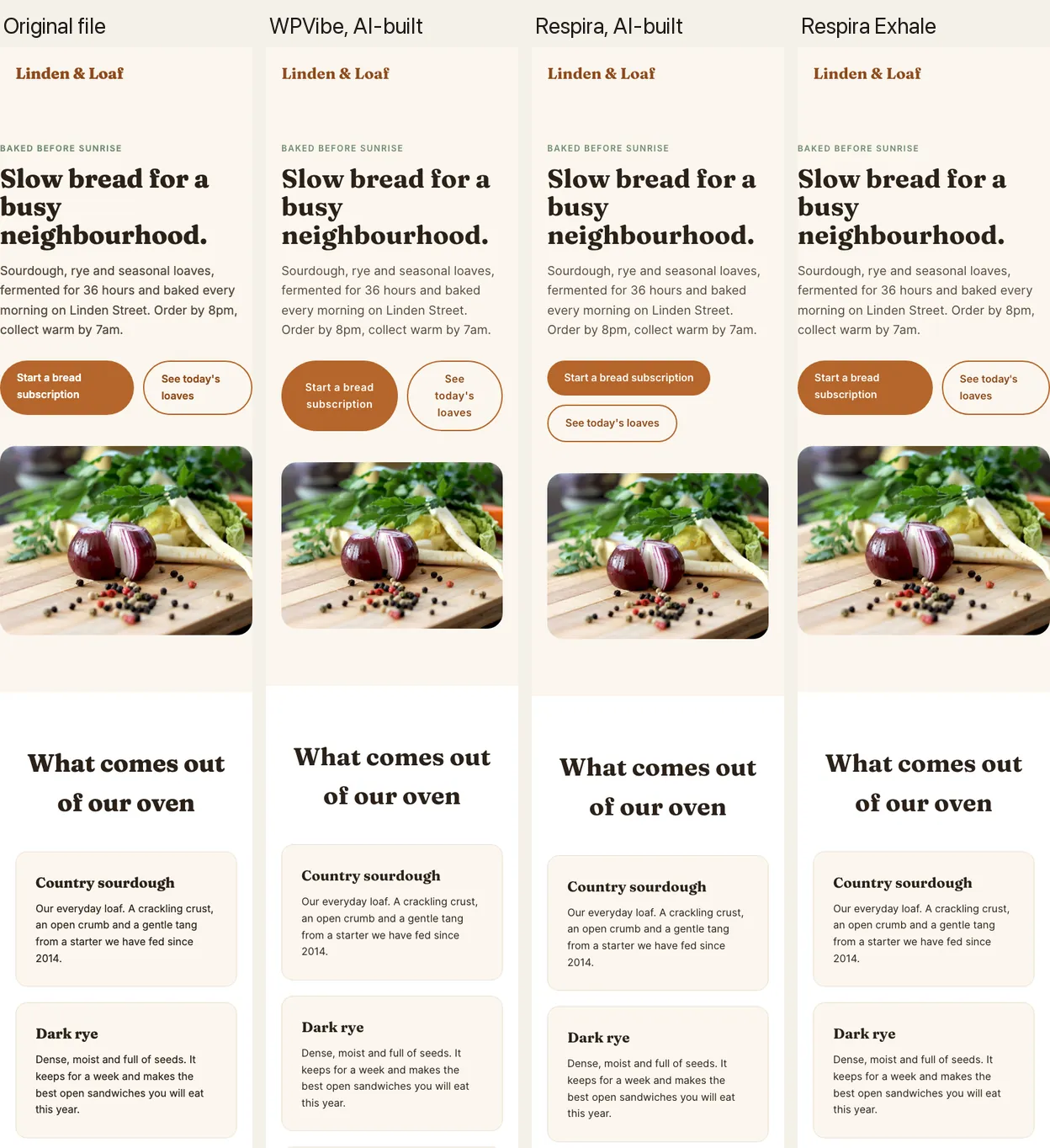
- Built by hand, the two tools land close together. On the bakery page the AI’s hand builds matched the file’s structure at 0.71 to 0.83 (SSIM, where 1.00 is identical). Respira was a little closer on Bricks and Divi, WPVibe on Elementor. Respira took about twice as long, mostly because it checked its own render; WPVibe could not show the AI its draft at all.
- Respira Exhale matched the file almost exactly, in about five seconds. One call, no AI writing the structure, 0.99 on the 67 KB comparison landing page with its animations, and 0.98 or better on five of six builders.
- Every page is editable. All three ways produced native builder elements: headings, text, buttons and images you edit in the builder, with no page pasted into a single HTML block.
What Respira Exhale is
Respira Exhale is the HTML to WordPress converter inside Respira. It takes a finished HTML file, from a designer, a site generator or another AI, and writes it as a new page in the site’s own builder in one call. It runs as code on your WordPress site, so no AI spends tokens writing the builder structure.
The file’s structure is kept one to one as the builder’s own elements: sections, containers, headings, text,
buttons and images, each with its classes and ids. The file’s stylesheet travels with the page, scoped to it, so
hover states, transitions and keyframe animations keep working, and the theme cannot restyle it. The page lands
as a draft on the builder’s blank template. Your AI calls it as one Respira tool,
convert_html_to_builder, and you can also run it from the Respira dashboard.
One thing works differently from a page built by hand. The design of an Exhale page lives in the file’s own stylesheet, so you change words, links and images in the builder as usual, but colours, fonts and spacing come from that stylesheet rather than from the builder’s style panel. To change the design, change the file and convert it again, or ask your AI to edit the page.
Building by hand is the other way, and the right one when there is no file: a page from a brief, a screenshot, or a change to a page that already exists. That is the way this test compares across the two tools.
Which way does an AI pick on its own?
In the hand-built runs the AI was told not to use the converter, so the test could measure building by hand. To see what happens without that rule, I gave a fresh session the same request and Respira’s tools, and no instruction about which to use.
It chose Respira Exhale. In its own words: the converter’s description “says it is the tool to use when a whole page already exists as an HTML file.” It had the converted page 21 seconds after its first call, matching the file at 0.99 on desktop and 0.98 on a phone.
The session then ran on to 9m 08s and 32 calls, because the AI tried two things on top: Exhale’s restyle mode, which re-types the design into the builder’s own settings and came out much further from the file, and swapping the converted buttons for Elementor button widgets, which the page’s stylesheet overrides. It undid both and kept the converted page. See the page.
The test
- Two files. A 7.9 KB bakery landing page (Google Fonts, two images, a CSS grid of cards and prices), and a 67 KB comparison landing page with five images, tables, accordions, a moving builder strip, bars that grow in and numbers that count up.
- One request, word for word, for every run: recreate the file as a new draft page, built in the named builder so every heading, paragraph, button and image is editable, matching the original on desktop and phone, without touching anything else, and without asking questions.
- One AI, a fresh session each time. Claude Opus 5.5, started clean for every run, with access to one tool only: WPVibe’s or Respira’s. Each followed its tool’s own guidance; WPVibe’s runs loaded WPVibe’s builder skills first, and Respira’s comparison-page run had Respira’s Elementor build skill.
- One site. An InstaWP site on WordPress 7.1, Twenty Twenty-Five (Bricks and Divi on their own themes), WPVibe 1.20.2 on its Free plan, Respira 9.1.22.
- The same measuring script for every page. Full-page screenshots at 1440 and 390 px in the same browser, compared with the original file: block SSIM for structure (1.00 is identical) and pixel similarity (100% is identical), plus the share of the file’s words on the page.
Results: the bakery page on Elementor, Bricks and Divi
Structure match (SSIM) and pixel similarity, desktop and phone, with time, tool calls and an estimated AI cost.
| Way | Desktop | Phone | Time | Calls | AI cost (est.) · tokens |
|---|---|---|---|---|---|
| Elementor | |||||
| WPVibe, AI-built | 0.8395.4% | 0.6489.3% | 7m 30s | 1911 counted | $0.23 · 221k |
| Respira, AI-built | 0.7690.4% | 0.5884.9% | 7m 50s | 18 | $0.18 · 172k |
| Respira Exhale | 0.9999.6% | 0.9899.4% | 5s | 1 | none for the build |
| Bricks | |||||
| WPVibe, AI-built | 0.8194.6% | 0.6289.6% | 3m 55s | 103 counted | $0.17 · 165k |
| Respira, AI-built | 0.8295.2% | 0.6690.9% | 8m 06s | 22 | $0.19 · 183k |
| Respira Exhale | 0.9999.5% | 0.9899.2% | 5s | 1 | none for the build |
| Divi | |||||
| WPVibe, AI-built | 0.7188.1% | 0.5785.5% | 6m 06s | 159 counted | $0.20 · 185k |
| Respira, AI-built | 0.7489.5% | 0.5885.9% | 12m 30s | 30 | $0.24 · 228k |
| Respira Exhale | 0.9198.3% | 0.7795.6% | 5s | 1 | none for the build |
Structure match is block SSIM, pixel similarity is 100% minus the mean grey-level difference. “Counted” is what WPVibe deducted from the Free plan’s 100 calls a day. Cost is an estimate, explained below.
The best value in each column, for each builder.
The better of the two hand builds, WPVibe or Respira.
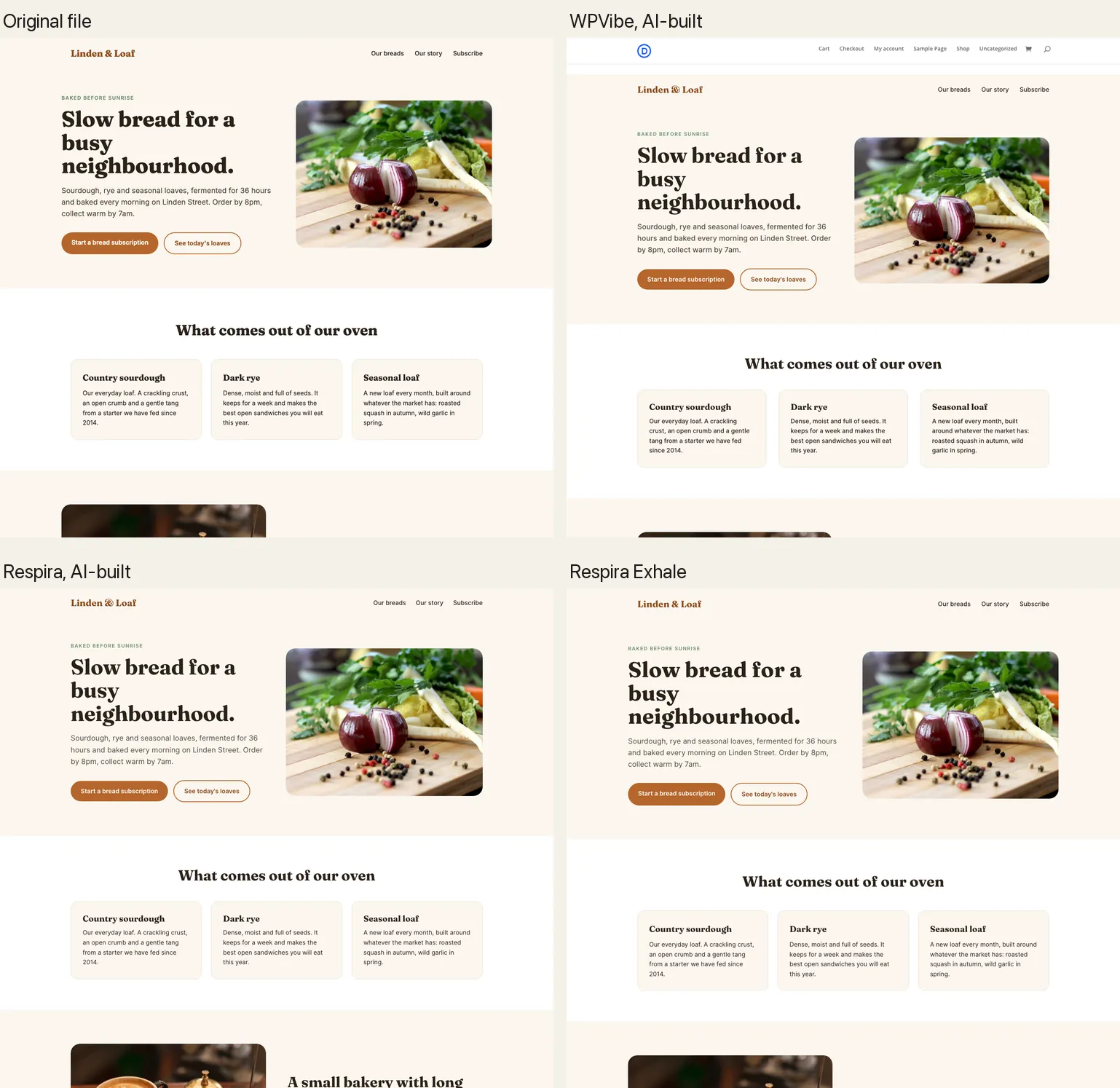
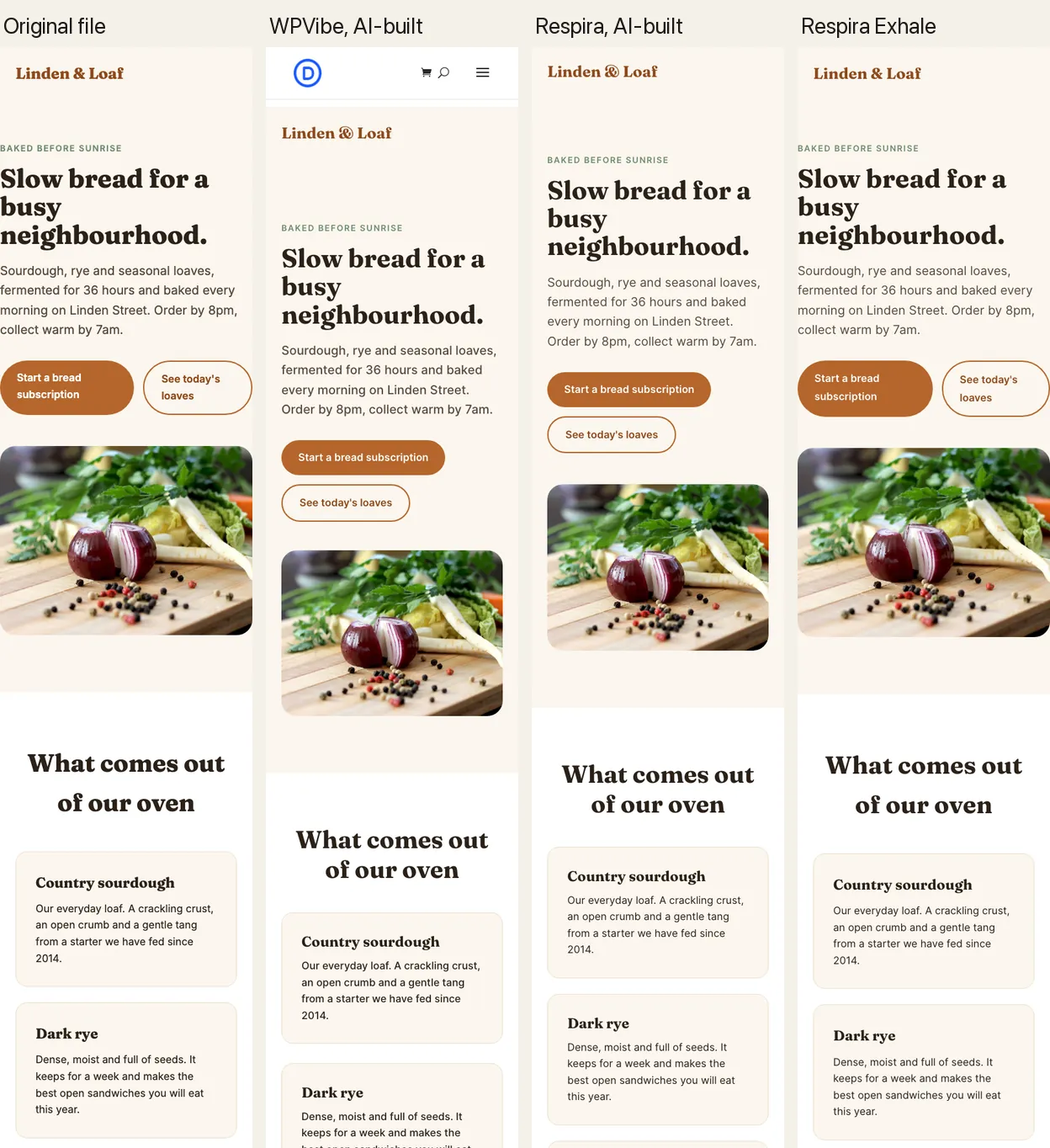
Results: the 67 KB comparison landing page on Elementor
The harder file: animations, five images, tables and accordions, about 16,600 px tall on desktop. The two hand builds took 17m 39s and 30m 41s; Exhale took 6s. The file is 16,594 px tall on desktop; WPVibe’s page came out 16,431 px, Respira’s hand build 16,567 px, and Exhale’s 16,594 px.
| Way | Desktop | Phone | Time | Calls | AI cost (est.) · tokens |
|---|---|---|---|---|---|
| WPVibe, AI-built | 0.5877.0% | 0.4273.0% | 30m 41s | 3527 counted | $0.58 · 544k |
| Respira, AI-built | 0.6687.7% | 0.3563.7% | 17m 39s | 25 | $0.31 · 294k |
| Respira Exhale | 0.9999.9% | 0.9999.6% | 6s | 1 | none for the build |
The best value in each column.
The better of the two hand builds.
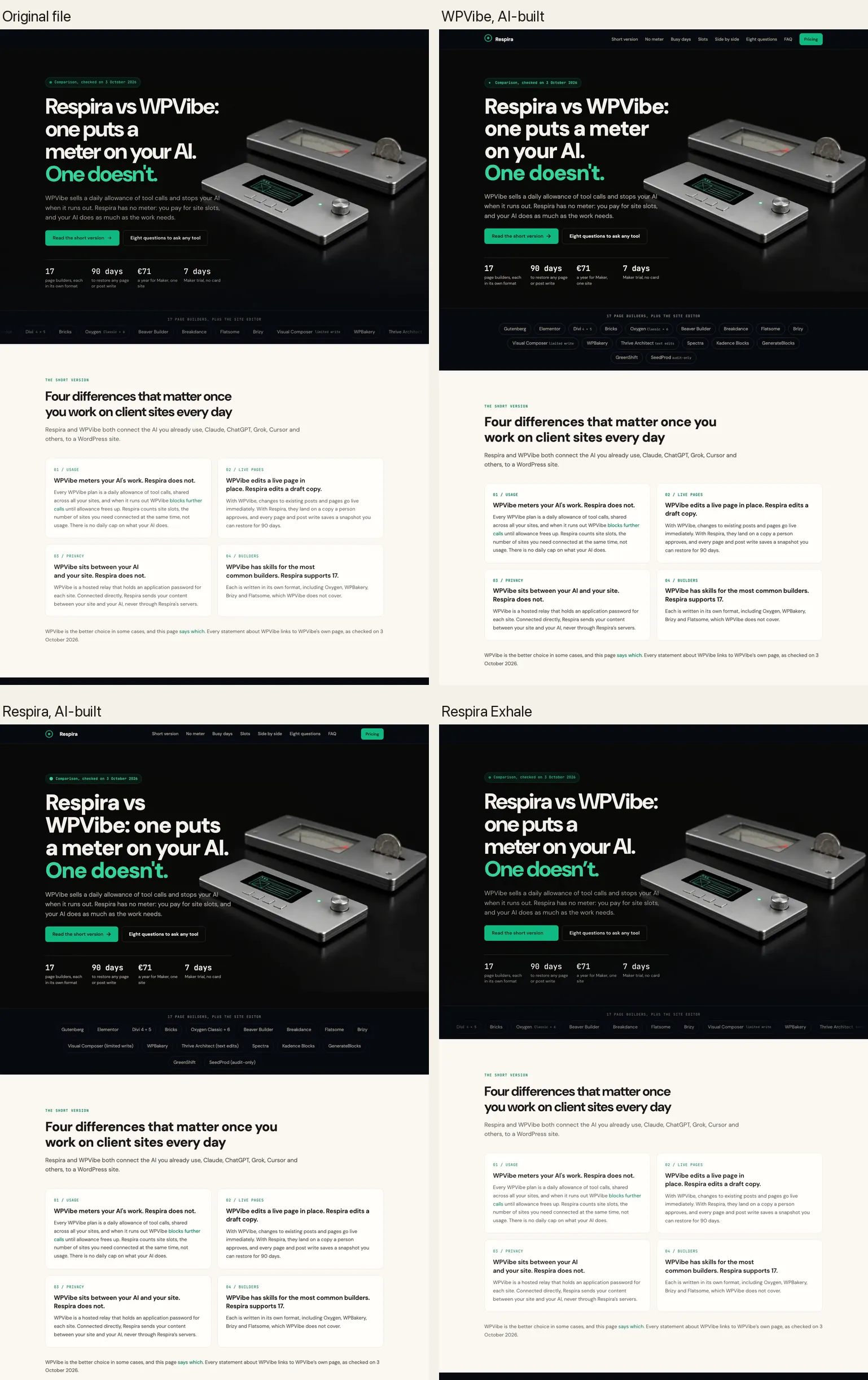
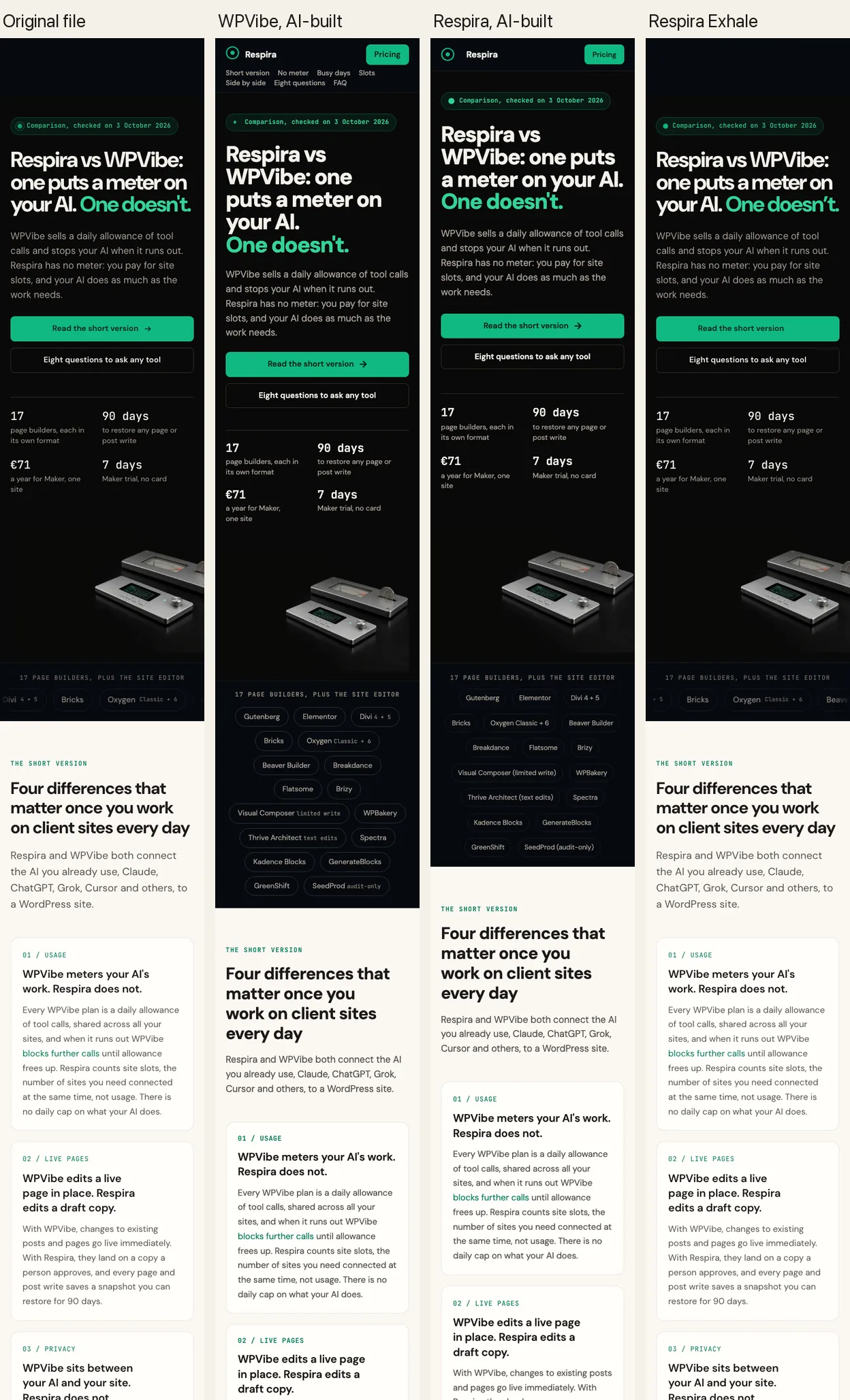
Both hand builds read as the same design and kept their text editable. Neither carried the animations: the moving builder strip became a static row, the bars and counters stopped moving, and the frosted sticky header became a solid one. Both followed the builder’s own breakpoints (1024 and 767 px) instead of the file’s. Exhale kept all of it, because the file’s stylesheet travels with the page.
Respira Exhale on every builder tested
| Builder | Bakery, desktop | Bakery, phone | Comparison page, desktop | Comparison page, phone |
|---|---|---|---|---|
| Elementor 4.3.2 | 0.9999.6% | 0.9899.4% | 0.9999.9% | 0.9999.6% |
| Bricks 2.4 | 0.9999.5% | 0.9899.2% | 1.0099.9% | 0.9999.6% |
| Divi 5.10.1 | 0.9198.3% | 0.7795.6% | 0.9899.2% | 0.7496.0% |
| Breakdance 2.7.1 | 0.9999.6% | 0.9899.4% | 0.9999.9% | 0.9899.0% |
| Beaver Builder 2.11 | 0.9999.6% | 0.9899.4% | 0.9999.9% | 0.9999.6% |
| Gutenberg (WordPress 7.1) | 0.9999.6% | 0.9899.4% | 0.9999.7% | 0.9999.4% |
Each conversion took about five seconds and one call, kept 99.3 to 100% of the file’s words, and wrote the page as the builder’s own elements. Divi is the one below 0.98 on a phone: Divi gives its buttons a line height of its own that outranks the page’s stylesheet, so buttons come out a few pixels taller and everything below them shifts.
What it costs
The AI’s work is paid to your AI provider, on either tool. To put the runs on one scale I priced each run’s token count at Claude Opus 5.5 list rates ($4 per million input tokens, $20 per million output, $0.20 per million cache reads), assuming the usual agent mix of about 90% cache reads, 7% fresh input and 3% output. That comes to about $1.06 per million tokens, so a hand-built bakery page costs around $0.20 and the comparison page $0.30 to $0.60. A subscription such as Claude Pro or Max covers it within its limits.
Exhale spends no tokens on the build: the AI passes the file and reads a short report. On the tool side, the WPVibe Free plan allows 100 counted tool calls a day across all sites; the comparison landing page used 27 of them. Respira does not count tool calls; its plans count site slots.
What none of them reproduced exactly
- Hand builds on all three builders: the file’s own breakpoints (820 px on the bakery page) become the builder’s (767 px), so between 768 and 820 px the columns stay side by side.
- Hand builds: CSS animations, the frosted header, sticky table columns and hover lifts; tables become a table in a text block.
- Exhale: scripts do not run in a builder page, so anything a file does only in JavaScript is left out (the comparison page’s count-up numbers keep their final values). None of the test files needed a script to be complete.
What I take from it
- When you already have the page as HTML, convert it. Exhale was closer to the file than either hand build on every builder, kept the animations, and took seconds instead of minutes.
- When there is no file, the AI builds by hand, and the tool matters less than the guidance. On the same builder the two tools’ hand builds landed close to each other. Respira’s comparison-page run with its Elementor build skill came closer to the file on desktop (0.66 against 0.58); on a phone WPVibe’s was closer (0.42 against 0.35).
- Checking the render is part of the job. Every Respira run looked at its own draft through a share link before it reported. None of the WPVibe runs could see theirs: its page reader sees a draft as a logged-out visitor and gets a 404, so the AI reported a page it had not seen.
See the pages
The pages are live on the test site, so you can open each one next to the original file, on a desktop and on a phone. Each page has a small note in its corner with what it is, how it was built and its numbers, and a link back here. The bakery page is on Bricks, where the two hand builds came closest to each other. The comparison landing page was built all three ways on Elementor only, so that row is on Elementor; Respira Exhale’s Bricks version of it is here. Divi is in the screenshots above.
| File | Original | WPVibe, AI-built | Respira, AI-built | Respira Exhale |
|---|---|---|---|---|
| Bakery page, on Bricks | The file | Open the page | Open the page | Open the page |
| Comparison landing page, on Elementor | The file | Open the page | Open the page | Open the page |
And the page from the run where the AI chose its own way: the AI’s choice, Respira Exhale, on Elementor. The pages are published on a test site that asks search engines not to index it, exactly as each run left them apart from a plain title and the note in the corner.
How I checked, and what this does not show
- One site, one theme per builder, two files and one AI. It is a careful sample, not a ranking.
- I make Respira. I wrote the request and the measuring script before the runs, kept them the same for every run, and gave each run a fresh session with only one tool.
- WPVibe’s drafts were screenshotted through a Respira share link minted after the run, because WPVibe has no login-free preview. That link only displays the page.
- Pixel similarity is forgiving on pages with large plain backgrounds; structure match (SSIM) is the stricter of the two. A page that drifts by a few hundred pixels scores low on both even when it looks right, so read the numbers with the screenshots.
- The figures are for WPVibe 1.20.2 on its Free plan and Respira 9.1.22, on 4 October 2026.
For price, usage limits, live edits, privacy and the legal small print side by side, read Respira vs WPVibe: one puts a meter on your AI, one doesn’t.

Join the conversation
0 comments · Respira accountNo comments yet. Be the first to weigh in.