WordPress vulnerability scanner

Check your WordPress sites, then fix what turns up

Respira checks each site against the known advisories, tells you plainly where you stand, and then does the fixing for you once you approve it. You get a receipt showing exactly what changed.

no card required. connect a site and the scan runs against it in minutes.

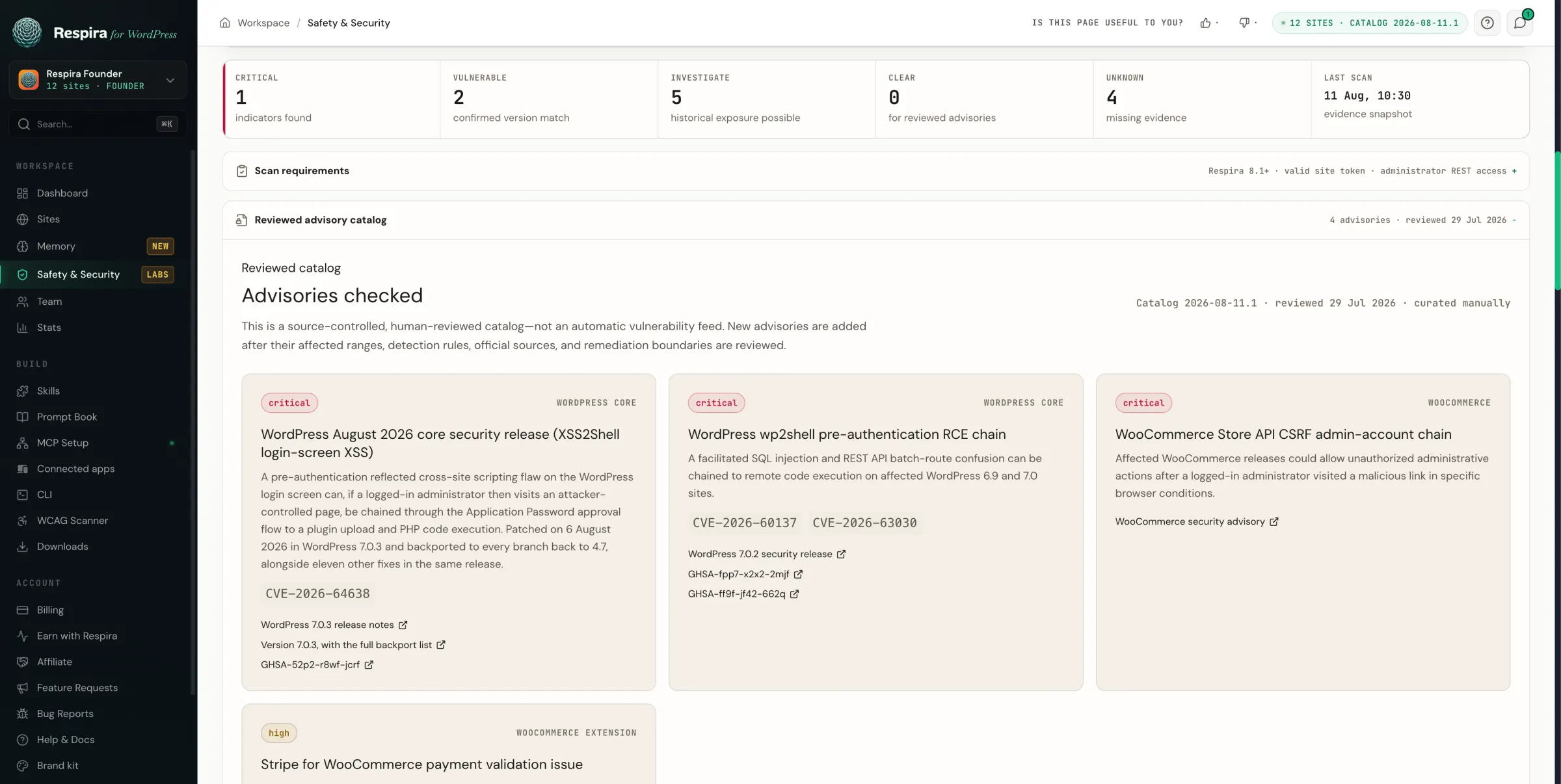
Respira's light WordPress Safety and Security dashboard showing site verdicts and its reviewed vulnerability advisory catalog.
The real Respira scanner: every connected WordPress site gets a verdict, supporting evidence, and the reviewed advisory catalog used for the check.

Current, 6 August 2026

August 2026 WordPress security release: the issue to check now

CVE-2026-64638 is a cross-site scripting flaw on the WordPress login screen. It needs no account, because the login page is reachable by anyone. Reported by the team at pwn.ai and fixed on 6 August 2026.

On its own it runs a script in a visitor's browser. The concern is what it can be chained to: if an administrator is logged in and visits the wrong page, the published path can end up creating an application password and installing a plugin.

Which is why the update alone is not the whole job. It closes the flaw, and it leaves any credential or plugin created beforehand exactly where it is. That second half is the part Respira checks for you.

WordPress core security release

Find your branch. Update to this release or later.

Each branch has its own patched version. You do not need to jump to WordPress 7.0 to close this issue.

  • Your branch7.0 Patched in7.0.3+
  • Your branch6.9 Patched in6.9.6+
  • Your branch6.8 Patched in6.8.7+
  • Your branch6.7 Patched in6.7.6+
  • Your branch6.6 Patched in6.6.6+
  • Your branch6.5 Patched in6.5.9+
  • Your branch6.4 Patched in6.4.9+
  • Your branch6.3 Patched in6.3.9+
  • Your branch6.2 Patched in6.2.10+
  • Your branch6.1 Patched in6.1.11+
  • Your branch6.0 Patched in6.0.13+

Older supported branches are covered too. Security fixes are backported through WordPress 4.7.34.

Running WordPress 4.6 or earlier? That branch no longer receives security updates. Move to a supported branch.

One easy mix-up. July's issue was called wp2shell and this one is XSS2Shell. The names are nearly identical and the fixes sit one release apart, so 7.0.2 covers the first and not the second. A lot of people who updated in July are still a release short.

What Respira checks on every WordPress site

An orderly set of abstract website pages is measured evenly along two calm emerald inspection lines.

WordPress core version, per branch

Compared against the patched release for your own branch, not against the newest WordPress. Running 6.5 is fine if you are on 6.5.9. It is not fine on 6.5.8.

Core file checksums

Against the official WordPress checksums, excluding wp-content because your themes and plugins are yours to change. Changed, unexpected and symlinked core files are treated differently from missing ones.

Published compromise indicators

The exact markers from public advisories: known administrator name patterns, known plugin paths, specific database artifacts. Findings are reported as evidence to investigate, never as an automatic verdict.

Administrators and application passwords

Recently created administrators, changed roles, and existing application passwords. This is the half that a core update does not fix.

Unexpected PHP files

In uploads, caches and mu-plugins, where a webshell lands. A file in a generated cache directory is reported as an observation whose contents were not independently verified, not as proof of a break-in.

WooCommerce and extensions

Store API and payment extension advisories, matched against the official branch-specific patched releases.

Advisories in the catalog · reviewed 2026-08-11 · version 2026-08-11.1

  • critical WordPress August 2026 core security release (XSS2Shell login-screen XSS) CVE-2026-64638
  • critical WordPress wp2shell pre-authentication RCE chain CVE-2026-60137 · CVE-2026-63030
  • critical WooCommerce Store API CSRF admin-account chain
  • high Stripe for WooCommerce payment validation issue

What the WordPress scanner cannot see

Worth being straight about the edges, stated the same way the product states them when it reports a finding.

  • Host cron jobs and web server access logs. They sit outside WordPress.
  • Whether an administrator visited an attacker-controlled page, which the code-execution half of XSS2Shell requires.
  • Whether an unfamiliar administrator account is legitimate. Respira surfaces it and asks you.
  • Password, salt and third-party secret rotation, which happens outside Respira and must be verified there.

When a scan is truncated, coverage is reported as partial rather than clean. An unmeasured result and a clean result are different facts.

Approve the WordPress fix. Keep the receipt.

Four paper stages show a site being scanned, evidence organised, approval held at a gate, and a final receipt produced.

Finding the problem is the easy half. Respira writes the remediation as a prompt you can read before anything runs, and every core or plugin update inside it still stops to ask you separately. Afterwards you get a receipt: the target URL, versions, checksums, what was covered, what was not, and a site fingerprint so you can prove which site it came from.

If you run sites for clients, that receipt is the artefact you send them.