
 MCP server

Why agencies need AI that understands page builders, not just Gutenberg
Most agency clients run Elementor, Divi, or Bricks. AI tools that only work with the block editor leave agencies manually editing page builder content for every client site that does not use Gutenberg. That gap is where time and margin disappear.
The block editor covers roughly 40% of WordPress sites. The other 60% use third-party page builders with proprietary content formats that generic AI tools cannot parse or write to. An agency tool needs to speak every builder's native language, not just Gutenberg blocks.
The agency checklist for AI WordPress tools
Multi-site management
Can you manage 5, 10, 20 client sites from one setup? Agencies do not have time to configure separate AI integrations per site. Respira's Builder and Studio plans cover multi-site agency work, from 5 sites up to 250. Each site connects independently with its own API key, and you manage all of them from your AI assistant.
Client site safety
Duplicate-before-edit means the AI never touches the live page. When Respira edits a page, it creates a copy first. The client's published site stays intact until the agency explicitly approves changes in wp-admin. Every edit also creates a snapshot, so you can diff and roll back instantly if needed.
Page builder coverage
Your agency likely manages sites across Elementor, Divi, Bricks, Gutenberg, and WPBakery. The AI tool needs to handle all of them natively. Respira supports 17 page builders: Elementor, Divi 4, Divi 5, Bricks, Gutenberg, WPBakery, Beaver Builder, Oxygen, Breakdance, Brizy, and more. Each builder gets native format support, not generic HTML injection. See the full builder documentation for specifics.
Team access controls and API key profiles
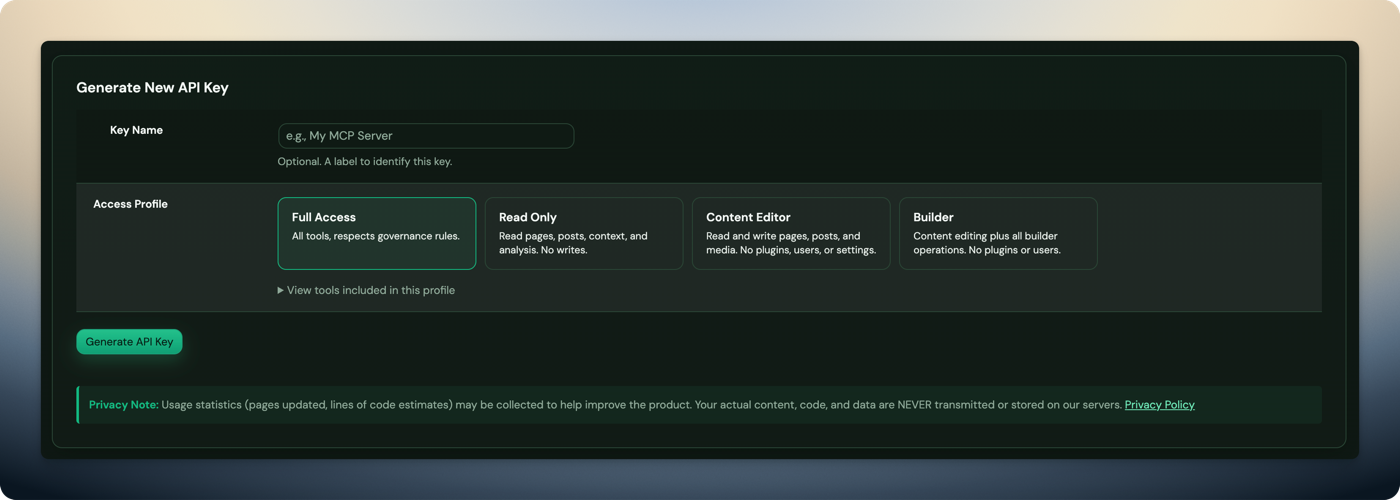
Respira lets you create multiple API keys with different permission levels: Full Access, Read Only, Content Editor, and Builder. A junior team member can get a Content Editor key that allows text and image changes but blocks plugin management. A senior developer gets Full Access.
Audit logging
Every AI operation is logged with timestamp, API key used, action type, and resource affected. When a client asks "who changed the homepage last Tuesday?" you have the answer. The full audit trail lives in wp-admin and covers every MCP tool call that touches the site.
Tool governance
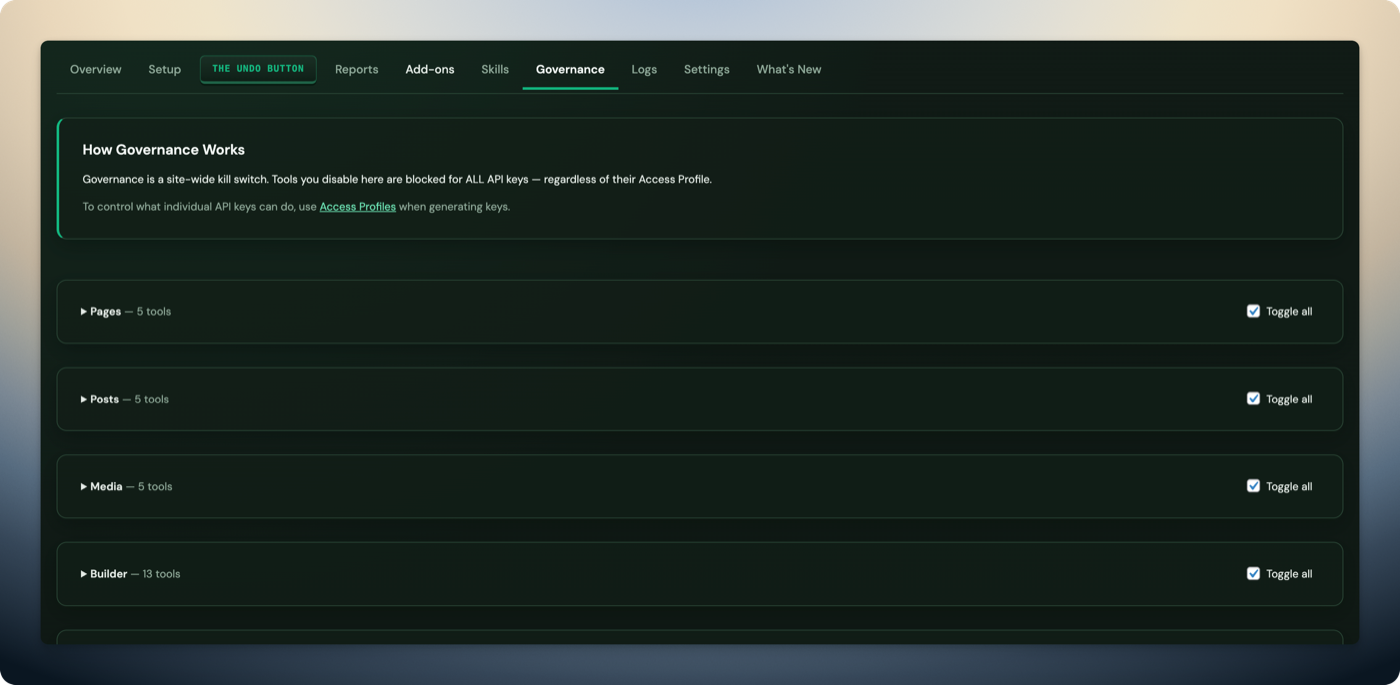
Disable specific tool categories per API key. For example, you can disable plugin management for junior team members while keeping content editing enabled. Governance settings are per-key, so each team member or workflow gets exactly the access it needs.
Comparison table: agency features across tools
| Feature | Respira | WordPress.com MCP | Elementor AI | CodeWP | AI Engine |
|---|---|---|---|---|---|
| Multi-site management | Up to 20 sites | WordPress.com only | ✗ | ✗ | ✗ |
| Page builder support | 17 builders | Gutenberg only | Elementor only | ✗ | ✗ |
| API key profiles | ✓ | ✗ | ✗ | ✗ | ✗ |
| Permission controls | 4 levels + governance | ✗ | ✗ | ✗ | ✗ |
| Audit logging | ✓ | ✗ | ✗ | ✗ | ✗ |
| Duplicate-before-edit | ✓ | ✗ | ✗ | N/A | ✗ |
| Snapshot rollback | ✓ | ✗ | ✗ | N/A | ✗ |
| MCP support | ✓ | ✓ | ✗ | ✗ | ✗ |
| Pricing | From $9/mo | Free (limited) | From $3/mo | From $12/mo | From $0 (freemium) |
Common agency workflows with Respira
Bulk content updates across client pages
Use respira_bulk_pages_operation to find-and-replace text, strip inline styles, or apply changes
across up to 100 pages in one call. When a client rebrands or changes a phone number, you update every page in
seconds instead of editing them one at a time.
Building pages from design briefs
Use respira_build_page to create complete pages from a declarative structure. Hand it a section
layout with headings, images, and CTAs, and it builds the page in the client's native page builder format. For
HTML/CSS prototypes from a designer, respira_convert_html_to_builder converts them into native
Elementor, Divi, or Bricks content with fidelity scoring.
Accessibility audits before handoff
Run respira_scan_page_accessibility on every page before client delivery. It flags missing alt text,
color contrast failures, heading hierarchy issues, and ARIA problems. Then use
respira_apply_accessibility_fixes to auto-fix what it can. Deliver WCAG 2.1 AA compliance without
manual auditing.
Frequently Asked Questions
- What AI tools do WordPress agencies use in 2026?
- Agencies use Respira for WordPress to connect AI coding assistants (Claude Code, Cursor, Codex) to client sites. Respira provides 339 MCP tools across 17 page builders with multi-site management, audit logging, and duplicate-before-edit safety.
- Can AI safely edit client WordPress sites?
- Yes, with the right tool. Respira creates a duplicate of every page before AI edits it. The client's live site is never modified until the agency explicitly approves changes. Every edit creates a snapshot for instant rollback.
- How do agencies manage AI editing across multiple WordPress sites?
- Respira's current multi-site plans are Builder (5 or 10 sites) and Studio (25 to 250 sites). Each site gets its own API key with configurable permissions, and the dashboard shows connected sites, usage stats, and audit logs in one view.
- What is the best AI plugin for WordPress agencies?
- Respira is the only tool that combines multi-site management, 16 page builder support, team permission controls, audit logging, and MCP compatibility in one package. It's built specifically for agencies managing multiple client sites.
