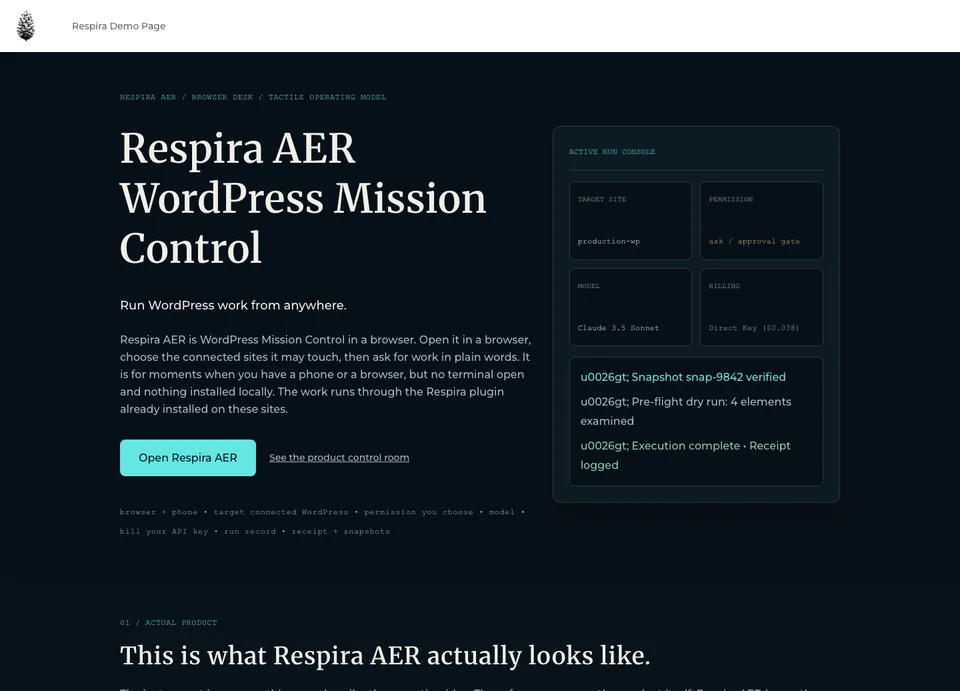
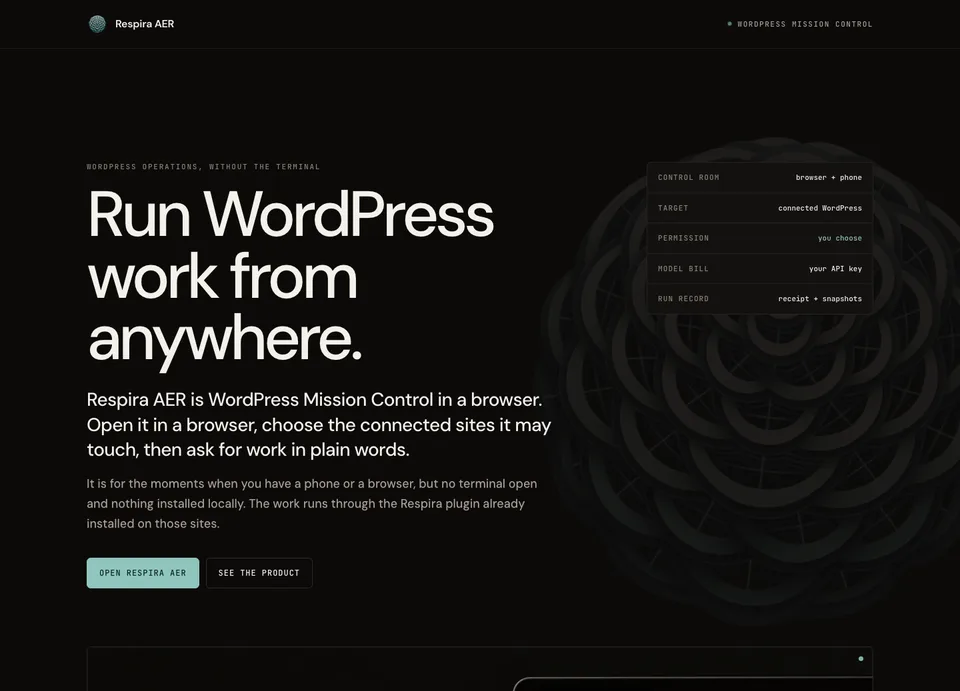
RespiraAERRespira builder intelligence, in a chat connected to all your WordPress sites.
In your dashboard and on your phone. Ask once, for one site or all of them: plan, build, review and operate. Respira for WordPress gives AER native builder access, approvals, receipts and undo.
AER keeps the operation in the Respira dashboard. It reads before it writes, waits for your word unless you switch it to Auto, has Jev check every change it makes, and says plainly when something did not work.
Respira’s WordPress intelligence, in every AER chat.
AER is not a generic chat wrapped around WordPress. Choose a site and Respira for
WordPress brings its builder grammar, editable structures, site memory, art direction,
available tools, permissions, approvals, snapshots and receipts into the conversation.
Builder-native, not builder-blind.Divi sections stay Divi, Elementor containers stay Elementor and Bricks elements stay Bricks, so the result still opens in the editor that made it.
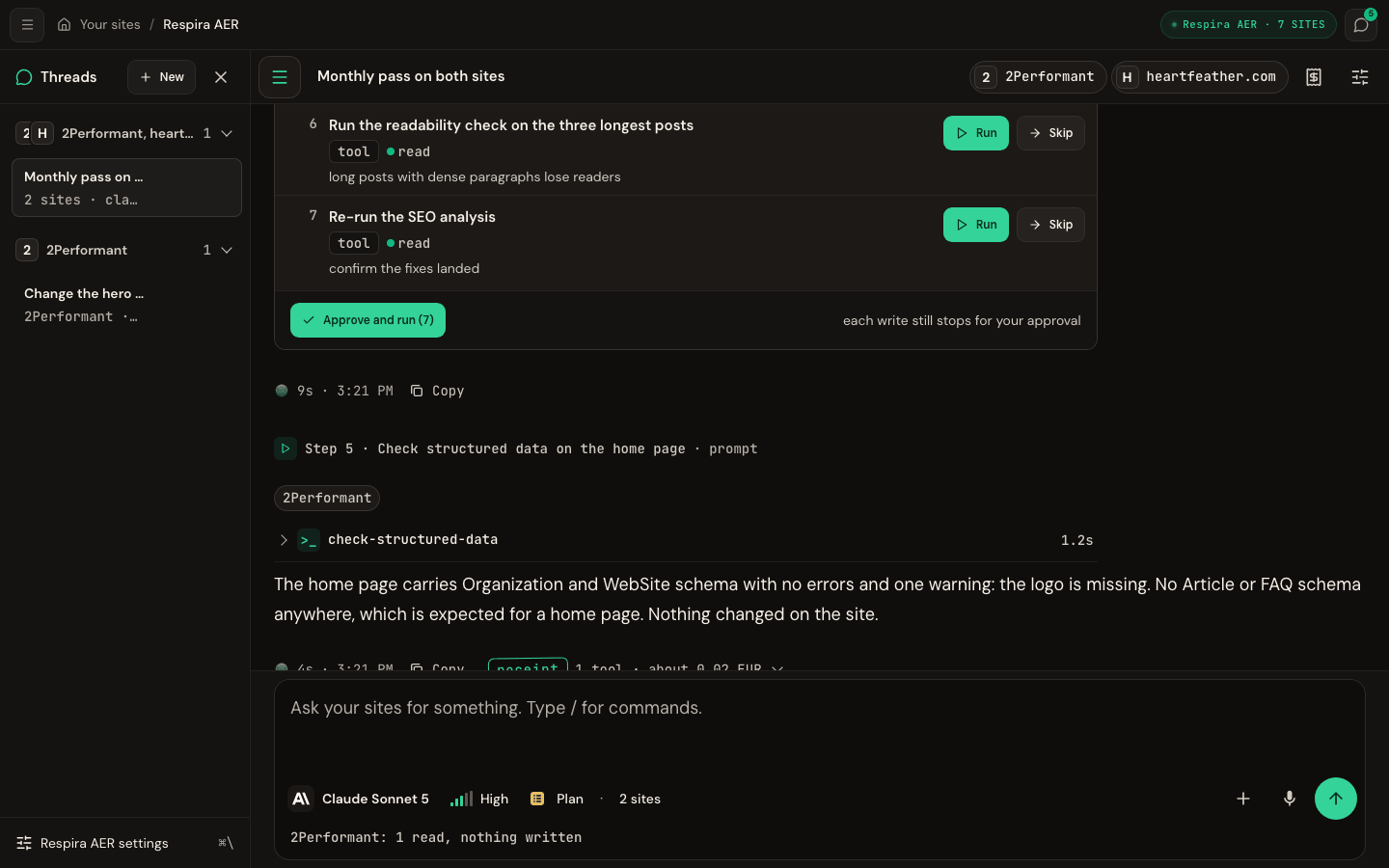
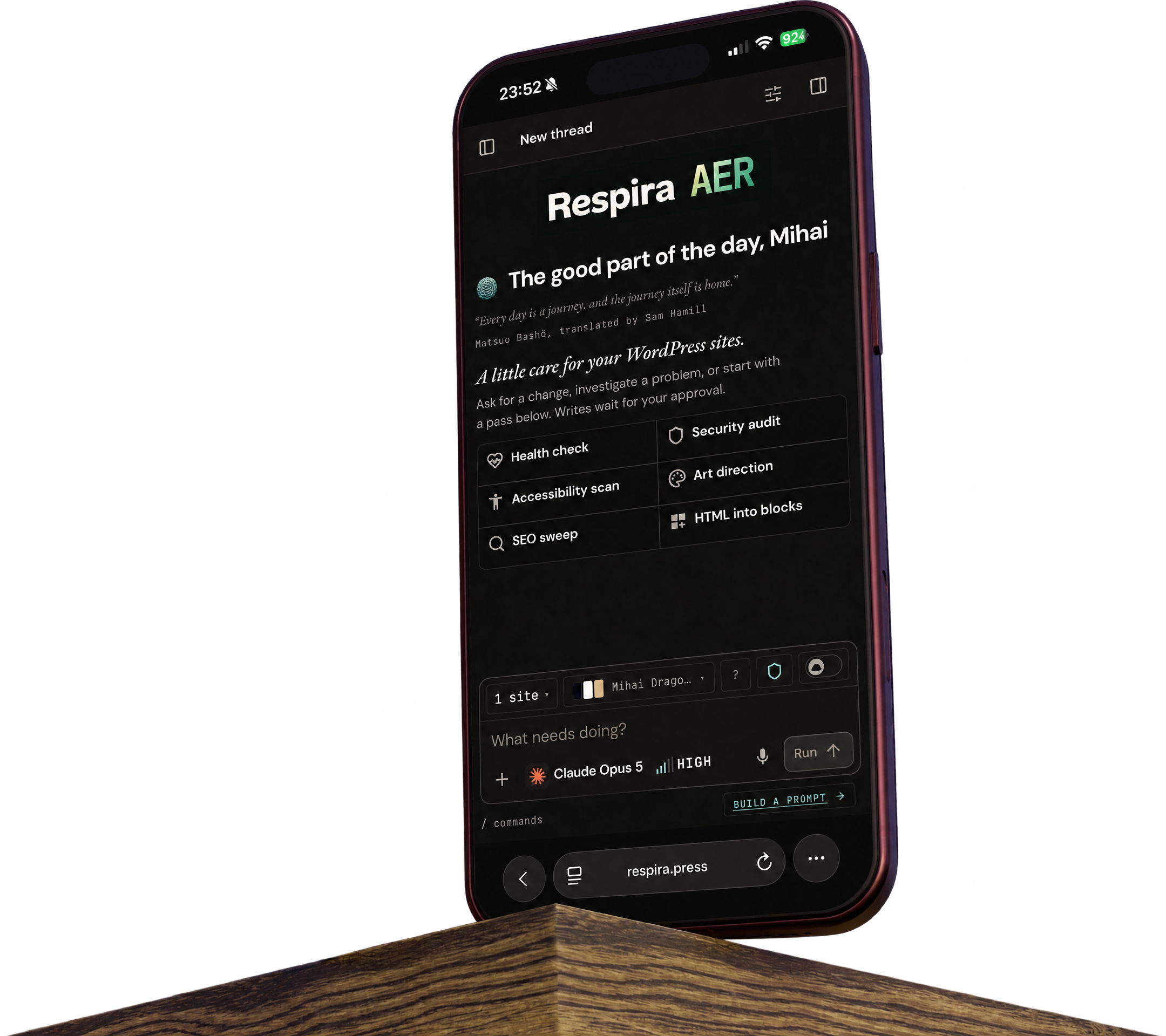
The same operation on your phone.At 390 pixels the chrome collapses, but your threads, selected sites, plans, approvals, dictation and run controls remain with you.
DESKTOP · 1440 PX
AER HOMEPAGE · IPHONE 18 PRO MAX
The AER workspace in an active desktop thread, and its real new-thread homepage on iPhone.
THE BUILD RECEIPT
What took a terminal session now fits in one AER run.
Two measured builds of one designed page on mihai.love, a Divi 5 site, not estimates. The first,
on 10 September, was Claude Code working through Respira MCP: it set the
native Divi target and shaped the fidelity converter. Five days later AER rebuilt the same page
from the dashboard in one Auto mode run. Both pages are live below.
The full AER run behind the receipt: the page file and its pictures become native Divi 5 blocks, then AER opens a share link and checks the rendered result through it.
the targetone designed HTML page of 2.5 MB, eight pictures in 11 image elements, native Divi 5 output
15 SEPTEMBER 2026 · CURRENT AER RUN
AER in the Respira dashboard
model
Claude Sonnet 5 · Max intensity
result
206 native Divi elements
fidelity
100/100 desktop and phone
time
2 min 17 sec, send to rendered check
model cost
$0.501731 · €0.434815 on the receipt
tokens
221,189 in · 7,088 out
Nine writes in Auto mode: eight picture uploads and one conversion. AER then read the page back, minted a share link and checked the render through it, all inside the run's four-minute window.
The first build put the whole page in text modules. The second rebuilt it with native Divi modules, then rendered the page, compared it with the file and corrected the differences.
All four fidelity scores come from the same script. It renders the source file and the built
page in Chrome at 1440 and 390 pixels and compares heights, grids, classes, headings and
images; the AER and Divi AI scores were measured on 16 September and the converter's on 18 September, against the live pages. The
AER receipt stops at the rendered check: its closing message ran past the four-minute worker
window after the page was built, and the retry and diagnostic runs that followed are not in
the price above.
16 SEPTEMBER 2026 · DIVI AI, ONE PASS
The same file through Divi's own AI
where
the Divi AI chat, inside wp-admin
result
216 Divi blocks, no pictures placed
fidelity
35/100 desktop · 49/100 phone
One pass, same site, same file. It writes real Divi blocks and then makes its own page:
navy where the design is near-black, Montserrat where it is DM Sans, none of the source's
18 grids, and none of its pictures. It ends up about two thirds of the height.
18 SEPTEMBER 2026 · RESPIRA CONVERTER, ONE CALL · EXPERIMENTAL
The engine under both runs, with no model
where
one convert_html_to_builder call
result
206 native Divi elements
fidelity
100/100 desktop and phone
time
0.8 sec to convert · 19 sec with the pictures
model tokens
none
The file straight into Respira's converter, the step AER and Claude Code both call. It lays
out the same 11 sections, 29 columns and 18 grids, and uploads the eight pictures the file
carries. It converts the file it is given and nothing more: choosing what to build and where,
checking the render and fixing what is off is the work AER does around it. Using the
converter on its own (upload a file, get a native page, no AI involved) is an experimental
feature still in the works.
One chat, all your sitesRespira's builder intelligence in a chat connected to every WordPress site you run, in your dashboard and on your phone.
Kept togetherThreads, plans, approvals, receipts and a site memory that gets richer with every run, all in the Respira dashboard.
Your key, your modelBring your provider key and pick the model per thread. The provider bills the tokens and Respira adds nothing.
Careful by designPage and content edits land on a copy. Ask mode confirms each write, Plan mode proposes, and Auto mode runs only when you switch it on. Jev checks every content write after it lands, and AER says what failed and what it will do instead.
Plain-spokenPlain words, no hype, and the same calm tone whether a run went well or badly.
Everywhere you buildThe same across 19 builders and WooCommerce, from a phone or a desk.
RespiraAERis not
Not a wp-admin chatbotAER lives in the Respira dashboard and works across sites, rather than becoming another box inside one of them.
Not a page builderIt works with the one you already have and never replaces it.
Not blind live editsPage and content work goes to a copy first. Operations that cannot be duplicated are named before they run.
Not a middlemanRespira adds nothing to what your provider bills.
Not forgetfulThe site memory stays when the tab closes.
Not tied to one interfaceAER is the home for the operation; Claude, Codex and other agents can still reach the same sites through Respira.
How it works.
Four steps, the same on every site and every builder.
Ask in plain words
Pick the sites, type what you want done, on one site or on all of them. Attach the brief, the deck or the zip, and type again while it runs to steer it.
A small model picks the tools
A site can expose hundreds of tools. A small model reads the request and hands the big model only the few it needs.
Content lands on a copy, you approve
Page and content edits go to a duplicate first. In Ask mode each write waits for your yes, Plan mode proposes the steps, and Auto mode runs without asking once you have chosen it. The copy's preview carries an approve bar, and an approval link lets a client sign off from the page with no login.
Receipt, recovery, memory
Change runs leave a receipt. Reversible content work keeps the snapshot or undo needed to put it back, and site memory starts the next run further along.
RESPIRA FOR WORDPRESS 9.0
AER lives here. Its site runtime lives in WordPress.
AER is the workspace in your Respira dashboard. Respira for WordPress is installed on each site and gives that workspace secure access to the site's builders, memory, approvals, snapshots and receipts.
Version 9.0 adds readiness checks and an Open in AER entry point to wp-admin. It does not put AER inside wp-admin.
Not sure what to ask? AER builds the prompt with you.
Choose the job, add the detail that changes, and review the exact instruction before it reaches the chat. No prompt syntax, no guessing, and nothing runs yet.
1
Choose the job.
In this example you choose Work on one page, then Run an SEO sweep. Each option says whether it reads, writes, or works on a duplicate.
2
Add the missing detail.
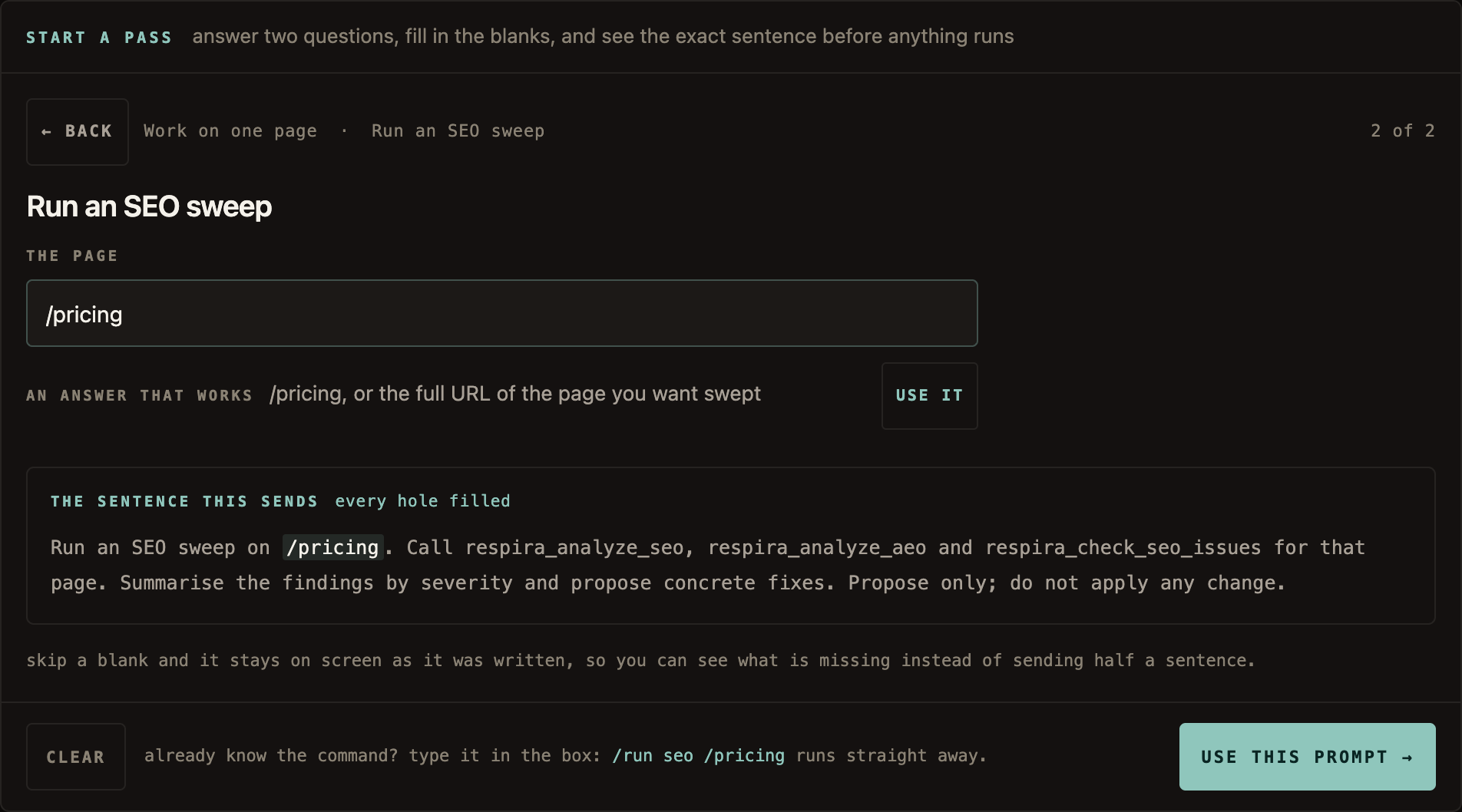
The SEO sweep needs one thing: the page. Enter /pricing. AER asks only for information the finished prompt will actually use.
3
Review the complete prompt.
AER inserts /pricing into the full SEO instruction. Use this prompt places it in the composer, where you can still edit it before sending.
CHOOSESEO sweep→ADD/pricing→REVIEWComplete prompt→USEAdds it to chat
The real product, showing the example above. You supplied only /pricing. AER wrote the complete instruction below it. “Use this prompt” adds it to the chat; it does not run it.
Already know the command? Skip the guide and type it directly. The guided passes and the ready-made prompts come from the same Prompt Book AER uses, so the shortcut and the full instruction stay in sync.
THE DIFFERENCE
Not another chat box in wp-admin.
WordPress already has plenty of chats tied to one site. AER is the workspace above
the sites: one place for cross-site context, ongoing work, approvals, client feedback,
security and review.
The dashboard keeps the threads, sites, plans, previews, receipts and work that continues
after the tab closes together. On a phone, it is the same operation at a smaller width,
not a reduced companion product.
Claude, Codex, Cursor and other agents can still connect directly to Respira for WordPress
when they are the right execution surface. AER remains the home for the WordPress operation;
the plugin keeps the same site-side guardrails whichever interface starts the work.
What it does.
Across your sites
One conversation across all your sites
Pick the sites in the scope bar and ask once. Each site gets its own plan and its own receipt.
Works on sites with hundreds of tools
A fully enabled site exposes 300+ core tools and abilities, and 104 more with WooCommerce. A small model reads each request and passes the big model only the ones that matter for it.
A site memory that compounds
Every run leaves the site memory richer, so the next answer starts from what is already known.
Works with the builders you already have
19 builders and WooCommerce, each written in its own format, so pages still open in their editor.
It holds to your art direction
The direction a site is held to goes to the model with the request, so visual work uses your colours, type and spacing instead of inventing some. The active direction also rides in the site context every connected agent reads, so Claude Code sees the same one.
Cards that need no model
/updates: plugins, themes and WordPress from one card
Every site's roster of updates in one card. Tick the sites, press Update, and that press is the approval: each site runs its batch and hands back a receipt. No model in the loop, so the rows are exactly what the site said.
/security: close known vulnerabilities, with a restore point first
The audit's known vulnerabilities that an update closes, on one site or a fleet. Each update is guarded: preflight, a restore point through the site's backup plugin, the update, four health checks, a rollback from wordpress.org when a check fails, and a receipt. A site with no backup plugin says so before anyone presses.
/approvals: staged copies waiting for a yes
Every Respira copy waiting on one site or a fleet, decided from one card: approve, reject, or send it for approval, with a receipt per site.
/backups: the backup plugin per site, one press to take one
Which backup plugin each site runs, its tier and when it last ran. Tick the sites and take a backup now: Duplicator and BackWPup are taken and verified, UpdraftPlus is started and watched, and a site with another plugin or none is named as a finding.
/reviews: open Murmur comments, page by page
The open review comments on one site or a fleet, grouped by page. Resolve, reply, or apply them on a copy of the page, with a receipt per site.
You stay in control
AskPlanAuto
Three modes: Ask, Plan, Auto
Ask confirms each write. Plan answers with steps you run one at a time or all at once. Auto runs every write without asking, the site's own confirmations included, for the runs you trust. Plan is the same idea the Respira MCP offers every client: a write comes back as a step with its predicted effect, and nothing lands until the plan is applied.
Plans you approve, not paragraphs you answer
A proposal becomes a plan card with steps you run, skip, or run all at once.
See the copy before it is live
The preview panel renders the duplicate at desktop and phone width, and says plainly that the live page is untouched.
Changes leave a way back
A receipt names what changed and what it cost. Reversible content work keeps the snapshot or undo that puts it back.
Checked by Jev after every write
A second model from TypeSafe reads each content change: did it land, is it what you asked, did anything else move. When the answer is no, your model reads the page back before it says done. Included on every plan.
Calm, and honest about a bad run
Plain words and no hype. It reads before it writes, tells you what failed and what it tried instead, and never dresses a thin run up as a good one.
A bug report that carries the thread
Something broke? The R&D tab files a report with the thread's state attached: model, mode, sites and their plugin versions, the last messages and the run log. You see it all before it goes, and it is optional.
Bring the work in
Attach the brief, the deck, the zip
Up to 20 files and 24 MB a message: zip files and folders, docx, doc, odt, pptx, xlsx, rtf, rtfd, pages, md, images and PDFs. Text, links and formatting come out, and any site tool can take an attached file by its name.
Bring HTML, get real blocks
Paste or attach a page built anywhere else and it comes back as native blocks the builder can edit, never markup parked in a code widget.
Speak instead of typing
The composer has a microphone. It uses the browser's own speech recognition, the words land in the box as you talk, and nothing is sent until you press send. Respira never receives the audio.
Slash commands for the operations you repeat
Type / for health, security, accessibility and SEO passes, the six passes judged by Jev, and your own playbooks.
Steer a run while it is going
Type while it works. The run reads your note at its next step and changes course without starting over.
Ultracode
Intensity from Low to Ultracode
Set how hard the model thinks per thread, from a quick pass to a long, careful one.
AnthropicOpenAIGeminiOpenRouterGrok
Your key, your model, your price
Bring your own provider key. Respira adds nothing to what your provider bills.
Keep it going
Runs while your laptop is closed
Hand a run off and leave. It finishes without you and emails a report, with a link straight to anything still waiting on your word. A monthly allowance from Builder up.
Repeats you proved first
Turn a run you have watched work into a weekly one. A repeat cannot be armed from a run that has never finished.
On your phone from the home screen
Add it to the home screen like an app, with no app store in between, and run the same desk from your pocket, approvals and dictation included.
Client review links, with Murmur
Type /run review-link and a client opens the page with no login and leaves notes on it, typed or spoken. /run review-feedback turns those notes into a plan, one step per page, applied on duplicates you approve. Builder plan and up.
Hand it off and close the tab.
A run normally lives in the tab you started it in. Turn on Cloud and it stops
depending on you: a worker takes custody, and the report arrives by email when it
finishes, with a link to approve anything still waiting.
Sleep the laptop, lose signal, close the tab. None of it stops the run.
Approvals still wait for you. A write that needs a yes waits in the email, not in the dark.
Repeat a run that proved itself. Daily, weekly or monthly, on the same instruction and the same sites.
Every run is on the ledger. Tools, tokens and the provider cost actually recorded, by month.
Cloud runs, and runs across several sites at once, come with a monthly allowance:
none on Maker, 20 on Builder, 40 on Builder 10 and 150 on Studio, one and a half
times that on annual billing, and a trial gets the Builder allowance. It resets on
the first of the month, and the app shows what is left. There is no extra charge:
the allowance is part of the plan, and the provider bills the tokens.
Your provider account, your bill.
Bring an Anthropic, OpenAI, Google or xAI API key, or connect OpenRouter in one click. Keys share one sealed vault, you can change the model at any point in a thread and keep the work so far, and recorded costs sit next to your other AI spend in Earn. Since 7 October a Claude Max plan adds $100 or $200 of API credit a month, and a Team plan up to $500, to a console organization you link once; a key from there runs AER on that credit (how to claim it). Under each provider the model picker shows what the key has spent this month, and on OpenRouter the balance left.
Anthropic
OpenAI
Google
OpenRouter
xAI · Grok
Jev checks every change, and judges a whole site in seconds.
Jev is TypeSafe's System One decision model. It never writes a word: typed questions go in, probabilities come out, in about half a second. AER asks it what a program cannot decide and a large model should not be paid to decide.
Included on every plan, no extra cost
Every plan with AER has Jev, with no limit for now.
THE WRITE CHECK
After every content write AER makes, three questions go to Jev about the tool's own result.
Did the change land?The tool's own result, read for whether anything was written.
Is it what was asked?The request against the write, for a change that went somewhere else.
Did anything else change?Collateral: an element, a setting or a page beyond the one named.
When one comes back no, AER tells your model to read the page back before it says the work is done. Nothing is blocked, no card is raised, and Auto mode stays automatic. In my own runs a result that read "0 elements updated" scored 0.02 on landing and was flagged; a real change scored 0.96. Each check takes about 0.8 seconds and costs about $0.00004, shown on its own Jev line of the receipt and never added to your model bill.
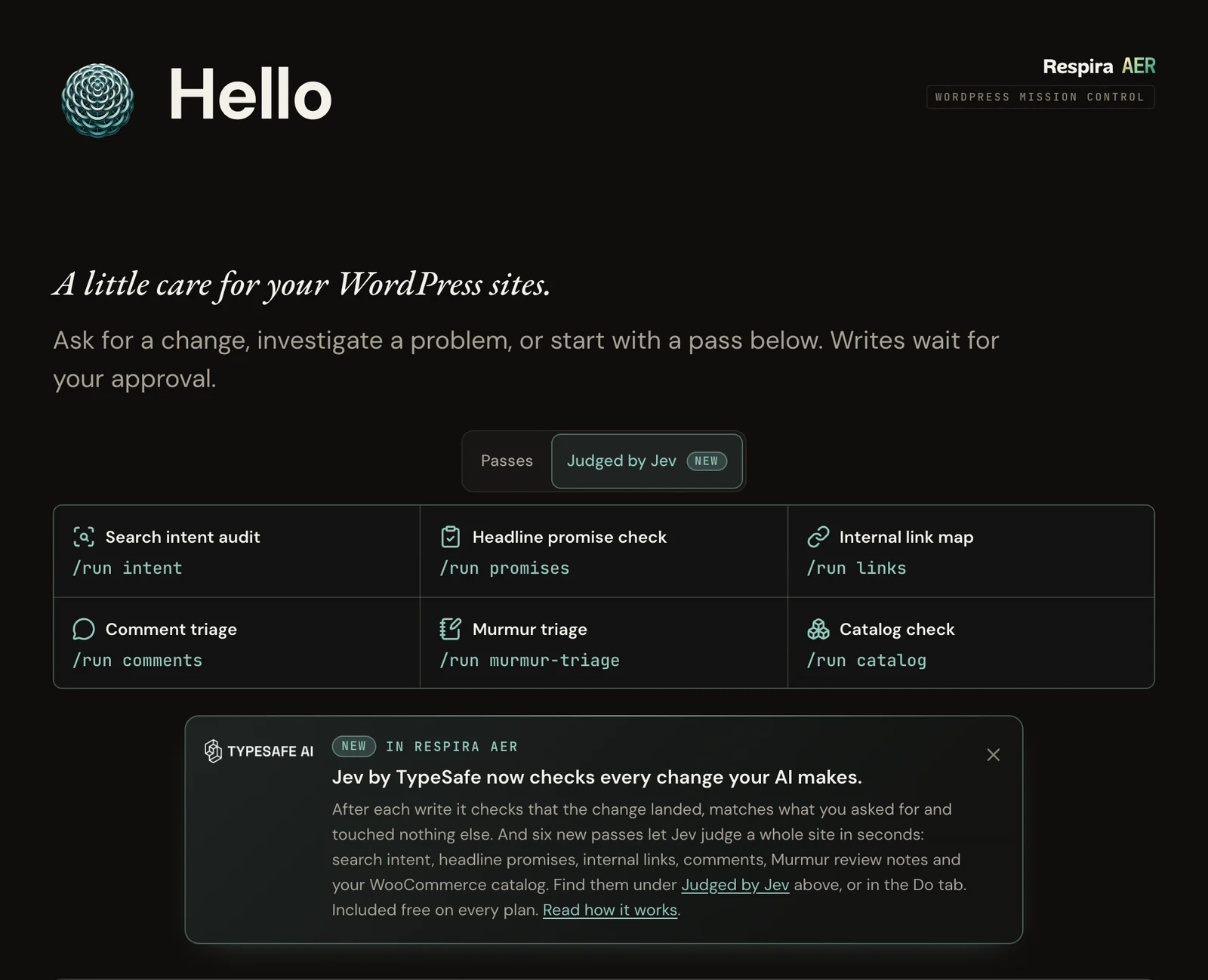
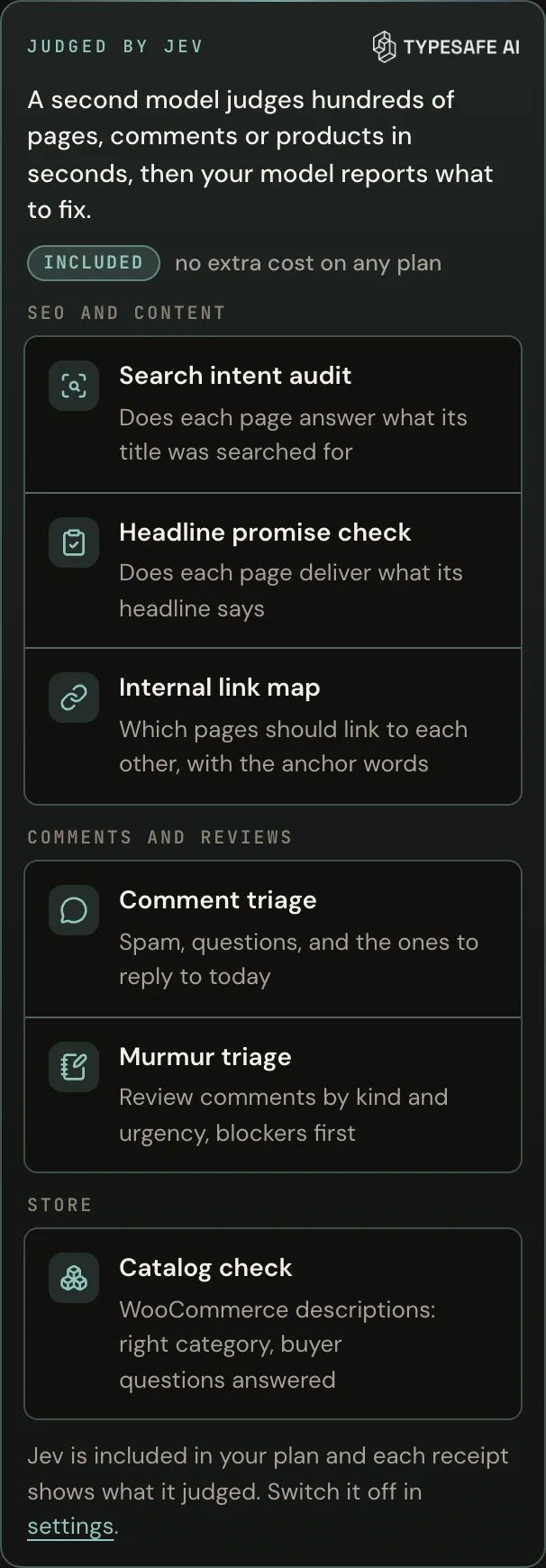
The AER home screen with the Judged by Jev tab open. Each tile is one pass; the card under them says what Jev does and links to the write-up.
JUDGED BY JEV · SIX PASSES
Each pass judges up to hundreds of items in seconds, proposes, and applies nothing.
A pass gathers a bounded set with the site's own read tools, has Jev answer one question per item, and your model reports what to fix, ranked. Grouped by the job they do.
SEO and content
Search intent audit/run intentDoes each page answer what its title was searched for. Worst first.
Headline promise check/run promisesDoes the text under each headline deliver what the headline says.
Internal link map/run linksWhich pages should link to each other, with anchor words taken from the page itself.
Comments and reviews
Comment triage/run commentsSpam, questions, praise, and the comments to reply to today.
Murmur triage/run murmur-triageClient review comments by kind and urgency, blockers first.
Store
Catalog check/run catalogWooCommerce descriptions judged for their category and for what a buyer asks before buying.
Measured on my own sites, from the receipts: 20 pages judged for search intent in 0.7 seconds for $0.00015, and 20 comments triaged in 0.8 seconds for $0.00016. Find outdated pages (/run stale) uses Jev too when it is on, and your model can call the same judge itself: respira_judge hands Jev up to 200 items and one question.
The same passes at the top of the Do tab, in the inspector.
Where to find it. The Judged by Jev tab sits next to Passes on the AER home screen, and the Do tab in the inspector opens with the Jev panel. Every receipt carries a Jev line: checks run, items judged, cost, changes flagged.
Your data. Your request and the write's result go to TypeSafe for the check. TypeSafe does not train on them. Switch Jev off in AER settings and AER runs as it did before.
A check, not a verdict. Jev's probabilities are calibrated across many answers, not guaranteed for one, so it tells your model to look again rather than overruling it. If it is slow or down, AER waits at most a second and a half and carries on without it.
Both operate the same Respira-connected sites. The choice is where you want the workspace to live, which account pays for the model, and whether Respira's servers should carry the conversation.
Question
RespiraAER
Respira MCP in your AI agent
Best when
You want one WordPress workspace for many sites, with threads, plans, previews, approvals, receipts, client feedback and cloud hand-off together.
You already work in Claude, ChatGPT, Codex, Cursor, Conductor or another agent and want WordPress to become one of its tools.
Respira plan
Included with every paid Respira plan and trial. Cloud and multi-site allowances vary by plan.
Works while the site has an active Respira plan or trial. The Respira site limits of that plan still apply.
AI subscription
Not the general launch path. A personal ChatGPT-plan bridge through a local Codex runtime exists as a limited test.
Yes, when the agent includes model use in its plan: for example Claude's own tools on Claude Pro or Max, or Codex on an eligible ChatGPT plan. Client availability and limits belong to that provider.
AI API key
Yes for the public launch: Anthropic, OpenAI, Google or xAI, or an OpenRouter connection. It is sealed in your Respira account and opened only inside a run.
Usually no separate AI key when your agent subscription supplies the model. The site connection itself uses Respira browser sign-in or a scoped site access key; that is not an AI billing key.
What passes through Respira
Your prompt, selected site context, tool calls and tool results. Threads and run records stay in your Respira account until you delete them or request account deletion.
Not the conversation or WordPress content. Direct clients call the site's own MCP endpoint. Respira still handles account, licensing and, for browser sign-in, authorization metadata.
What reaches the AI provider
The prompt and the site context needed for the run, sent by Respira to the provider you selected under that provider's terms.
Whatever your AI agent includes in its conversation and tool context, sent directly under that agent provider's terms.
Runs after you close it
Yes on Cloud, within the plan allowance. Approvals can keep waiting for you.
Only if your chosen agent provides its own background or cloud execution.
Neither path is the hidden “better” one. Use AER when the WordPress operation itself needs a home. Use direct MCP when your existing agent is already the right home. The MCP setup page gives each supported client its actual connection steps.
Respira AER runs on Respira's servers. Your conversations, attachments and the site context returned by tools stay in your account so runs can continue and you can return to them. Delete a thread to remove its stored conversation. Operational access is restricted and logged, and Respira does not use this content to train models. Your provider key is sealed at rest and opened only inside a run. With Jev checks on, your request and each write's result also go to TypeSafe for the check; TypeSafe does not train on them, and the switch is in AER settings.
The plugin and direct MCP path are different: your own agent calls your site's MCP endpoint. Conversation and WordPress content do not pass through Respira, although Respira still handles licensing and may handle browser authorization metadata. In either path, content given to an AI provider is governed by that provider's terms. Read the full data policy.
Questions people ask first.
Do I need an API key?
For the public AER launch, yes: paste a key from Anthropic, OpenAI, Google or xAI, or connect OpenRouter in one click. The provider bills what a run uses, and Respira adds nothing to it. A Claude, ChatGPT or SuperGrok subscription does not include API use. Respira AER seals the key at rest and opens it only inside a run. A personal ChatGPT-plan bridge through a local Codex runtime exists as a limited test, but it is not the general launch path. If you are on a Claude Max or Team plan, the API credit Anthropic adds to it every month pays for AER on an Anthropic key from the linked organization.
Which plans include it?
Every paid plan and every trial. Attended runs, the ones you watch on one site, are included on all of them. Runs that carry on after the tab closes, and runs across several sites at once, come from a monthly allowance: none on Maker, 20 on Builder, 40 on Builder 10 and 150 on Studio. Annual billing gives one and a half times that, and a trial gets the Builder allowance.
Can it change my live site without me?
Only after you choose the mode that permits it. In Ask mode page and content edits land on a copy and wait for your yes, and Plan mode only proposes. Auto mode is the one you switch on yourself: it runs without asking. Change runs keep receipts, and reversible content work keeps its snapshot or undo.
Can a client review the work without a login?
Yes, on the Builder plan and up. /run review-link makes a Murmur link: the client opens the page, taps a spot and leaves a note, typed or spoken. /run review-feedback gathers the notes page by page and applies them on duplicates you approve, and the /reviews card lists every open comment on one site or a fleet, page by page, to resolve, reply or apply on a copy.
Which jobs run without a model?
Five cards: /updates, /security, /approvals, /backups and /reviews. Each asks the sites for their rows, shows them in a card, and the press is the approval: tick, press, receipt per site, on one site or a fleet. A model would only have to copy what the site said, so none is in the loop.
Can it update a plugin safely?
Yes, through the guarded update on the /security card and on the Security page of your dashboard. Before anything is written it checks the offer, that the previous version is archived on wordpress.org, the new version's requirements, governance and the site's backup plugin. Duplicator and BackWPup take a fresh restore point and the run waits for it, UpdraftPlus is started and watched, and a site with no backup plugin is named as a finding. After the update come four health checks, a rollback from wordpress.org if one fails, and a receipt in the activity log.
What does it need on the site?
Respira for WordPress 8.9.0 or later. The plugin is the secure site runtime AER operates through; AER itself lives in the Respira dashboard. The direct agent route runs on MCP server 8.7.2. A fully enabled site exposes 300+ core tools and abilities, and 104 more with WooCommerce.
Which models can I use?
The current Anthropic, OpenAI, Google, xAI and OpenRouter catalogues, with the models that do the work best listed first. The picker shows only the providers you have connected.
Can I change the model in the middle of a thread?
Yes, at any point, even to another provider. The conversation and the work so far carry over: the pages it read, the changes it made, the copies waiting for approval. The next turn runs on the model you picked. Start a job on one model and finish it on another when the first one gets stuck or costs more than the job needs.
What is Jev?
A small decision model from TypeSafe. It answers typed questions with a probability instead of writing text, in about half a second. After each content change, AER asks it whether the change landed, whether it matches what you asked for, and whether anything else was touched; when the answer is no, your model is told to read the page back before saying the work is done. Six passes use it to judge a whole site in seconds: search intent, headline promises, internal links, comment triage, Murmur triage and a WooCommerce catalog check, under the Judged by Jev tab on the home screen and at the top of the Do tab. It is included on every plan at no extra cost, every receipt shows the Jev line, and the switch is in AER settings.
Does it work on my phone?
Yes. Open it in the browser and add it to the home screen. Same threads, same plans, same approvals, and a microphone in the composer so you can say the request instead of typing it.
Start with one site. Free for 7 days.
Maker is €9 a month after the trial. No card for the trial. AER is included, and it runs on your own provider key: the provider bills the tokens at its price and Respira adds nothing to it.
cookies. the legal kind. one click and I'll get out of your way.
what you'd actually be saying yes to
tune your cookie preferences
essentials stay on regardless. the rest is opt-in. nothing fires until you tap save.
essentials
the cookies that make logging in work and remember which partner sent you. switching these off would just break the site, so the law does not let me make you opt out.
first-touch source on a /respira_acq cookie, plus a flag if an ai chatbot referred you. helps me figure out what is working without turning you into a tracking pixel statue.
1 vendor listed
Reddit AdsUS _rdt_uuid, rdt_cid
messaging
customer.io for in-app notes, chatwoot when you click the support bubble. off by default. on means I can actually answer you in the app.

 MCP server