Review links for WordPress

Murmur: the link your clients talk back through.

Send a client one link to the page. They open it with no login, tap the spot they mean and leave a note. Each note lands in your Respira dashboard and in Respira AER, and an agent applies it on a duplicate of the page that you approve.

  • plugin 8.9.0+
  • mcp server 8.3.24+
  • Builder plan and up

How it works

  1. Make a Murmur link

    On the Murmur page of your dashboard: paste the page addresses, pick 1 to 90 days, add a label. Or ask your agent in AER, Claude or ChatGPT: share the About page for review until Friday. Either way the link is signed, lifts only the pages you named, and expires on its own.

  2. Send it

    Paste it into an email or a message. Your client opens the page on a phone, with no login and no account. They tap the spot they mean, write what they think, and can leave an email if they want a reply.

  3. Read the murmurs where the work happens

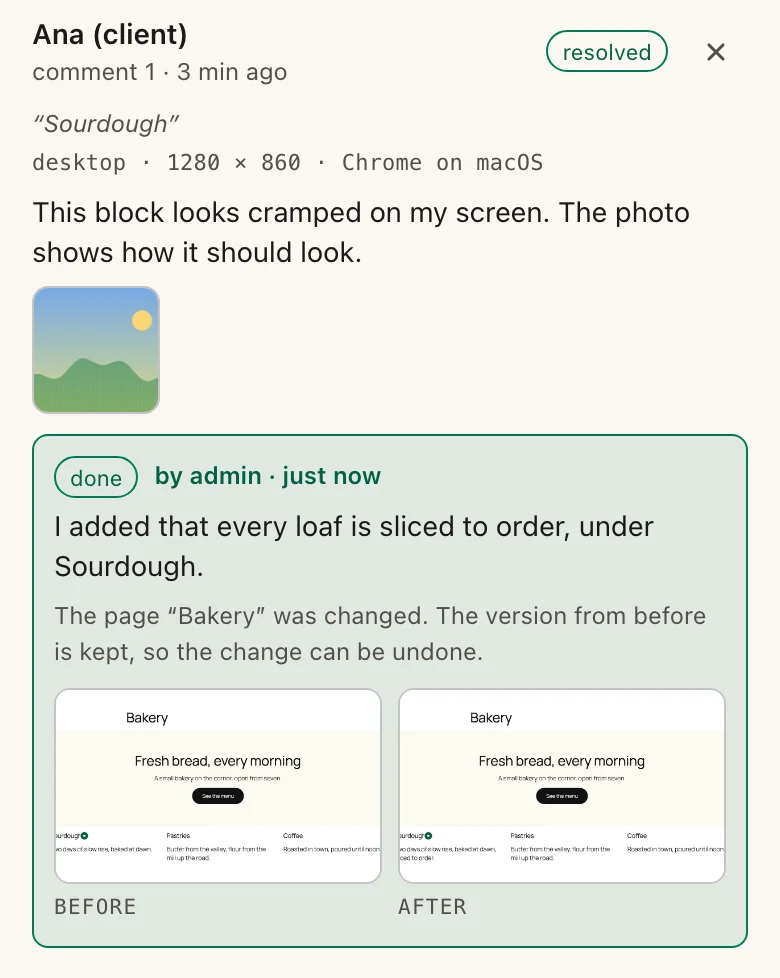
    Every note lands in your respira.press dashboard and in Respira AER, with the page, the quoted text, the builder element under it and a label in words: the picture, the button, this section. Reply, or send it to AER and let the agent apply it on a duplicate of the page.

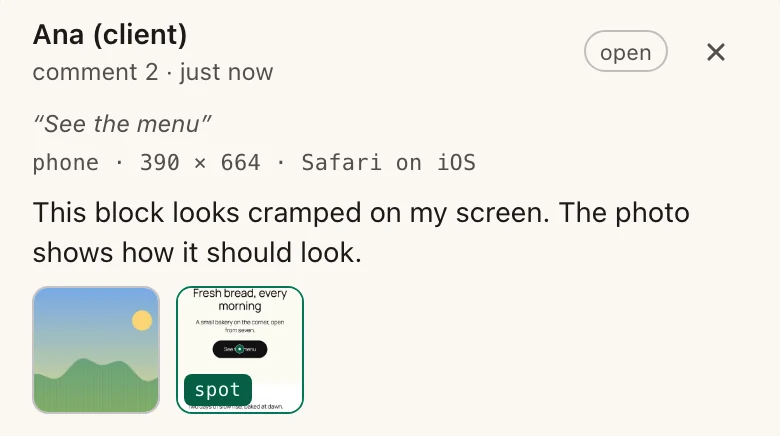
What the reviewer sees on a phone: the page as it is, a thin bar at the bottom that says review mode, two emerald pins where notes were left, and a note sheet open with the reviewer's name, what they wrote and an optional email for a reply.

The reviewer's view

The page looks like the page. One bar sits at the bottom. Tap a spot and a small sheet opens: a name, a note, an email if they want a reply, send. The pin stays where they tapped, numbered, and the next reviewer sees it too. Your reply shows on the page under the note, and when a note is resolved, the pin says so.

There is nothing to learn. A trustee who has never used a review tool leaves a usable note on the first try, from a phone, on the train.

Three people, one note

For the reviewer

No login, no account, nothing to install. The link opens the page as it is. Tap any spot, type a note, send. Leave an email to get the reply by mail; it shows on the page under the note either way. It works on a phone, which is where most clients read.

For the owner

Notes per page, each with the exact spot it points at and what that spot is: the picture, the button, this section. Reply from the dashboard, mark a note resolved, and the reviewer sees both on the page. The first murmur on a link reaches you by email, then a digest while more come in.

For the agent

Send to AER hands a note to Respira AER with the page, the quoted text and the builder element beneath it. Copy prompt gives the same prompt for Claude or ChatGPT. The agent works on a duplicate of the page, you approve it, and every murmur closes with the snapshot that changed it.

What it looks like in conversation

One sentence, one link.
The notes come back as text, with the spot attached.
Applied on a duplicate, resolved with a receipt.

What a link can and cannot do

  • Signed, expiring, revocable

    A link carries its own signature and its own end date, 14 days by default, 1 to 90 if you ask. Revoke it from the dashboard or through your agent and it stops within one request.

  • Only the pages you chose

    A page link shows those pages and nothing else. Site scope exists for staging sites and needs an explicit flag on a production one.

  • Plain text, nowhere else

    Notes are text, up to 2,000 characters, no files, escaped everywhere they appear. The agent reads them as quoted data, never as instructions.

  • Never cached for other visitors

    A review-mode response is served with no-store and Vary: Cookie, so a cache never hands a reviewer's view to someone else.

  • White-label respected

    On a white-label plan the bar carries your studio name and mark, not Respira's. Your client sees your work and a place to leave a note.

  • Nothing loads from outside the site

    The overlay is one asset served by the plugin in its own Shadow DOM. No third-party script, no font, no tracker on your client's page.

respira_review=<id>.<expires>.<signature> · no-store · noindex · no admin bar · 20 notes per 10 minutes per reviewer

Against the review tools people pay for separately

A separate review tool Murmur

The client creates an account before the first comment.

The client opens a link. There is no account to create.

A separate dashboard the client has to learn, and you have to check.

One bar at the bottom of your own page. Notes show up where you already work.

Comments sit in a tool. Someone reads them, then does the work elsewhere.

Each note carries the page, the quote and the element, and goes to the agent that makes the change.

A monthly fee on top of everything else.

Included on the Builder plan and up. No extra fee.

Where it came from

An agency owner had a staging site to show a client's trustees. They needed to browse it page by page and leave comments as they went. He had paid for a review tool to do that, and disliked its interface enough to ask whether Respira could do it instead: one link, a tap on the spot, a note, and the notes going to the agent that would make the changes. That is Murmur.

Questions

What is Murmur, in one line?

A signed link to your WordPress page. Your client opens it with no login, taps a spot and leaves a note. The notes reach your Respira dashboard and Respira AER, and an agent applies them on a duplicate of the page that you approve.

Does my client need an account?

No. They open the link, type a name once, and it is remembered on their device. No login, no signup, nothing to install, and it works on a phone.

Which plans include it?

The Builder plan and up, from plugin 8.9.0 and MCP server 8.3.24. It needs no other product: the plugin stores the links and the notes in your own database.

Can a link show the whole site?

A link covers the pages you name by default. Site scope exists for staging sites, where trustees or a client walk from page to page. On a production site it needs an explicit flag, and the agent tells you why.

What can a reviewer see and do?

Read the pages in the link, including drafts you scoped, and leave plain-text notes, with an email if they want a reply. They cannot edit, cannot see other pages, and cannot upload files. Reviewers see each other's notes and your replies on the page.

How long does a link last, and can I stop it early?

14 days by default, 1 to 90 if you ask. Revoke it from the Murmur page of the dashboard or by asking your agent, and it stops within one request.

Does the agent change the live page?

No. It applies the murmurs on a duplicate and hands you a preview. Approve it and the live page takes the change. Each resolved murmur keeps the snapshot id that changed it.

Where do the notes live?

In two tables in your WordPress database first. From there they relay to your respira.press dashboard and to Respira AER. Revoke a link whenever you like; its notes stay yours.

Send a link. Read what comes back.

Murmur ships with Respira for WordPress 8.9.0 and MCP server 8.3.24, on the Builder plan and up. Your first review link is one sentence to your agent away, or one paste in the dashboard.