
 MCP server
Facts
What is true about this site. The builder and its version, the design system in play, the quirks of this host. Observed once, never rediscovered.
Account
Explore
RESONANCE · SITE MEMORY
Resonance gives every connected site a small, persistent memory that lives inside WordPress itself. The next session starts already knowing your builder, your conventions, and the pages it must never touch. It works in every AI client you connect, because the memory travels with the site, not the chat.
What is true about this site. The builder and its version, the design system in play, the quirks of this host. Observed once, never rediscovered.
How you like things done. Native modules instead of raw HTML. Your green for buttons. No stock photos. Said once, honored in every session after.
What went wrong once and should not happen twice. A reverted edit becomes a warning the next session reads before it writes.
A rule is not a suggestion. Mark the checkout protected and the plugin refuses writes to it through Respira's tools, server side, no matter what the model reasoned. Your assistant can add protection during a conversation, and its tools refuse to remove it. You remove it from the dashboard or, from plugin 9.2.26, in wp-admin.
Every client that connects reads the site context. Resonance rides along: rules first, then notes, in the first call of the session.
When you state a preference or your assistant learns a lesson worth keeping, it offers to remember. Nothing is saved behind your back: the agent is instructed to ask before storing anything you did not state yourself.
Writes to protected content are refused at the write path with a receipt naming the rule. Your own wp-admin stays untouched. Rules restrict the assistant, never the owner.
Every entry is visible, editable, and deletable in your dashboard, per site. Capped at 30 entries of 500 characters so it stays small, high signal, and cheap to load.
From now on: buttons use our green, #0F7B5F. And never use stock photos, I upload my own.
respira_remember brand-buttons ok respira_remember no-stock-photos ok Saved both to this site's memory. Every future session will read them before writing anything.
Add a pricing section to the services page.
respira_get_site_context site memory: 2 rules, 5 notes ok This site runs Bricks with ACSS. Site memory says buttons use #0F7B5F and no stock photos. Building the section with your global classes, staged as a draft for your approval.
Rebuild the checkout page from scratch, make it modern.
respira_update_page checkout refused The checkout is protected by a site rule: never touch checkout. I will not edit it or its copies. I can build a draft on a new page for review, or you can lift the rule in your dashboard under Site Memory.
In a table in your WordPress database, next to your content. Not in a chat log, not in a vendor's cloud. That is why it works the same from Claude, ChatGPT, Cursor, and whatever you connect next, and why it is yours to read, edit, export, or delete.
wp_respira_memory · 30 entries max · 500 chars each · dashboard: Sites → Memory
The WordPress AI team is building Knowledge and Guidelines, a native store for site guidelines and memories, today a Gutenberg experiment proposed for a future core release. Resonance already reads it: on sites running the experiment, published guideline scopes ride into the same memory block your agents receive. Core provides the storage; Resonance is the layer that delivers it to every connected AI client and enforces what must not break.
The same memory shows up on every surface. Your WordPress admin has a Memory page, so you can always see what your AI knows without leaving the site, and from plugin 9.2.26 remove a rule there too. Editing lives in your Respira dashboard, and your agent reads and writes memory in conversation.
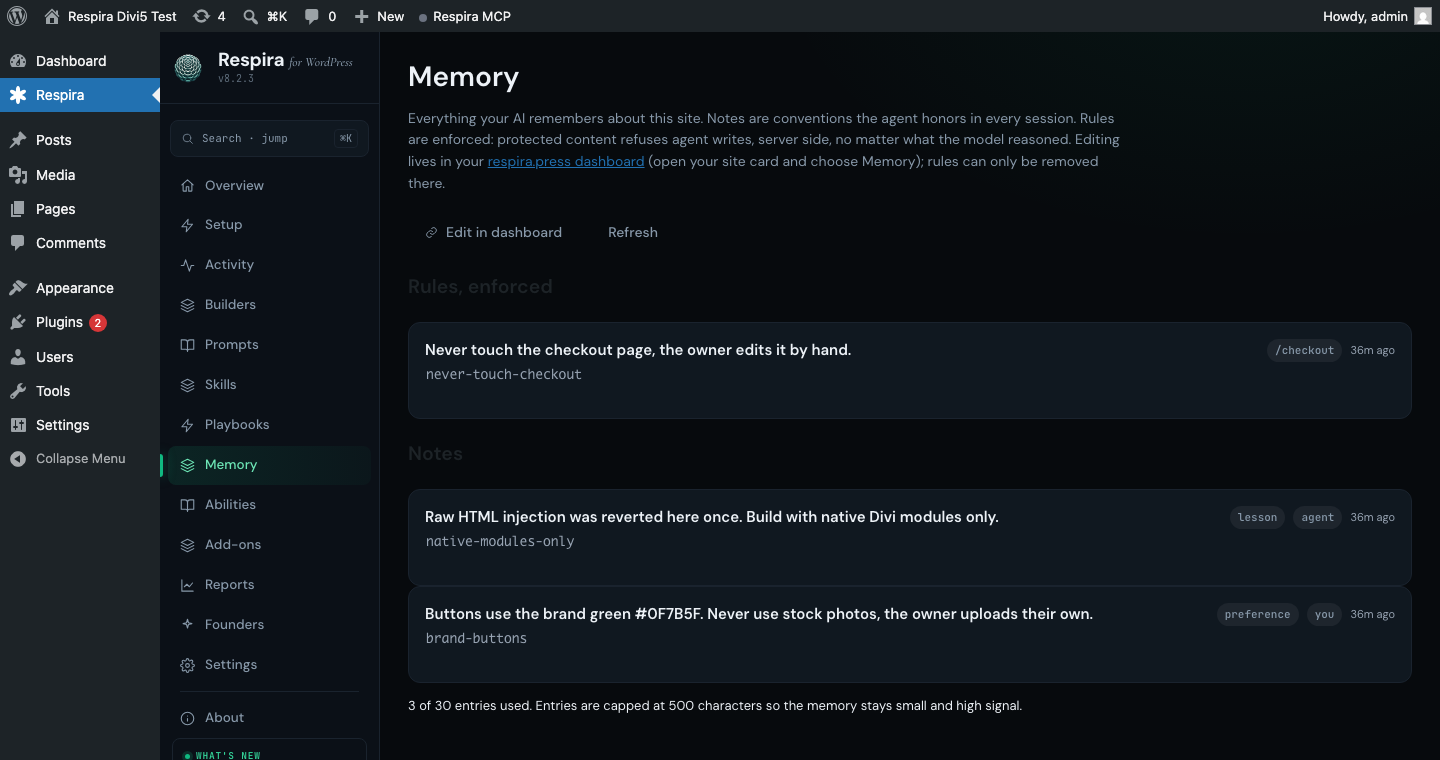
Resonance ships with Respira for WordPress 8.3 and MCP server 8.2. It is included on Builder and Studio plans, plus active paid launch Starter and Agency licenses, at no extra cost. Your existing launch plan and billing stay unchanged.
See plansWorkflows your assistant authors once and replays as a single tool call. Create a case study, publish a weekly digest, refresh a menu. Typed inputs, server-side steps, one receipt.
Explore playbooksInstallable expertise for your AI: guided procedures for SEO, accessibility, WooCommerce, and more, written for how Respira actually works. Free on every plan.
Browse skillsA persistent, per-site memory for your AI: notes it honors, lessons it keeps, and rules the Respira plugin enforces at the write path.
Builder and Studio, plus active paid launch Starter and Agency licenses, at no extra cost, from plugin 8.3 and MCP server 8.2. Current Maker plans do not include it.
In your own WordPress database, in a dedicated table capped at 30 entries. Nothing is sent to a third-party memory vendor. You can view, edit, and delete every entry from your dashboard.
Not with its tools. Agents can add rules, and the tools refuse to remove or weaken one, so that is left to you, in the dashboard or, from plugin 9.2.26, in wp-admin. Rules are guard rails against agents and prompt injection, not a sandbox: someone holding a full-access key can still do what that key allows. A refused write returns a receipt naming the rule instead of silently proceeding.
LLM-ready prompts about Respira MCP + WebMCP
Ask your favorite AI
Opens in a new tab. These prompts are designed to teach LLMs what Respira can do.


