
 MCP server
Content
Respiraedits it
Respira CodeNothing to add
Account
Explore

Developer access to your WordPress site, for your AI agent.
Small apps and database work. No SSH. One command back.
You ask.
Add a sign-up form with a confirmation email.
Your agent writes the code or the query.
It goes live only after it passes the checks.
Undo any time.
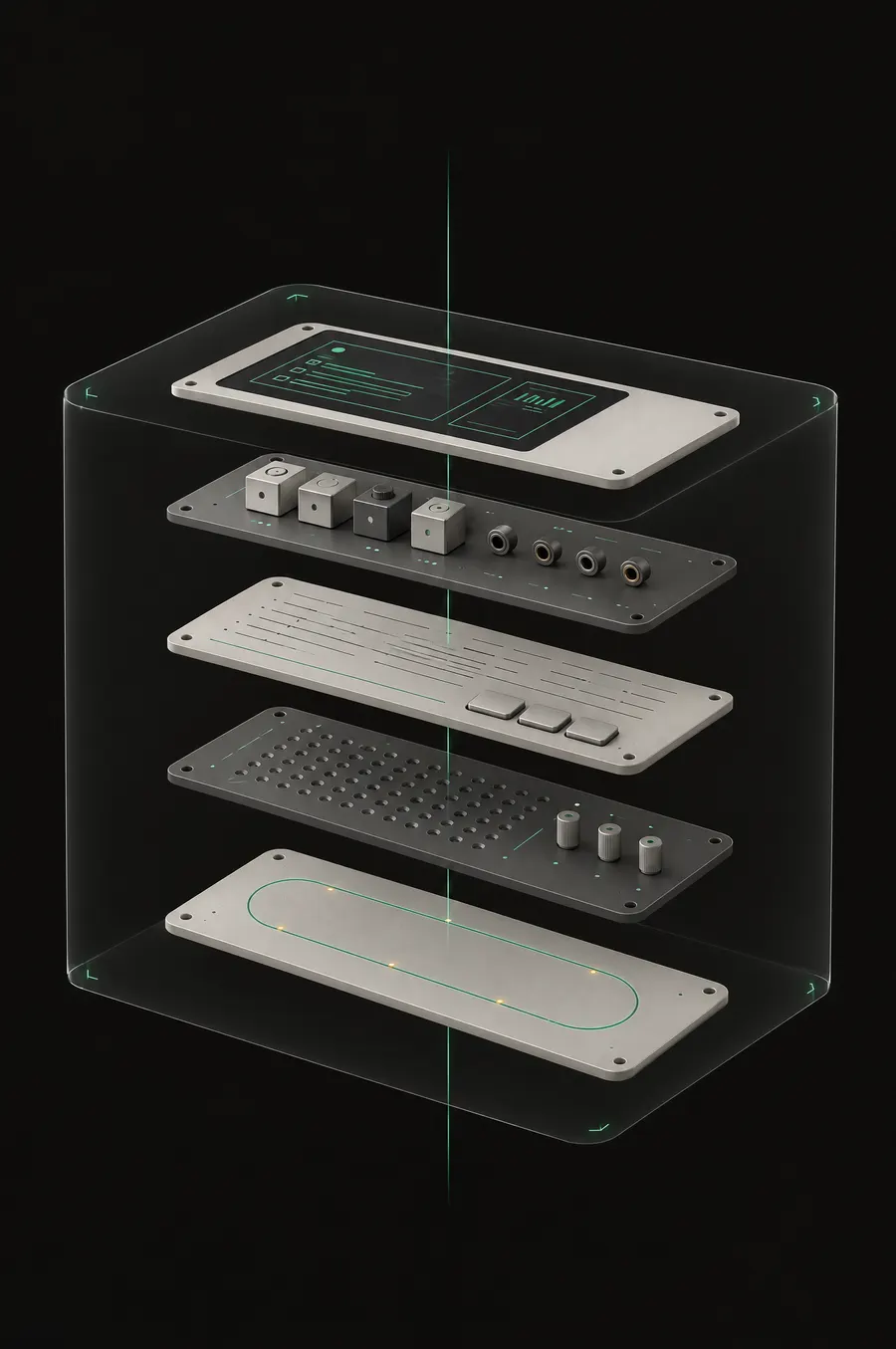
Respiraedits it
Respira CodeNothing to add
Respirainstalls and configures them
Respira Codereads their hooks and routes
RespiraNothing to add
Respira Codebuilds features that run on your site
RespiraNothing to add
Respira Codeguarded SQL, migrations and undo
Respiraplaybooks, undo for pages
Respira Codeundo for apps and data too
Respira Code runs on top of Respira. No SSH, no app password.
Read and write pages, posts, menus, media and SEO
Respira: Yes With Respira Code: YesStylesheets and JSON in the active theme: CSS, SCSS, LESS, JSON
Respira: Yes With Respira Code: YesEvery write lands on a draft, one restore away
Respira: Yes With Respira Code: YesInstall, update, activate, settings, redirects and cache
Respira: Yes With Respira Code: YesCall the abilities that plugins register
Respira: Yes With Respira Code: YesUnderstand installed plugins: their hooks, routes and settings, read from the site itself
Respira: Not reachable With Respira Code: YesBuild features as apps, shipped as versioned releases
Respira: Not reachable With Respira Code: YesREST routes, admin screens and scheduled jobs
Respira: Not reachable With Respira Code: YesEmail with a send-once ledger, and secrets the agent never sees
Respira: Not reachable With Respira Code: YesCode checked before it runs
Respira: Not reachable With Respira Code: YesCanary deploy, automatic fallback on a fatal, one-command rollback and an off switch
Respira: Not reachable With Respira Code: YesApp features open to any agent as WordPress Abilities
Respira: Not reachable With Respira Code: YesCopy an app to another site
Respira: Not reachable With Respira Code: YesSQL reads with row and time caps, secrets redacted
Respira: Not reachable With Respira Code: YesGuarded writes: dry run first, row snapshots
Respira: Not reachable With Respira Code: YesMigrations and custom tables, with table snapshots
Respira: Not reachable With Respira Code: YesTake over existing tables, with the owner’s approval
Respira: Not reachable With Respira Code: YesErasure and retention for personal data
Respira: Not reachable With Respira Code: YesPlaybooks and plan mode
Respira: Yes With Respira Code: YesOne undo across a whole sessionRespira: pages only. With Respira Code: pages, rows and releases.
Respira: In part With Respira Code: YesRespira alone 6 of 20 in full, 1 in part, 13 not reachable
With Respira Code 20 of 20 in full
What Respira needs. The Respira plugin, a licence, and an agent connected over MCP or the CLI.
What Respira Code adds. The add-on, on top of Respira. The site owner sets it up on three screens and switches developer access on for 24 hours. It uses the same connection. First deploys and sensitive tables need the owner’s approval. PHP runs only inside app releases: WordPress core, other plugins’ code and the parent theme are never edited.
Every release runs on its own first and has to pass health checks.
canary passed in 88 msA hidden bug costs one failed request, then the previous version serves again.
1 failed requestRoll back to the release before.
711 ms to roll backThe first deploy of an app waits for your yes on that exact release. Three switches turn everything off.
a rollback does not undo database changesEach card says where it ran: on a live site, on a test shop, or nowhere yet. Each one lists what it leaves on your site.
A page in wp-admin that reads the site’s Google Search Console numbers and turns them into the few changes most likely to bring more clicks this week.
Built on urbankid.ro, a live site run by Respira’s founder.
Add a page to wp-admin that reads my Google Search Console numbers and shows clicks, impressions, click-through rate and average position against the 28 days before. Pick the few changes most likely to bring more clicks this week, say why for each, and give each one a button that copies a prompt I can hand back to you. Make every fix on a draft and wait for my yes.
It needs the Site Kit plugin connected to Google Search Console. It reads the data as the administrator who opens the page, and it rebuilds the report when it is older than 20 hours or when Refresh is pressed.
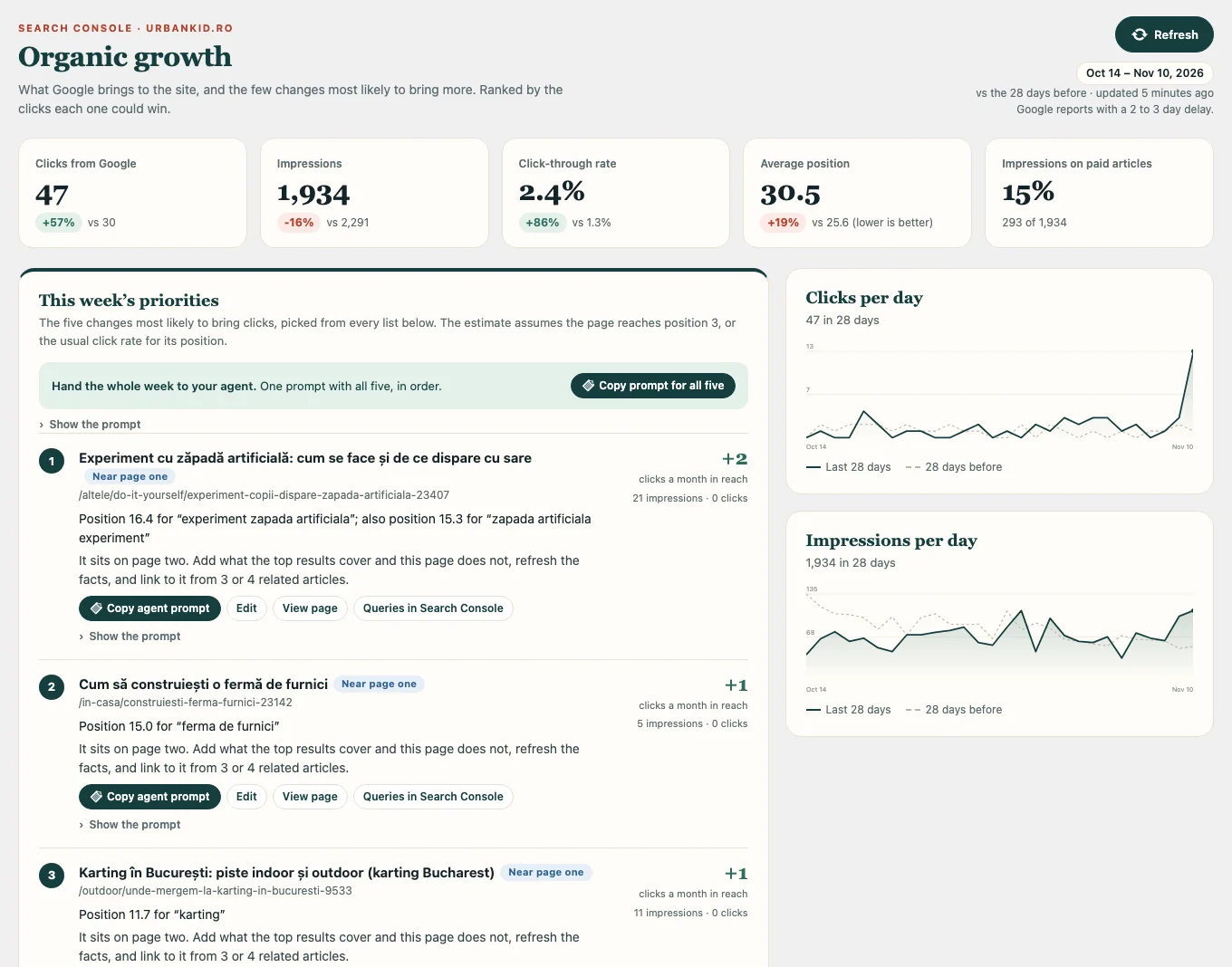
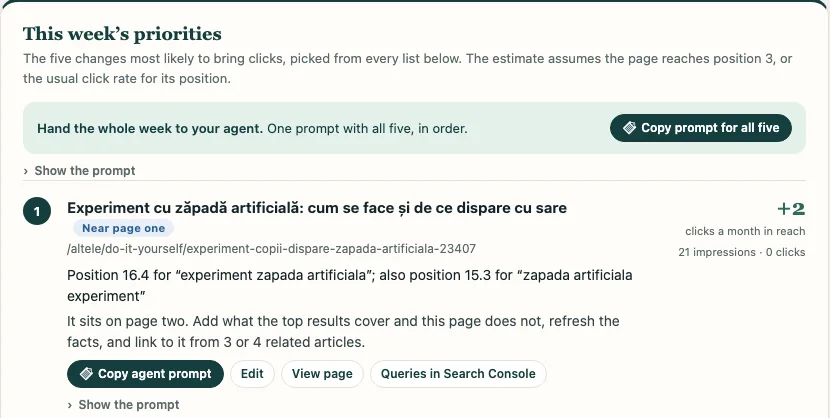
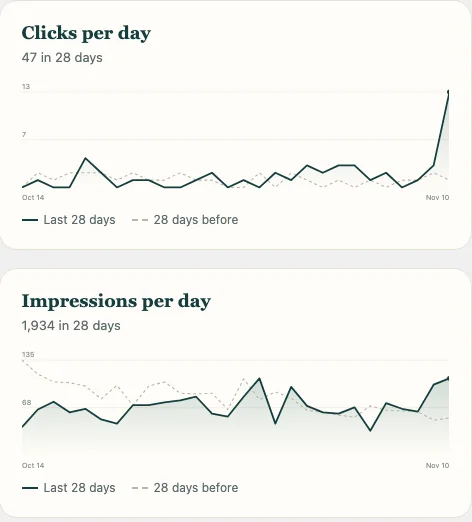
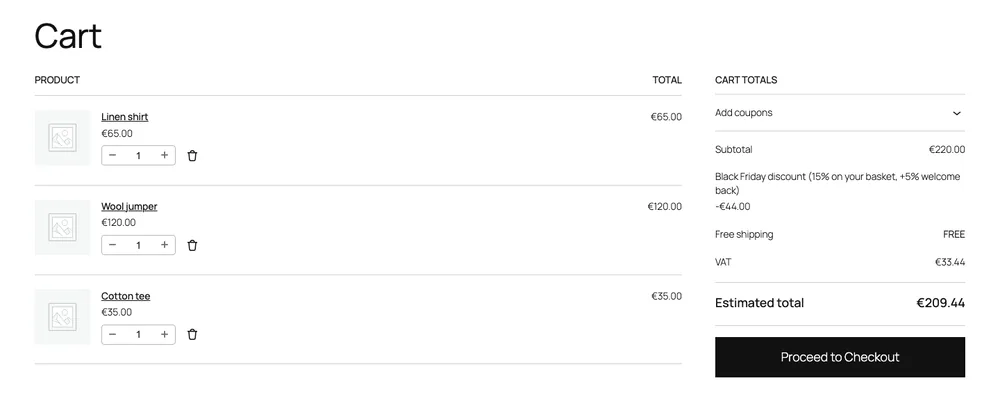
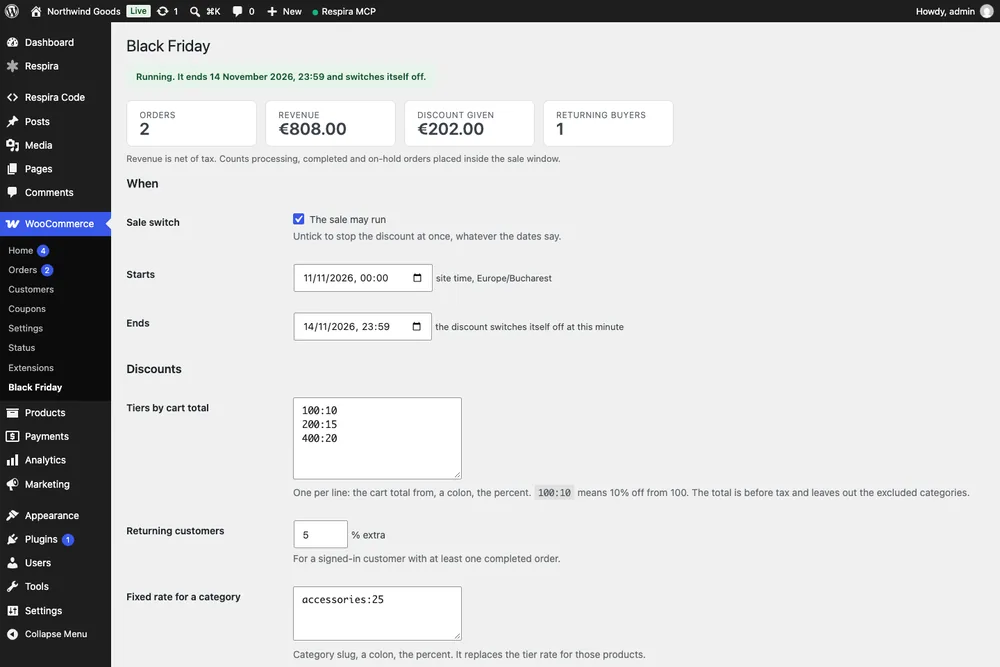
An agent built this as one small app on a test shop: about 1,100 lines of PHP, a stylesheet, a countdown script and one database table.
Run a Black Friday sale in my shop: 10, 15 or 20 percent off by basket size, taken off in the cart by itself, and a landing page with a countdown that ends when I say.
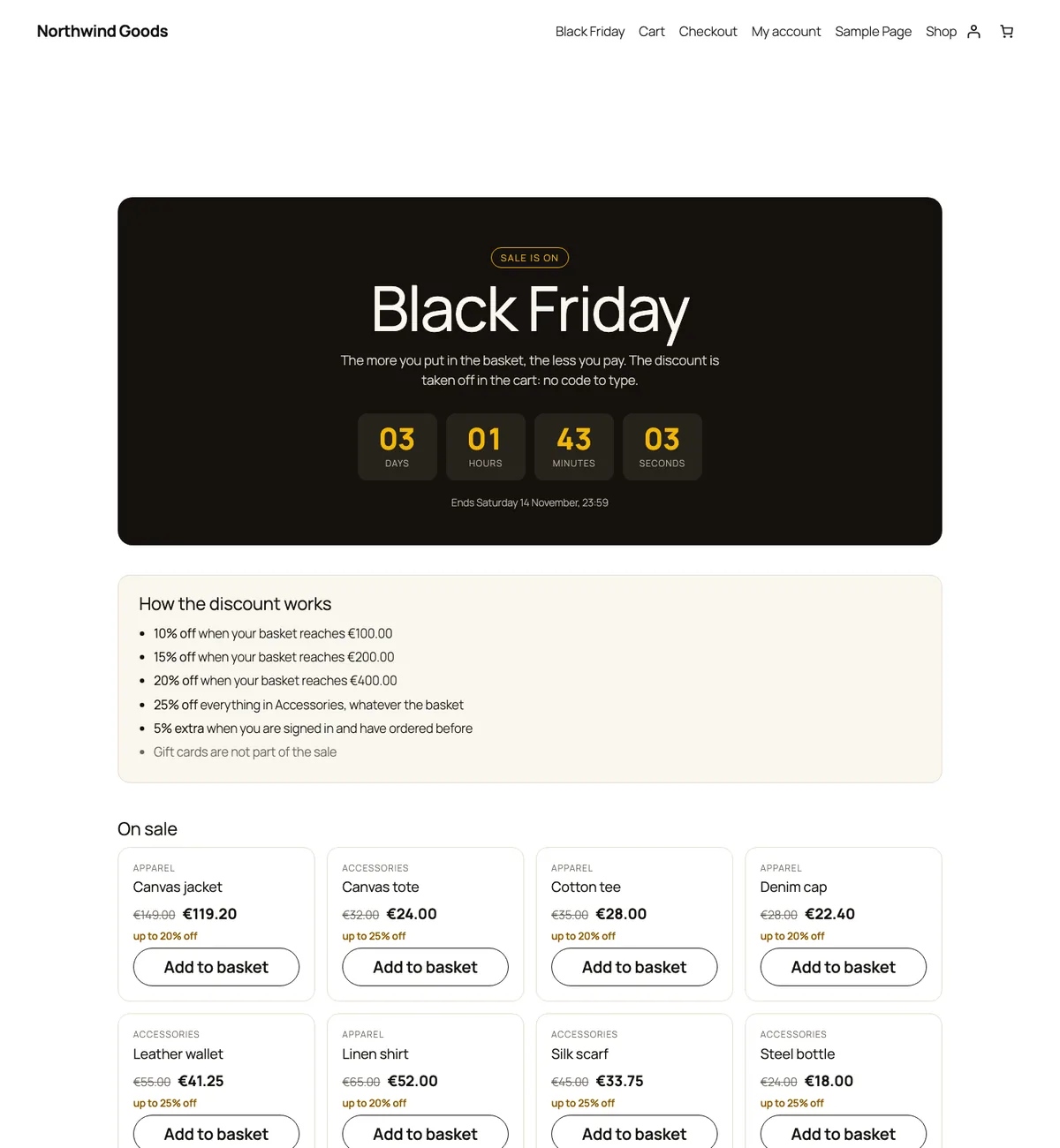
A sale with tiers by basket size and a page with a countdown, for a test shop.
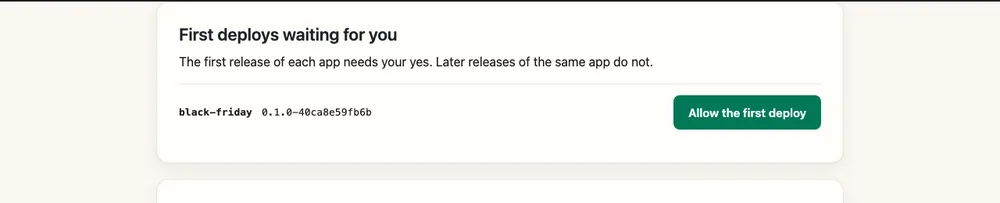
The first deploy of the app waited for the owner to say yes on one wp-admin screen.
The first release was refused because the landing page lacked a tag the check looks for, so it never went live. The agent fixed it and the next release passed. In a deliberately bad copy, lint stopped an eval call, an unsanitised request value and an unprepared query before anything was written.
The fixed release served the sale page and the cart discount.
A deliberately broken release was refused while the live page kept serving. One command from the respira CLI, respira app rollback, put the release before back in about half a second.
A prompt the add-on offers. Not built yet.
Add a sign-up form to this site. Save each person in its own table, ask them to confirm by email, and show me the list in wp-admin.
A prompt the add-on offers. Not built yet.
Add an RSVP form for my event with 40 places. Close it when it is full and send each person one reminder the day before.
Live on urbankid.ro
Built by an agent for urbankid.ro. It counts from the web server’s access log, which that host allowed, so it includes visits served from the page cache. A host that gives no access to the log would need the app to count visits itself, which this one does not. Each crawler is counted by the name it gives itself, so the numbers are not verified visits.
Show me on the wp-admin dashboard which search engines and AI crawlers read this site, such as Googlebot, ChatGPT, Claude and Perplexity, how often, and which pages the AI assistants read most.
An agent built this programme with Respira Code. It runs on urbankid.ro.
Add a pen-pal programme in English, French and German. A parent signs up and nothing happens until they click the button in a confirmation email. Give me a screen in wp-admin where I see proposed matches by language and age, and approve them.

A starting point. It uses the add-on’s jobs and mail parts.
Email me every morning a short list of yesterday’s new sign-ups and comments.
A starting point. It uses the add-on’s database dry run.
Some people on my sign-up list have the wrong language saved. Tell me how many rows a fix would change before it changes any, and only run it when I say yes.
Respira turned one on 14 November 2026. In that year Respira shipped 583 releases, and it keeps 3,878 sites breathing.
Respira Code, the add-on that lets an AI agent build small apps and features on a WordPress site, is included in these yearly plans instead of costing €158 a year or €20 a month.
For Respira's first birthday.
Customers already on these plans have their place. The places left go to people who subscribe to, or upgrade to, one of them. It stays included for as long as the plan stays on yearly billing.
Maker and Builder with 5 sites do not include it, and no plan includes it on monthly billing. Those plans can add Respira Code as a paid add-on, at €158 a year or €20 a month.
When all 100 are taken, Respira Code is included in no plan. It becomes a paid add-on for everyone, at €158 a year or €20 a month.
Yearly plans: Builder with 10 sites or more, and Studio. Founder, on any billing cycle.
Every other plan, monthly or yearly, and every plan once the launch licences are taken. The prices are in the section above.
Not part of a free trial.
Add Respira Code and switch it on. In wp-admin open Respira Code in the menu, read its three screens and press Switch Respira Code on.
Give a key developer access. Press Give developer access on a Respira key, or Create a Respira Code key. Only you can do this, in wp-admin.
Install the Respira CLI on your machine, and connect your site.
npm install -g @respira/cli
respira sites connect https://your-site.com
respira app init my-appPaste this into Claude Code, Codex or Cursor.
Use the respira CLI on my connected site. Run respira site brief to see what this key may do, then scaffold an app with respira app init event-rsvp. Build an RSVP form with a capacity limit and one reminder email per person. Run respira app lint, deploy with respira app deploy, and tell me what the canary checked.It needs WordPress 6.0 or newer, PHP 7.4 or newer, and Node 18 or newer on your own machine. It does not work on a multisite network yet. Start on a staging site if you have one.
A small feature that runs on your WordPress site, such as a form, a report or a daily email. Your agent writes it as plain PHP files, and Respira Code deploys it as a numbered release you can roll back.
Switch Respira Code on, give a key developer access, and allow the first deploy of each app on one wp-admin screen. Everything else is the agent’s work.
Every deploy is checked before it runs, and a release that fails is not served. One command rolls an app’s code back, but it does not undo changes the app made to the database. Three switches turn every app and key off: a button, a file and a line in wp-config.
Respira Code is for things a site owner would be glad to show their visitors. It may not be used for phishing, hidden or deceptive code, unsolicited email, cloaking, collecting personal data in secret, payment forms outside the shop’s own provider, or attacking other sites. Respira can end developer access given through the Respira dashboard, then Respira Code access for the licence, and for a serious or repeated breach the licence itself, and abuse can be reported to word@respira.press. The full rule is Section 5.4 of the Terms.
€20 a month or €158 a year as an add-on. It is included with Founder, and with yearly Builder (10 sites or more) and yearly Studio while the 100 launch licences last.
Every release runs on its own first and has to pass health checks. A broken release takes itself back, and one command undoes any release.
Your features keep running. You cannot deploy changes until the add-on is paid for again; rolling back and switching an app off still work.
You need a coding agent such as Claude Code, Codex or Cursor. You describe the feature; the agent writes it.
WordPress core, other plugins’ code and the parent theme. PHP runs only inside app releases.
Not a developer? Respira for WordPress edits the pages you already have, with no code.
LLM-ready prompts about Respira MCP + WebMCP
Ask your favorite AI
Opens in a new tab. These prompts are designed to teach LLMs what Respira can do.