
 MCP server


A WordPress security release used to buy a few days. In September it bought a few hours.
I built a free scanner for this, and the reason is in the dates below. Nothing in this article needs a plugin, a login or an account to try.
Two clocks
On 22 September WordPress fixed CVE-2026-87902, a flaw in core that lets someone with no login make WordPress load a PHP file from outside the active theme (record). A working exploit was published the same day, and SecurityWeek reported that Patchstack saw it used against sites within hours. CISA added it to its Known Exploited Vulnerabilities catalog three days later. The fixed releases are 7.1.2, 7.0.6 and 6.9.9, with backports down to 4.7.37, and the September roundup has the rest of that month.
That is the fast clock. The slow one is worse, because nobody is watching it. WooCommerce Wholesale Lead Capture had a critical flaw, rated 9.8, fixed in version 2.0.3.2 on 20 February (record). In September, seven months later, Wordfence reported blocking more than 100,000 attacks on it. In June, Everest Forms Pro drew more than 29,300 attempts on a flaw of the same rating, fixed in 1.9.13 (record, report).
Every one of those attacks went to a site where the fix already existed and had not been installed. Nobody has to be first to a new bug. Old bugs on sites nobody updates are enough.
How sites get picked
Most WordPress sites tell anyone who asks what they run. Three places give it away:
- The
generatortag in the page source, and the RSS feed, which name the WordPress version. - Stylesheet and script addresses ending in
?ver=, which often carry a plugin's version. - Each plugin's
readme.txt, public by default, with the version on its "Stable tag" line.
Reading those takes a few ordinary requests and no skill. Hiding them helps less than it sounds, because an attacker can try the exploit and skip the check. Updating is what closes the door. Reading them yourself first tells you which doors are open.
Check your WordPress site in 20 seconds
The free WordPress vulnerability scanner reads those same public signals, from outside, the way a browser does. It never logs in, never submits a form and never sends an attack payload.
- Open the scanner and type the site's address.
- It reads that page, the feed when the page hides the version, up to 40 plugin readme files and up to 6 theme stylesheets, and stops after 20 seconds.
- Every version it can read is matched against more than 41,000 records from the Wordfence Intelligence database, refreshed every six hours.
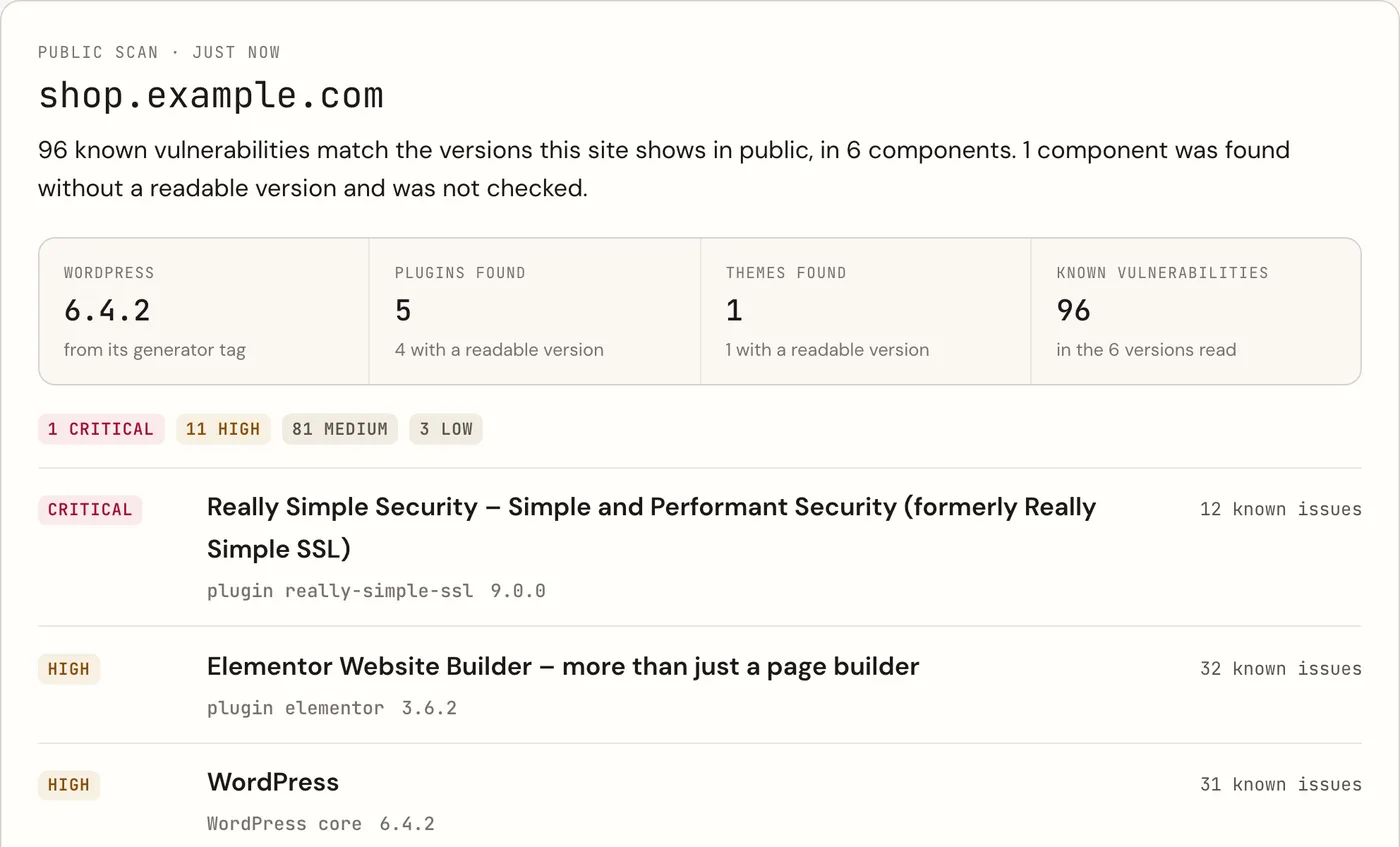
The free result answers the first question: is anything known to be wrong with the versions this site shows. A free respira.press account answers the next one. It lists every record with its CVE and the version that fixes it, writes a fix prompt, and re-checks up to 25 sites every week, so a record published next month reaches the site you scanned today.
What to do with a finding
A list of CVEs is where most people stop, so the free account turns it into a prompt. Paste it into ChatGPT or Claude, or send it to whoever looks after the site. It asks the assistant to walk you through wp-admin one step at a time and to wait for you between steps.
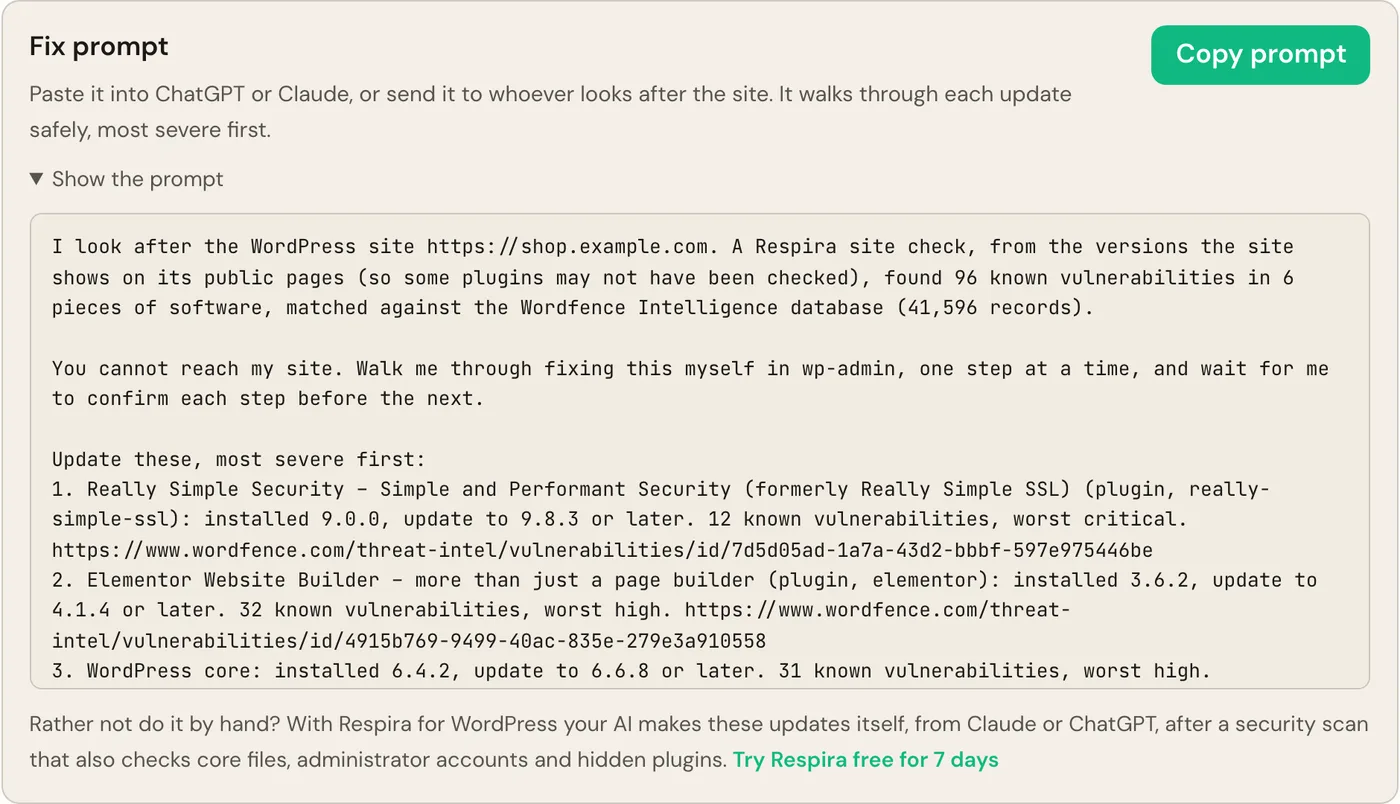
The prompt follows the order I would use by hand:
- Confirm a backup of files and database exists, from your host or a backup plugin, and that you can restore it.
- Update the most severe item first, one at a time, to the version named or later.
- If WordPress offers a lower version, or no update at all, stop. That is usually a premium plugin with a lapsed licence, and the vendor is the next call.
- If no fix is published, deactivate the plugin until one is, or replace it.
- After each update, load the home page and one page that matters, checkout or the contact form.
- Scan again.
An update closes the hole. It does not undo what came through before. After a critical finding, also look for
administrators and application passwords you do not recognise, plugins installed recently that nobody remembers
adding, and PHP files under wp-content/uploads.
What an outside check cannot see
A scan from outside sees what the site shows in public. A plugin that loads nothing on the page scanned, or hides its version, is listed as "found, version unknown, not checked" rather than guessed at. A clean result means nothing known matched the versions that were readable. It is not a malware scan.
Two ways to see the rest, one of them free:
- From inside, free. Inhale and Respira ARC, the two free Respira plugins on WordPress.org, can connect to a free account. The site then reports every plugin and theme with its exact version once a week, including the ones the public pages never mention.
- The full scan. Respira for WordPress (what each scan checks) also checks core files against the official release, administrator accounts, hidden plugins and whether PHP runs in uploads. Your AI can make the updates from Claude or ChatGPT, with a snapshot before each one. It is paid, after a 7-day free trial.
If you look after a friend's site, a client's, or the one your local club runs, the scanner takes their address as easily as yours. That might be the most useful 20 seconds of their week.
Questions
How fast are WordPress vulnerabilities exploited after a fix?
Sometimes within hours. WordPress fixed the core flaw CVE-2026-87902 on 22 September 2026, a working exploit was published the same day, and SecurityWeek reported attacks within hours. CISA added it to its Known Exploited Vulnerabilities catalog on 25 September. Plugin flaws can be attacked months later too: Wordfence reported blocking more than 100,000 attacks in September 2026 on a WooCommerce plugin fixed in February.
How do I check if my WordPress site is vulnerable without installing a plugin?
Enter the address in the free Respira WordPress vulnerability scanner. It reads the public pages the way a browser does, finds the WordPress, plugin and theme versions they show, and matches them against more than 41,000 records from the Wordfence Intelligence database. It needs no plugin and no login and stops after 20 seconds.
What does a free respira.press account add to the scan?
Every matching record with its CVE and the version that fixes it, a fix prompt to paste into ChatGPT or Claude or send to a developer, and a weekly re-check of up to 25 sites against the database as it grows.
Is a clean result proof that my WordPress site is safe?
No. A clean result means nothing known matched the versions the site shows in public. Plugins that do not show a version are listed as not checked, and a version check cannot tell whether someone got in before you updated. A check from inside the site sees every plugin, and Respira for WordPress also checks core files, administrator accounts and hidden plugins.
What should I do first if the scan finds a vulnerability?
Make sure a backup you can restore exists, then update the most severe item to the version the result names, one item at a time. If no update is offered, often a premium plugin with a lapsed licence, ask the vendor. If no fix is published, deactivate the plugin until one is. Then run the scan again.
Checked on 9 October 2026.


Join the conversation
0 comments · Respira accountNo comments yet. Be the first to weigh in.