
 MCP server


my mother was pregnant with me when the car she was travelling in crashed.
during that pregnancy she had an unusual condition: a loud enough noise would put her to sleep. the crash was loud, so she fell asleep in the moment before the impact, and because she was asleep her body was slack instead of braced. she walked away from it without a scratch. I was born a few months later.
she gave me Victor as a middle name, for the victory of not losing either of us.
so when a tool called Viktor turned out to be genuinely useful for the thing I build, I noticed. it is a good name. this is how to connect it to your WordPress site.

Viktor is an AI agent that lives in Slack and Microsoft Teams. Connect any WordPress site or WooCommerce store to it and you can change a headline, fix a price, ask what this week's revenue was or publish a post by typing a message in a channel, from your phone, without opening wp-admin. Setup is one link pasted into one field.
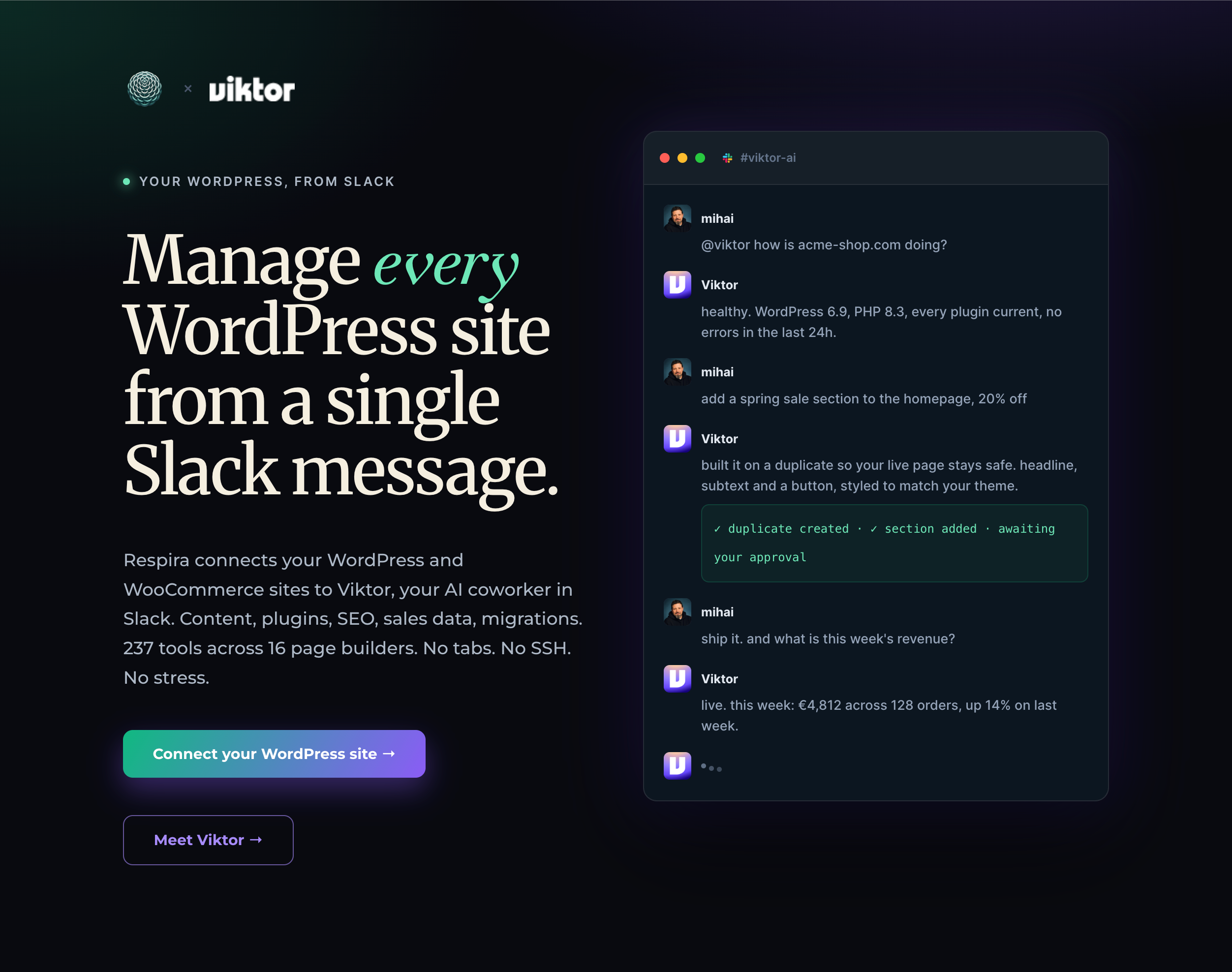
There is a longer walkthrough of the pairing, including the agency setup, at mihai.love/viktor. That page is worth a look for a second reason: it is a WordPress page that was built through Viktor itself, from Slack messages, so it doubles as a demo of the thing it describes.
What you need first
The Respira plugin installed and activated on the site, and the site showing up in your Respira dashboard. If that part is not done yet, start at respira.press/dashboard/mcp and come back here.
One limitation worth knowing before you start: Viktor connects to sites over HTTPS only. A site running on plain HTTP, or a local site on your own machine, cannot be reached. That is a Viktor rule, not a Respira one, and it applies to every custom MCP server it connects to.
1. Copy your site link
In your Respira dashboard, find the site you want to connect and copy its connector link. It looks like this, with your own domain in place of the example:
https://yoursite.com/wp-json/respira/v1/mcpThat link is the address of your site's own MCP server. It runs on your hosting, not on anyone else's. Treat it like any other access credential: anyone who has it, plus permission to use it, can act on the site.
2. Open Viktor's integrations page
Go to Viktor and open Integrations from the left sidebar. In the top right of that page there is a button marked Add Custom MCP. The direct address is app.viktor.com/integrations.
3. Paste the link and connect
A panel opens titled Add Custom MCP Server with a single Server URL field. Paste your connector link there and choose Connect.
The field shows a greyed-out example ending in /sse. Ignore it. That is placeholder text for a different and older style of connection. Your Respira link ends in /mcp and that is correct.
4. Approve the access
Viktor does not ask you for a password or an API key. Instead it follows the link, finds that the site wants you signed in, and sends you to Respira to approve it in your browser. Sign in, pick the access level you are comfortable giving, and confirm.
Access levels are worth a moment's thought here, because Slack channels tend to have more people in them than you expect. Read-only lets Viktor answer questions about the site and change nothing. Content lets it write posts, pages and media. Builder adds layouts and templates. Full adds plugins, users and settings. You can change this later from the Sites page, and starting narrower is the easier mistake to recover from.
5. Check that it worked
Back on the integrations page, your site appears with its domain in the name, listed as connected. The honest test is in Slack, not on that screen: ask Viktor to list the pages on your site. If the titles come back, it is working.
If nothing comes back, the usual cause is the site not being reachable from outside. Check the link opens in a private browser window, and that your host or firewall is not blocking requests to /wp-json/.
What this is actually good for
The point is not that Slack is a better editor than WordPress. It is that most small edits never happen because the friction of opening a laptop, remembering a login and finding the right page is higher than the value of the edit. A typo sits on a homepage for a month. A price stays wrong through a weekend.
A message in a channel removes that gap. Reply to a customer complaint about a wrong opening time by fixing the opening time in the same minute you read it.
Once connected, the things people actually end up asking for most:
- Site health. WordPress and PHP versions, plugin status, errors in the last day, surfaced in one message rather than three admin screens.
- Page edits that cannot break anything. Respira duplicates the page before editing, so the live version is untouched until you approve the change. This is the part that makes editing from a phone reasonable rather than reckless.
- WooCommerce numbers. Orders, revenue and stock, without opening a dashboard tab.
- SEO checks. Missing meta, Core Web Vitals, scores, with the fixes waiting for your approval.
- Plugin management. List, activate, deactivate and update, with security advisories arriving in the channel.
- Builder migrations. Moving a site between page builders, content and layout carried across.
If you build sites for other people
This is the arrangement worth looking at properly. Put a shared Slack or Teams channel between you and a client, connect their site through Viktor, and the client can write what they want changed in plain words in a place you already watch. No new login for them, no ticket system, no forwarded screenshots with a paragraph explaining which page it is.
It scales the way you would want: twenty client sites can sit behind one channel, or one channel each, and you decide per site what the agent is allowed to touch.
You keep control of the access level for each site, so a client can be given a channel that reads and drafts but cannot publish or touch plugins. And because you maintain the channel, the change history sits in one searchable place instead of scattered across email.
Viktor runs a partner programme, so if you are recommending it to clients you can apply and earn on the accounts you bring rather than sending the referral for nothing. Apply to become a Viktor partner here.
Getting started, and the discount
New Viktor accounts get 50 dollars off the first purchase with the code MIHAI50OFF at sign-up. Start here and add the code on the payment step.
Disclosure: the Viktor links on this page are affiliate links, and the partner link pays me if you join the programme. The code is a real discount and costs you nothing to use. I would not send you to a tool I had not connected to my own sites first, and the integrations screenshot in my own account is how this guide got written.


Join the conversation
0 comments · Respira accountNo comments yet. Be the first to weigh in.